web
You’re offline. This is a read only version of the page.
close
Skip to main content

Announcements

No record found.

News and Announcements icon
Community site session details

Community site session details

Session Id :
Microsoft Dynamics CRM (Archived)

Button getting hidden on ribbon

(0) ShareShare
ReportReport
Posted on by 687

Hi Community,


We are facing an issue in Dynamics 365 after update to v9.0 (current version is 9.1.0.648) from v8.2. After update to v9.0, buttons in the ribbon are getting hidden randomly (but if you click on it, they are working properly) and upon refreshing browser they are visible properly. Please see below given screenshot for more details:
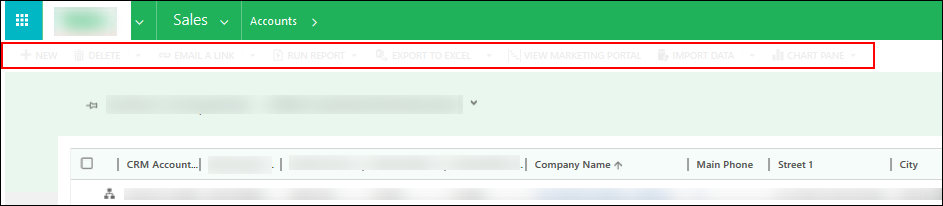
3034.1.png


Is anyone facing same kind of issue in Dynamics 365 v9.0? If yes, please share the solution for it.

Help is much appreciated!


Thanks!

Hardik Chauhan

*This post is locked for comments

I have the same question (0)
  • Suggested answer
    Mahadeo Matre Profile Picture
    17,021 on at

    Is there any javascript errors coming when buttons are hidden?

    Check running browser developer tool when this is happening.

  • Suggested answer
    Alex Fun Wei Jie Profile Picture
    33,628 on at

    Hi,

    if you do not have any custom java script that manipulated the button, try to clear the cache, else check the JS. In the end, if these doesnt work, raise a ticket to Microsoft asap.

  • Suggested answer
    gdas Profile Picture
    50,091 Moderator on at

    Hi Hardik,

    Can you please check with legacy rendering set to YES. If the button is showing with legacy rendering which means something is wrong in your JS code.

    dynamicscrmpros.com/microsoft-dynamics-crm-2015-2016-and-365-legacy-form-rendering

    To fix this issue try to detach all enable rules for the particular entity ribbon and see the result.

    Again attach one by one enable rule and find the impacting JS .

    Hope this helps.

  • chauhanhardik Profile Picture
    687 on at

    Hi Mahadeo,

    We have not hidden any button using any JS customizations.

    Thanks for suggestion!

    Regards,

    Hardik

  • chauhanhardik Profile Picture
    687 on at

    Hi Wei,

    We had tried to clear cache and also tried in incognito mode but this issue is still persisting. We have raised ticket with Microsoft but are yet to find any solution for it.

    Thanks for suggestion!

    Regards,

    Hardik

  • gdas Profile Picture
    50,091 Moderator on at

    Did you apply my suggestion ?

  • chauhanhardik Profile Picture
    687 on at

    Hi Goutam,

    The setting which you mentioned is already applied and after that also issue is arising. Are you aware about any other point which can cause such issue?

    Thanks for suggestion!

    Regards,

    Hardik

  • Suggested answer
    gupta.ambar2009@gmail.com Profile Picture
    797 on at

    Same issue we also faced after migrate it from 8.2 to 9.0 ,

    In our project we had done below points

    1- install ribbon work bench

    2- after right click , click on customize custom ribbon command

    3- publish the solution

  • chauhanhardik Profile Picture
    687 on at

    Hello Ambar,

    I appreciate your suggestion but we don't have any customization on ribbon. So there isn't any customized ribbon command which I can publish.

    Thanks,

    Hardik

Under review

Thank you for your reply! To ensure a great experience for everyone, your content is awaiting approval by our Community Managers. Please check back later.

Helpful resources

Quick Links

Introducing the 2026 Season 1 community Super Users

Congratulations to our 2026 Super Stars!

Congratulations to our 2025 Community Spotlights

Thanks to all of our 2025 Community Spotlight stars!

Leaderboard > 🔒一 Microsoft Dynamics CRM (Archived)

#1
Varsha deshpande Profile Picture

Varsha deshpande 5

#2
NeerajPawar Profile Picture

NeerajPawar 2

#2
jlattimer Profile Picture

jlattimer 2

Last 30 days Overall leaderboard

Featured topics

Product updates

Dynamics 365 release plans
