web
You’re offline. This is a read only version of the page.
close
Skip to main content

Announcements

No record found.

News and Announcements icon
Community site session details

Community site session details

Session Id :
Microsoft Dynamics GP (Archived)

Dynamics GP 2015 Version 14.00.0661 Arabic issue when installing on windows 10

(0) ShareShare
ReportReport
Posted on by

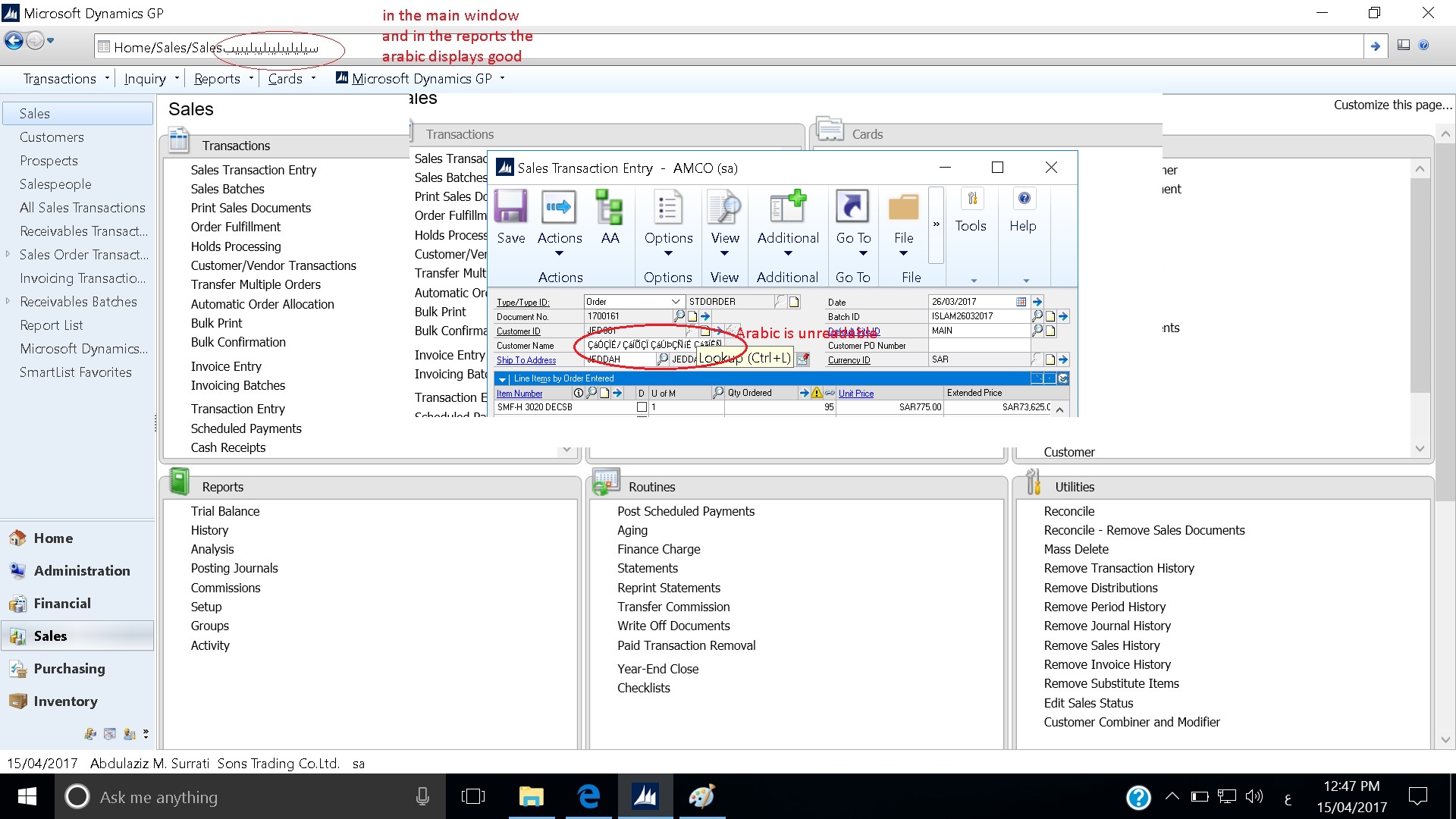
I installed the above version (which was working properly on windows 7 ) on windows 10 unfortunately the Arabic text is not correct on all windows but in the reports it is good as well as in the smart list. check below
Arabic-3.jpg

*This post is locked for comments

I have the same question (0)
  • MG-16101311-0 Profile Picture
    26,225 on at

    Yes, you need to change the Windows Locale to Arabic. In Windows 10, click on Start and type Settings. Select Time & Language, then click on Region & Language on the left pane (under Home). Select the appropriate Country or Region, then choose the actual language.

  • Suggested answer
    Beat Bucher  GP Geek  GPUG All Star Profile Picture
    28,061 Moderator on at

    Mariano,

    When looking at the task bar, it seems that the Windows 10 is already set to Arabic language..

    Talal,

    Dynamics GP does not support Unicode languages..  check the following thread :

    [View:https://community.dynamics.com/gp/f/32/t/219234:750:50]

    Check out also Mariano's post regarding SQL server collation and the effect on foreign languages :

    [View:http://dynamicsgpblogster.blogspot.ca/2008/08/microsoft-dynamics-gp-and-sql-server.html:750:50]

    Finally, this old thread talks about support for Japanese language, which not supported either.. [View:http://microsoft.public.greatplains.narkive.com/j18bC0lJ/japanese-localization-for-dynamics-gp:750:50]

    You could look into the only product I'm aware of nowadays that would help ouy out: Elastic-Windows from Titanimum GP

  • MG-16101311-0 Profile Picture
    26,225 on at

    Beat,

    If you do a double-take, you will see that the Cortana "Ask me Anything" appears in English. If the locale was set to Arabic, the message would appear as such. In addition, the screen is not flipped. I believe when you set Windows to Arabic, the start button appears on the right of the screen. I may be wrong, but I believe that's the way it is.

  • Beat Bucher  GP Geek  GPUG All Star Profile Picture
    28,061 Moderator on at

    You might be right Mariano,

    I've setup various foreign language pack on W10 (German & French), but nothing fancy like Arabic...  I had hoped that Mahmoud would jump into the thread to confirm this...

  • Archana Nair Profile Picture
    10 on at

    Hi,

    Arabic from GP 2016 is not being displayed on 11th generation processor. It's showing same characters. System local is already set as Arabic. Also Region/Location is set to UAE.

    Thanks

  • Suggested answer
    Beat Bucher  GP Geek  GPUG All Star Profile Picture
    28,061 Moderator on at

    Hi Archana,

    I've never had a chance to look closely to an Arabic W10 or W11 setup, but my understanding is that some of the fonts displayed in Dynamics GP are directly borrowed by the Windows system font library, and as such if those fonts are missing from a previous W7 setup, then GP might simply not display correctly the various menus and characters in GP.

    Windows fonts are usually .TTF files and can be transferred from older W7 systems to newer W10/W11 systems and might fix the problem..

    If you have a chance to have some older W7 setup around that worked, it might be worth a try.

  • Archana Nair Profile Picture
    10 on at

    Hi,

    I installed all the W7 fonts to the W10 laptop and tried again. But still it is not working. Could you please let me know if you have any other suggestion?.

    Regards,

  • Suggested answer
    Beat Bucher  GP Geek  GPUG All Star Profile Picture
    28,061 Moderator on at

    Hi Archana,

    At this point I don't have much answers anymore, given that Win10 editions have been released at a pace of 6 months since July 2015, and every release brought its share of changes and features that could impact the way GP works (just think about .NET).

    If you really want to dig into the problem, you may want to simply setup a Win7 VM locally on your Win10, which would be completely Independant from the W10 OS layer.. This way you could install the GP client on a 'native' W7 platform and check if it works.

    www.groovypost.com/.../

Under review

Thank you for your reply! To ensure a great experience for everyone, your content is awaiting approval by our Community Managers. Please check back later.

Helpful resources

Quick Links

Introducing the 2026 Season 1 community Super Users

Congratulations to our 2026 Super Stars!

Meet the Microsoft Dynamics 365 Contact Center Champions

We are thrilled to have these Champions in our Community!

Congratulations to the April Top 10 Community Leaders

These are the community rock stars!

Leaderboard > 🔒一 Microsoft Dynamics GP (Archived)

#1
Shravan Attelli Profile Picture

Shravan Attelli 1

Last 30 days Overall leaderboard

Featured topics

Product updates

Dynamics 365 release plans
