web
You’re offline. This is a read only version of the page.
close
Skip to main content

Announcements

No record found.

News and Announcements icon
Community site session details

Community site session details

Session Id :
Small and medium business | Business Central, N...
Answered

Configuration Package Issue - BOMs

(0) ShareShare
ReportReport
Posted on by 65

I have created a config. pack to import Production BoMs into BC SaaS.

The header files load from Excel and are visible in BC, in "New" status.  I have pre-numbered the BoMs.

The line table loads okay (and if I export the config pack to Excel, the lines are all reported properly), but the lines do not show up against the BoMs.  The BoM header used in the Header config pack is used in the line pack, so the two should connect.

I would be grateful for any suggestions as to what I need to do to so that the lines appear in the Production BoM from within BC please. 

(Please note - I have manually entered the lines in the first three BOMs now, which is why they are "Certified", but they were all imported as "New")

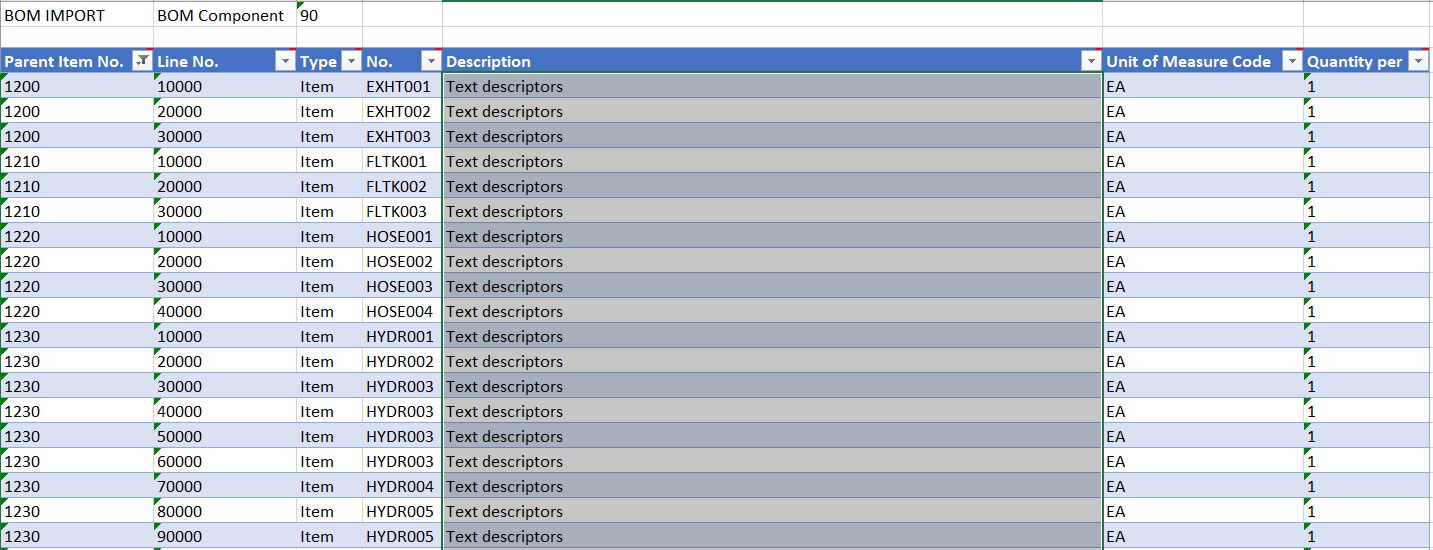
2020_2D00_04_2D00_12_2D00_001.JPG

2020_2D00_04_2D00_12_2D00_002.JPG

I have the same question (0)
  • Suggested answer
    JAngle Profile Picture
    157 on at

    You have chosen the wrong table for the lines. It is in fact Production BOM Line (99000772)

  • Simon A Profile Picture
    65 on at

    Hi Josh

    Thanks for this.  Do you know if there is a good source to find out which tables should be used for Config. Packages?  I have encountered a few issues in this area.

    Thanks again. Regards

    Simon

  • Suggested answer
    JAngle Profile Picture
    157 on at

    There is an action button in the table area (configuration packages) to do with finding and then adding related tables.

Under review

Thank you for your reply! To ensure a great experience for everyone, your content is awaiting approval by our Community Managers. Please check back later.

Helpful resources

Quick Links

Introducing the 2026 Season 1 community Super Users

Congratulations to our 2026 Super Stars!

Meet the Microsoft Dynamics 365 Contact Center Champions

We are thrilled to have these Champions in our Community!

Congratulations to the April Top 10 Community Leaders

These are the community rock stars!

Leaderboard > Small and medium business | Business Central, NAV, RMS

#1
OussamaSabbouh Profile Picture

OussamaSabbouh 2,086 Super User 2026 Season 1

#2
YUN ZHU Profile Picture

YUN ZHU 1,290 Super User 2026 Season 1

#3
AndrewThomas81 Profile Picture

AndrewThomas81 1,218

Last 30 days Overall leaderboard

Featured topics

Product updates

Dynamics 365 release plans
