web
You’re offline. This is a read only version of the page.
close
Skip to main content

Notifications

Announcements

Community site session details

Community site session details

Session Id :
Microsoft Dynamics CRM (Archived)

Registration Tool, Debug Custom Plugin, Not Showing profile or Log

(0) ShareShare
ReportReport
Posted on by 20

Hello everyone, 

I have a problem in CRM 2016 on-Premise, I am following all the steps to register my custom plugin, register new step, install profile, start profile then trigger my code from Portal CRM.

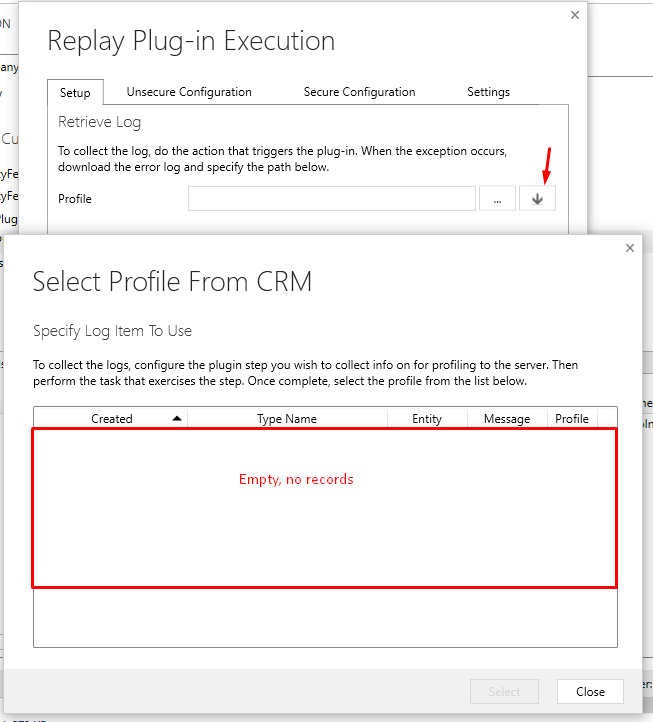
When trying to  debug my plugin, it is asking me to choose profile but nothing is coming, please see screenshot:
Screen-Explanation.png

Could you please help?

Thanks

Hani

*This post is locked for comments

I have the same question (0)
  • Suggested answer
    gdas Profile Picture
    50,091 Moderator on at

    Hi,

    You have to download the exception error file and choose that file  debug  plugin. Have a look below reference -

    dynamics365blocks.wordpress.com/.../how-to-debug-a-plugin-in-dynamics-365-online-using-plugin-profiler

  • Suggested answer
    Syed Ibrahim Profile Picture
    6,257 on at

    Alternatively, while profiling set " persist to Entity", then you can select from the profiled option which you are trying.

    Hope this helps.

  • Verified answer
    Charles Abi Khirs Profile Picture
    3,569 on at

    Hello,

    Check my blog post for step by step on how to debug plugins using profiler: charlesak.blogspot.com/.../debug-plugin-in-dynamics-365-online.html

  • Suggested answer
    Dynamics365 Rocker Profile Picture
    7,755 on at

    You have to follow below steps:

    1.On profiler in Plugin registration tool.

    2.Download error log when you execute this plugin from CRM.

    3. Browse that file in Plugin registration tool, Rather than Download click on three dotes(...)

    Below post may help you:

    www.c5insight.com/.../debugging-plug-in-made-easy-for-dynamics-crm-online.aspx

  • Suggested answer
    Sven Vervynckt Profile Picture
    115 on at

    To download the log file, you need to put your plugin in Synchronous mode. Asynchronous plugins don't give you the option to download the log file, as these end up in the System Jobs. 

    I hope this helps you out!

    Kind regards

    Sven V. 

Under review

Thank you for your reply! To ensure a great experience for everyone, your content is awaiting approval by our Community Managers. Please check back later.

Helpful resources

News and Announcements

Season of Giving Solutions is Here!

Quick Links

Responsible AI policies

As AI tools become more common, we’re introducing a Responsible AI Use…

Neeraj Kumar – Community Spotlight

We are honored to recognize Neeraj Kumar as our Community Spotlight honoree for…

Leaderboard > 🔒一 Microsoft Dynamics CRM (Archived)

#1
Shidin Haridas Profile Picture

Shidin Haridas 2

#2
Abdullah13 Profile Picture

Abdullah13 1

Last 30 days Overall leaderboard

Featured topics

Product updates

Dynamics 365 release plans
