Hi,
I have 2 servers. One of them contains crm 2015 (live), one of them contains crm 2016 (not online but for testing).
I will arrange the fonctionalities of some custom actions in crm 2016 which is used in crm 2015 using javascript language.
I faced a problem such as in crm 2016 the popup window does not appear. Because i can not append the web resource/css to the head control of the page. My code is below:
function advicequestionSelect() {
try {
if (sweetAlertCss_Loaded == undefined || sweetAlertCss_Loaded == null) {
var _css = "WebResources/new_SweetAlertCss";
var _cssref = document.createElement("link");
_cssref.setAttribute("rel", "stylesheet");
_cssref.setAttribute("type", "text/css");
_cssref.setAttribute("href", _css);
$("head").append(_cssref);//gives me error on crm 2016
var sweetAlertCss_Loaded = true;
}
swal({
title: 'Teklif veya Direk Satis?',
text: 'Lütfen olusturmak istediginiz kayit türünü seçiniz !',
type: 'warning',
allowEscapeKey: false,
showCancelButton: true,
cancelButtonColor: '#DD6B55',
confirmButtonColor: '#d33',
cancelButtonText: 'Teklif',
confirmButtonText: 'Dogrudan Satis',
closeOnConfirm: false
},
function (isConfirm) {
getAttr("new_direktsatis").setValue(isConfirm);
getAttr("new_tur").setValue(isConfirm ? 100000001 : 100000000);
if (isConfirm) {
getField("new_uretimtarihi").setRequiredLevel("required");
getField("new_kesinteslimtarihi").setRequiredLevel("required"); //"none", "required", "recommended"
Xrm.Page.getControl("new_uretimtarihi").setVisible(true);
Xrm.Page.getControl("new_kesinteslimtarihi").setVisible(true);
}
}
swal.close();
});
} catch (e) { alert(" error:" + e); }
}
The picture of the popup which i want it seems to be like this below (this is in crm 2015 )
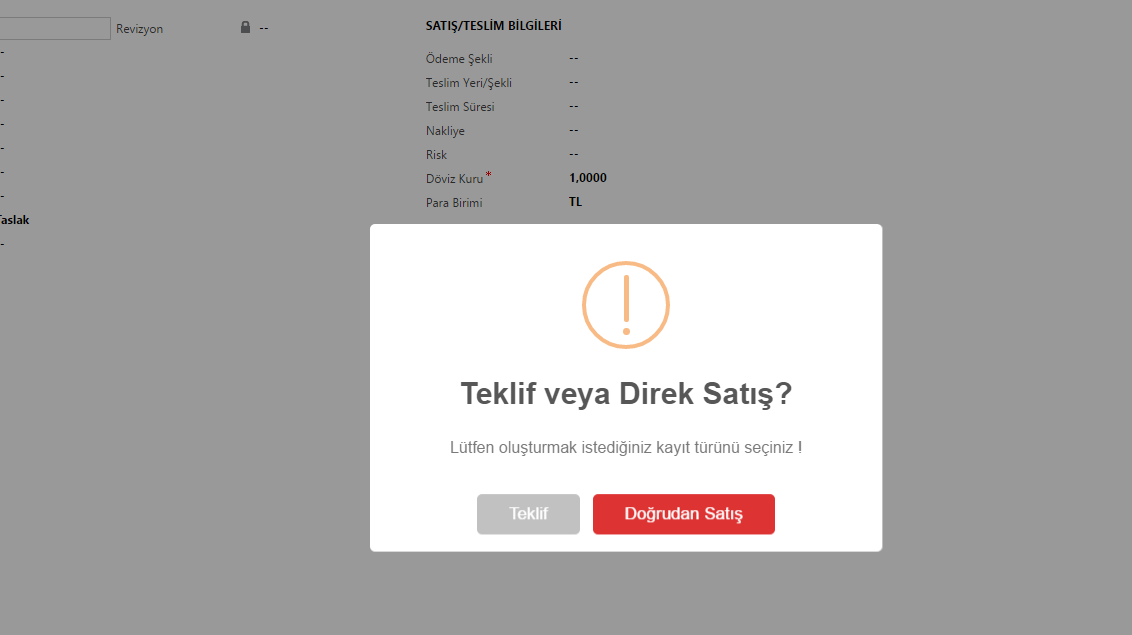
Can anyone help me please. How can i do this in crm 2016 using javascirpt.


