web
You’re offline. This is a read only version of the page.
close
Skip to main content

Announcements

No record found.

News and Announcements icon
Community site session details

Community site session details

Session Id :
Microsoft Dynamics CRM (Archived)

Cannot connect Microsoft Dynamics 365 Developer Toolkit to CRM

(0) ShareShare
ReportReport
Posted on by 35

Hi all,

I've installed the Dynamics 365 Developer Toolkit extension into Visual Studio 2017.

I'm now trying to connect to our On-premises CRM, but the extension keeps erroring at me.

I provide the server URL using 'discover.***.net' and I provide a username and password. (Screenshot below)
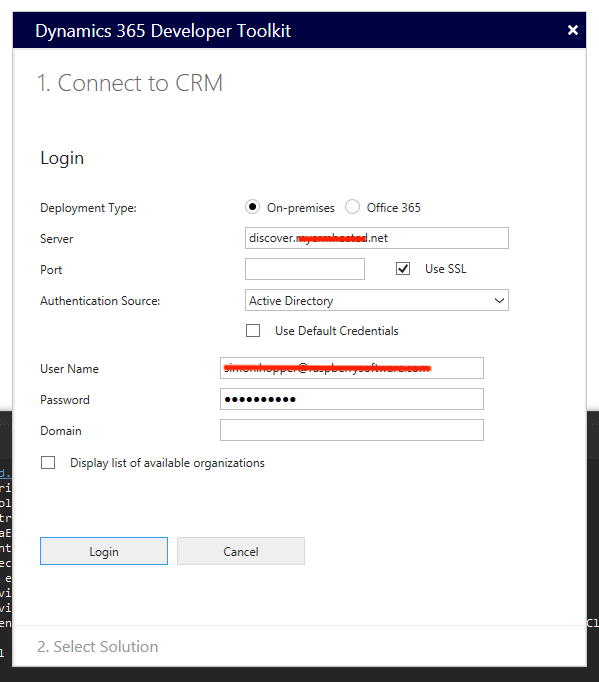
Screen-Shot-2018_2D00_04_2D00_16-at-15.57.01.png

This, in turn, provides me with a list of organizations. I select the organization I would like, and click 'Login'. (Screenshot below)
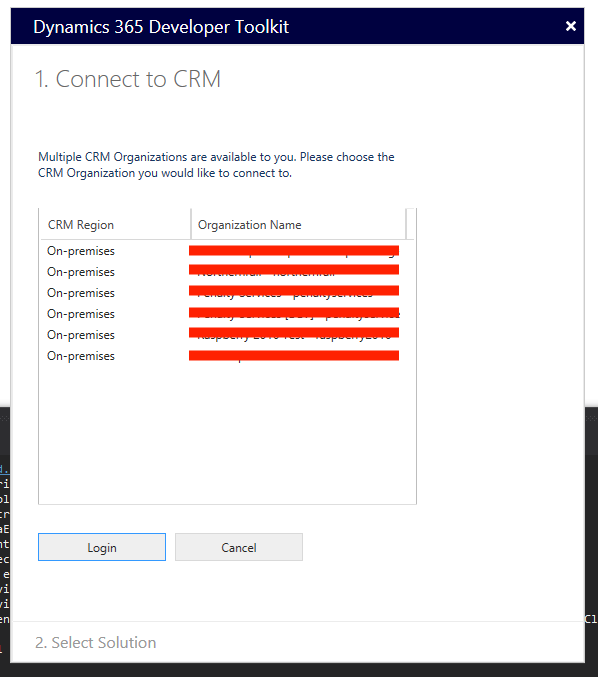
Screen-Shot-2018_2D00_04_2D00_16-at-15.57.10.png

In doing so, I receive an error. Looking at the log, there appears to be a bug.

Microsoft.Xrm.Tooling.Connector.CrmServiceClient Verbose: 16 :    ==>DiscoveryServer indicated organization service location = https://raspberry2016.***.net/XRMServices/2011/Organization.svc

Microsoft.Xrm.Tooling.Connector.CrmServiceClient Information: 8 :    ==>Organization Service URI is = https://discover.***.net/XRMServices/2011/Organization.svc

Microsoft.Xrm.Tooling.Connector.CrmServiceClient Information: 8 :    ==>ConnectAndInitCrmOrgService - Initializing Organization Service Object

Microsoft.Xrm.Tooling.Connector.CrmServiceClient Information: 8 :    ==>ConnectAndInitCrmOrgService - Requesting connection to Org with CRM Version: 8.1.1.1005

Microsoft.Xrm.Tooling.Connector.CrmServiceClient Information: 8 :    ==>ConnectAndInitCrmOrgService - Using ISerivceManagement

Microsoft.Xrm.Tooling.Connector.CrmServiceClient Verbose: 16 :    ==>ConnectAndInitCrmOrgService - attempting to connect to CRM server @ https://discover.***.net/XRMServices/2011/Organization.svc

Microsoft.Xrm.Tooling.Connector.CrmServiceClient Error: 2 :    ==>Source : System.ServiceModel

The log shows that it recognizes the correct organization service from the discovery server (https://raspberry2016.***.net/XRMServices/2011/Organization.svc) but then uses the wrong one to try and connect (https://discover.***.net/XRMServices/2011/Organization.svc).

Does anyone have a solution for this?

Thanks,

James

*This post is locked for comments

I have the same question (0)
  • Suggested answer
    RaviKashyap Profile Picture
    55,410 Moderator on at

    Hi,

    Do you have IFD enabled? If yes, then you need to select the Authentication Source as IFD.

    Hope this helps.

  • JamesNWarner Profile Picture
    35 on at

    Hi Ravi,

    To be honest, I'm not sure if I have it enabled or not. Do you know how I could check?

    In any case, the tool fails whether the 'Authentication Source' is set to 'IFD' or 'Active Directory'.

    Thanks,

    James

  • Suggested answer
    RaviKashyap Profile Picture
    55,410 Moderator on at

    Hi James,

    To rule out the issue with developer toolkit, can you try connecting to plugin registration tool and see if this works? You can download the sdk here: www.microsoft.com/.../details.aspx

    Once downloaded, you can see the plugin registration tool under sdk>> tools>> plugin registration.

  • RaviKashyap Profile Picture
    55,410 Moderator on at

    The credential you are providing are the ones which you use to access crm organization?

  • JamesNWarner Profile Picture
    35 on at

    Hi Ravi,

    I have the exact same issue with the plugin registration tool included in the Dynamics 365 SDK. However if I use the plugin registration tool from the Dynamics 2011 SDK, I can connect.

    I'm not too sure if that information is helpful or not.

    Thanks,

    James

  • RaviKashyap Profile Picture
    55,410 Moderator on at

    So 2011 PLT working fine but not the latest one. This is strange.

    Are you using the same value (server, org, credential) in both 2011 & latest?

  • JamesNWarner Profile Picture
    35 on at

    Hi Ravi,

    CRM 2011 Plugin Registration Tools asks me for a 'Label', 'Discovery URL' and 'User Name'. I then connect and it asks for a password, which I provide. I then see all my organizations and I can register plugins with them.

    The CRM 365 Plugin Registration Tool asks me for much more information. When I enter the same to the best of my ability (see screenshot in the original post), I cannot connect.

    Thanks,

    James

  • Community Member Profile Picture
    on at

    Any ideas for this issue? I have the same problem.

    I have two organisations on same server. One uses IFD and i reach app through port 444, and another is accessible through 5555. I can not connect Dynamics 365 Developer Toolkit on any of these databases no matter what kind of Authentication Source I am using.

    When I enter wrong parameters, I receive an error (it works as it should). Otherwise it turns me back on connecting screen every time.

Under review

Thank you for your reply! To ensure a great experience for everyone, your content is awaiting approval by our Community Managers. Please check back later.

Helpful resources

Quick Links

Introducing the 2026 Season 1 community Super Users

Congratulations to our 2026 Super Stars!

Meet the Microsoft Dynamics 365 Contact Center Champions

We are thrilled to have these Champions in our Community!

Congratulations to the April Top 10 Community Leaders

These are the community rock stars!

Leaderboard > 🔒一 Microsoft Dynamics CRM (Archived)

Last 30 days Overall leaderboard

Featured topics

Product updates

Dynamics 365 release plans
