web
You’re offline. This is a read only version of the page.
close
Skip to main content

Announcements

No record found.

News and Announcements icon
Community site session details

Community site session details

Session Id :
Small and medium business | Business Central, N...
Suggested Answer

Table Email View Policy - Updating a user's name

(0) ShareShare
ReportReport
Posted on by 293

Hey,

So in our offboarding a user process we put a unique character in front of their name so we know that the user is no longer with the company.  Now granted I have SUPER rights and when I try to add an X - in front of the user's name I get this permission error.  Why is this happening when I have SUPER and what is the workaround?

pastedimage1656078963452v1.png

Thanks,

I have the same question (0)
  • Suggested answer
    MahGah Profile Picture
    15,613 on at

    Hi

    Maybe try this go to the Email Accounts page (in every company) and remove the email addresses on this page.  Then change the name then go back and put the emails back in.  I mean find that person email account in email accounts page.

  • Suggested answer
    Vaishnavi J Profile Picture
    3,094 on at

    Hi,

    The reason you are getting this error is Business central introduced a new feature email view policy which give the ability to Administrators to have more control over who gets to see which emails by setting email view policies.

    So you globally search User Email policy

    and add the users and the policy. Currently it must be blank which means it has considered all the users to have the policy. That is why it is giving you the error.
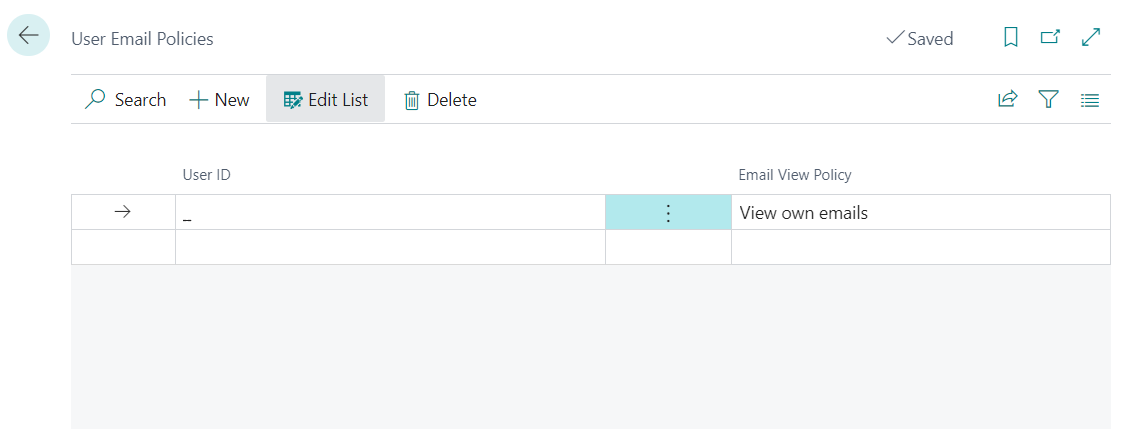
    pastedimage1656080784380v2.png

    if you want to change the user name of the user you can update it admin center and get the update user using Update User from Microsoft 365 action in user page.
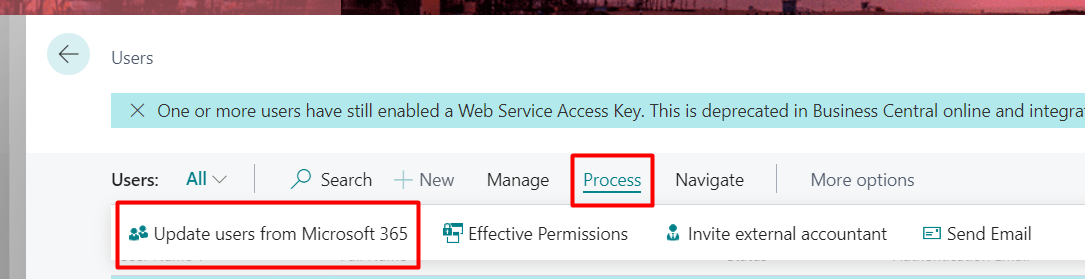
    pastedimage1656080839827v3.png

    If my answer was helpful to you, please verify it so that other users know it worked. Thank you very much

Under review

Thank you for your reply! To ensure a great experience for everyone, your content is awaiting approval by our Community Managers. Please check back later.

Helpful resources

Quick Links

Introducing the 2026 Season 1 community Super Users

Congratulations to our 2026 Super Stars!

Meet the Microsoft Dynamics 365 Contact Center Champions

We are thrilled to have these Champions in our Community!

Congratulations to the April Top 10 Community Leaders

These are the community rock stars!

Leaderboard > Small and medium business | Business Central, NAV, RMS

#1
OussamaSabbouh Profile Picture

OussamaSabbouh 1,948 Super User 2026 Season 1

#2
YUN ZHU Profile Picture

YUN ZHU 936 Super User 2026 Season 1

#3
Teagen Boll Profile Picture

Teagen Boll 616 Super User 2026 Season 1

Last 30 days Overall leaderboard

Featured topics

Product updates

Dynamics 365 release plans
