web
You’re offline. This is a read only version of the page.
close
Skip to main content

Notifications

Announcements

No record found.

Community site session details

Community site session details

Session Id :
Supply chain | Supply Chain Management, Commerce
Suggested Answer

Display Dimensions in Physical on-hand stock

(0) ShareShare
ReportReport
Posted on by 40

Hi,

How can I set the display dimensions for all users for the on-hand stock report:-
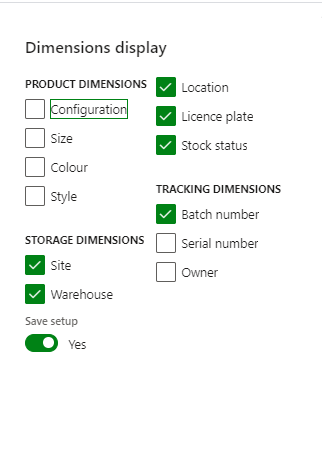
pastedimage1601551122825v2.png

Each user can go in and save the settings but we want to push this configuration to all users by default. The settings are set in the stock and warehouse management parameters as below but this is still not defaulting them on the on-hand stock page???
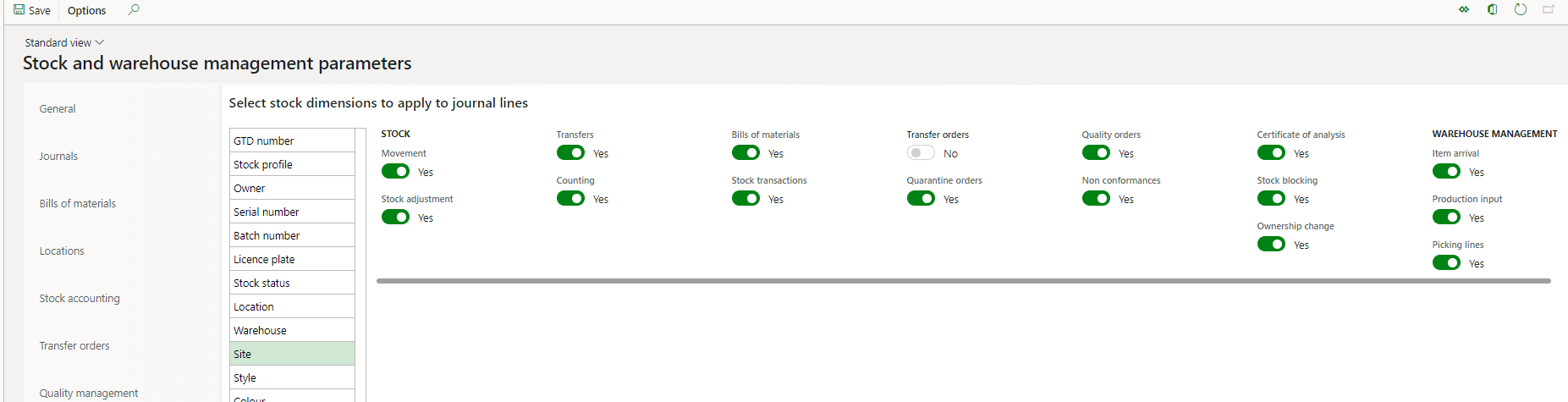
pastedimage1601551249946v3.png

I have the same question (0)
  • Gunjan Bhattachayya Profile Picture
    35,423 on at

    Hi Kerry,

    You can save your personalization and push it out to other users.

    Please check if this works for you. You can check this link for the steps.

  • Kerry Moran Profile Picture
    40 on at

    I've tried this and it fails to work. I set the configuration on my account and then exported

    pastedimage1601554147918v3.png

    I then used the method suggested and imported it to a user as a test. I can see it against against the user

    pastedimage1601554001306v1.png

    but when logged in as that user and going to the form the dimensions are still not showing and set:-

    pastedimage1601554034030v2.png

  • Suggested answer
    André Arnaud de Calavon Profile Picture
    301,170 Super User 2025 Season 2 on at

    Hi Kerry,

    In several parameter forms, there are setting for the inventory dimension to display or not. These are the defaults for new users. If a user opens a certain form the first time, it will look at the parameters. When it has been opened before, it will take the last setting for this user. The settings for dimension diaplay are not in the form personalizations saved, but the usage data (SysLastValue). You might copy the related record with a script (runnable class) to all other users.

Under review

Thank you for your reply! To ensure a great experience for everyone, your content is awaiting approval by our Community Managers. Please check back later.

Helpful resources

Quick Links

Responsible AI policies

As AI tools become more common, we’re introducing a Responsible AI Use…

Neeraj Kumar – Community Spotlight

We are honored to recognize Neeraj Kumar as our Community Spotlight honoree for…

Leaderboard > Supply chain | Supply Chain Management, Commerce

#1
Laurens vd Tang Profile Picture

Laurens vd Tang 303 Super User 2025 Season 2

#2
André Arnaud de Calavon Profile Picture

André Arnaud de Cal... 122 Super User 2025 Season 2

#3
Siv Sagar Profile Picture

Siv Sagar 105 Super User 2025 Season 2

Last 30 days Overall leaderboard

Product updates

Dynamics 365 release plans
