web
You’re offline. This is a read only version of the page.
close
Skip to main content

Announcements

No record found.

News and Announcements icon
Community site session details

Community site session details

Session Id :
Microsoft Dynamics CRM (Archived)

Enable the +New button in the Lookup view of the Dynamics 365 portal

(1) ShareShare
ReportReport
Posted on by 55,410 Moderator

Hi All,

I am currently working on customer service portal and have a requirement to add a +New button on the contact lookup similar to what we have in partner portal. See below screenshot-
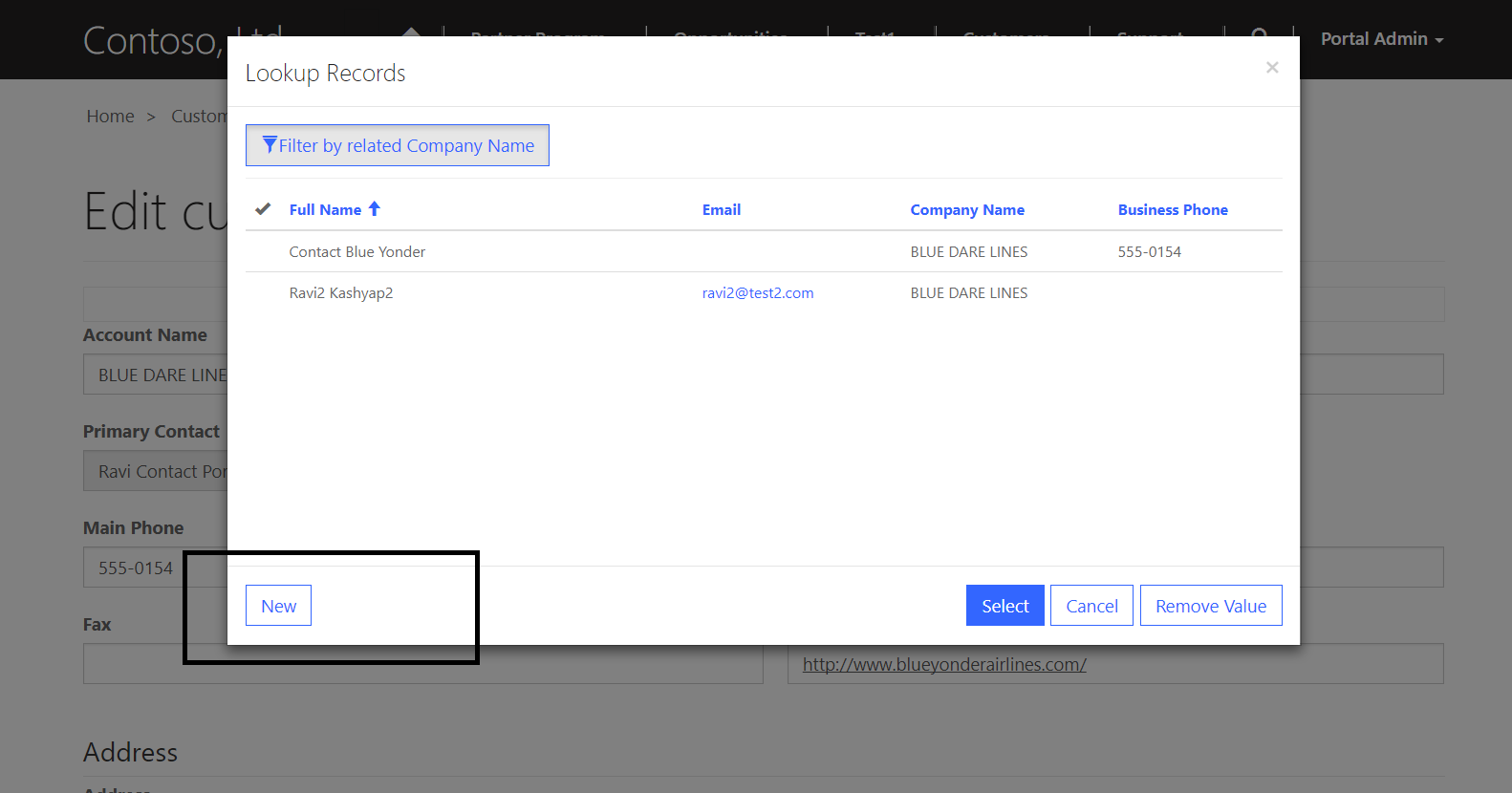
2541.new.png

I have added the correct permission but still the button is not visible.

Is this functionality only available on partner portal?

Please suggest.

*This post is locked for comments

I have the same question (0)
  • RaviKashyap Profile Picture
    55,410 Moderator on at

    Still looking for some inputs.

    Please suggest!

  • Tino Rabe Profile Picture
    652 on at

    Hi Ravi,

    that is very interesting!

    I have not seen that functionality in a lookup dialog before.

    Where did you find it?

  • RaviKashyap Profile Picture
    55,410 Moderator on at

    Hi Tino,

    This is inbuilt functionality of partner portal and I am trying to implement the same in customer service portal. So far no luck :( but still trying :)

    Thanks,

  • Vijay Waghmare Profile Picture
    on at

    any luck with "New" button on lookup window?

  • Suggested answer
    Syed Ibrahim Profile Picture
    6,257 on at

    Yes Ravi it is available only for the partner portal solution for adding customer records and to create leads and opportunities . It is not available to community portal or custom portal solutions. Because partner portal is paid for each individual users rather community and custom portal is free.

    Hope this helps

  • Verified answer
    SOUNDHARYA.N.V Profile Picture
    165 on at

    Hi Ravi,

    Please follow below link to get the "new button" it worked for me.

    https://www.adoxio.com/blogs/team/Create-new-entity-record-from-within-Lookups/

    Please like if it helps you.

  • Suggested answer
    Community Member Profile Picture
    on at

    4863.entity-form-metadata.PNGlookup-form.PNG

    If you use the Entity Form Metadata for the entity form that houses the lookup, you can select the attribute (lookup field) and then at the bottom of the entity form matadata form, you can select an entity form for creating a new record. Hope this helps!

Under review

Thank you for your reply! To ensure a great experience for everyone, your content is awaiting approval by our Community Managers. Please check back later.

Helpful resources

Quick Links

Introducing the 2026 Season 1 community Super Users

Congratulations to our 2026 Super Stars!

Congratulations to our 2025 Community Spotlights

Thanks to all of our 2025 Community Spotlight stars!

Leaderboard > 🔒一 Microsoft Dynamics CRM (Archived)

#1
Varsha deshpande Profile Picture

Varsha deshpande 5

#2
JS-09031509-0 Profile Picture

JS-09031509-0 3

#3
Ciprian  P Profile Picture

Ciprian P 2

Last 30 days Overall leaderboard

Featured topics

Product updates

Dynamics 365 release plans
