web
You’re offline. This is a read only version of the page.
close
Skip to main content

Announcements

No record found.

News and Announcements icon
Community site session details

Community site session details

Session Id :
Small and medium business | Business Central, N...
Answered

Difference between "Edit Firm Planned Prod. Order" and "Edit - Prod. Order Components".

(1) ShareShare
ReportReport
Posted on by 15

If I select any Firm Planned Prod. Order, this will take me to the “Edit – Firm Planned Prod. Order” window. The first line on this table is the parent item (finished good name), and under it lists the second layer components required for production, plus some more that look like third layer (Description name text idented to the right a bit, don’t know why either).

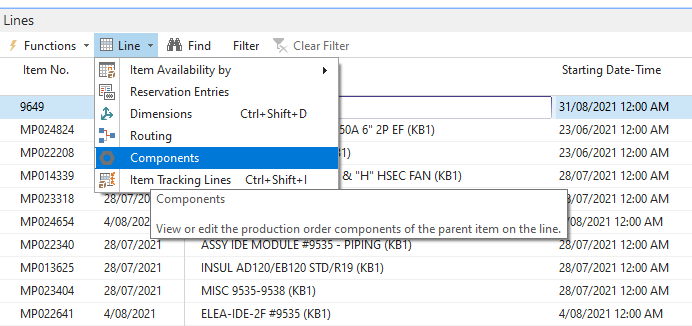
But if I select the first line, then Line\Components, this will take me to the “Edit – Prod. Order Components” window that also lists components for the parent item.


Simple question. What is the difference between the items on the Edit – Firm Planned Prod. Order and the ones on the Edit – Prod. Order Components window? Some components appear on both windows, some not, but I cannot tell why.
Screenshot-2021_2D00_08_2D00_23-131538.png

I have the same question (0)
  • Verified answer
    Ben Baxter Profile Picture
    6,918 Super User 2026 Season 1 on at

    “Edit – Firm Planned Prod. Order”:

    You have your Parent Item and your Sub-Assemblies all set as "Make-To-Order" on the Item Card/SKU's Manufacturing Policy.  This setting creates a multi-level Production Order with each "Make-To-Order" Sub-Assembly appearing below the "Make-to-Order" Parent (if supply is needed).

    Edit – Prod. Order Components”:

    The Line > Components menu takes you to the Production Order BOM for the specific Line you were on.  The Sub-Assemblies are part of the Parent Item's BOM, which is why they are in both places.  Raw Materials which have a Replenishment System of Purchase will appear in the Production Order BOM, but not on the Production Order Lines.

    If you don't want a nested Production Order, change the Manufacturing Policy on the Item/SKU to "Make-to-Stock" and it will create a separate Production Order per Item set with this policy.

    If you were to change the components or quantities in the Parent Item's Production Order BOM, the Planning Worksheet potentially will make suggestions regarding the Production Order Lines.

  • Verified answer
    Community Member Profile Picture
    on at

    Martin,

    Adding to Ben's reply...

    Editing a Firm-Planned Prod. Order allows you to edit the actual Firm-Planned Production Order Header and Line. The Line is for the Item being manufactured noted in the General Fast Tab. This is the parent Item.

    Editing Production Order Components, which you access from within the Firm-Planned Production Order/Line Fast Tab, allows you to edit the Bill of Material Components for the Parent Item being Manufactured, noted on the Firm-Planned Production Order Header and Line. You can change Quantities and add/remove components.

    Ben's reply take my summary to the next level.

    Thanks,

    Steve

Under review

Thank you for your reply! To ensure a great experience for everyone, your content is awaiting approval by our Community Managers. Please check back later.

Helpful resources

Quick Links

Introducing the 2026 Season 1 community Super Users

Congratulations to our 2026 Super Stars!

Meet the Microsoft Dynamics 365 Contact Center Champions

We are thrilled to have these Champions in our Community!

Congratulations to the March Top 10 Community Leaders

These are the community rock stars!

Leaderboard > Small and medium business | Business Central, NAV, RMS

#1
OussamaSabbouh Profile Picture

OussamaSabbouh 2,005 Super User 2026 Season 1

#2
YUN ZHU Profile Picture

YUN ZHU 1,148 Super User 2026 Season 1

#3
Khushbu Rajvi. Profile Picture

Khushbu Rajvi. 557 Super User 2026 Season 1

Last 30 days Overall leaderboard

Featured topics

Product updates

Dynamics 365 release plans
