web
You’re offline. This is a read only version of the page.
close
Skip to main content

Announcements

No record found.

News and Announcements icon
Community site session details

Community site session details

Session Id :
Microsoft Dynamics GP (Archived)

Project Accounting - Which table the Source field storing?

(0) ShareShare
ReportReport
Posted on by

In the Cards > Project > Project > Budget button, choose one of the cost category, click on the blue arrow button at the Cost Category header.
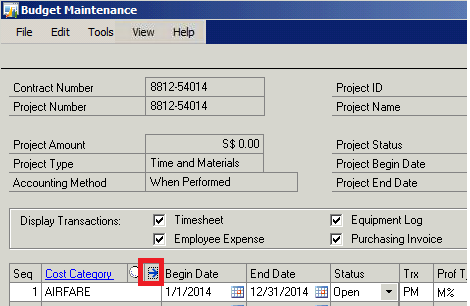
Pic-2.png


In the Budget Detail Entry, click on the Accounts button, it will open the Budget Accounts window.
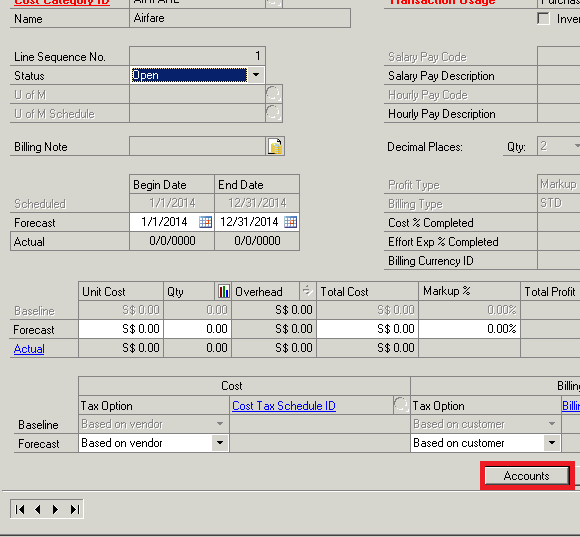
Pic-3.png

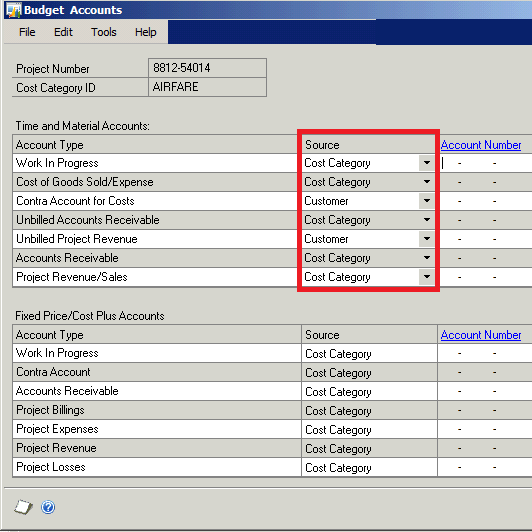
May I know which table is the Source information store at? For example, how they store the selection now is "Cost Category" for the "Work in Progress" account type? How they store the selection now is "Customer" for the "Contra account for costs" account type?

Thank you.

*This post is locked for comments

I have the same question (0)
  • Suggested answer
    Mahmoud Saadi Profile Picture
    32,738 on at

    I will recommend a method to get you the answer not only for this case but for any other similar cases. The support debugging tool is the ultimate tool in such a case, you can trace the source table from any window in Dynamics GP, and drill down for the fields on the SQL server accordingly.

    In a previous post, I have posted the steps to consider in order to run a trace on a specific window in Dynamics GP and reach the associated tables, check it out on how to findout the tables using forms in gp please any one can guide me

    Your feedback is highly appreciated,

  • Verified answer
    Community Member Profile Picture
    on at

    I found it, the query should be:

    SELECT TM_WIP_SRC, TM_COGS_SRC, tm_COST_CONTRA_SRC, TM_UNBILLED_AR_SRC, TM_UNBILLED_REV_SRC, TM_AR_SRC, TM_PRJ_REV_SRC, TM_OVHD_SRC FROM PA01301

    Hope this help. :)

  • Community Member Profile Picture
    on at

    Dear Mahmoud M. AlSaadi,

    Thank you for your reply. Really appreciate that. :)

Under review

Thank you for your reply! To ensure a great experience for everyone, your content is awaiting approval by our Community Managers. Please check back later.

Helpful resources

Quick Links

Introducing the 2026 Season 1 community Super Users

Congratulations to our 2026 Super Stars!

Meet the Microsoft Dynamics 365 Contact Center Champions

We are thrilled to have these Champions in our Community!

Congratulations to the April Top 10 Community Leaders

These are the community rock stars!

Leaderboard > 🔒一 Microsoft Dynamics GP (Archived)

#1
talty09 Profile Picture

talty09 2

#1
Anthony Beatty Profile Picture

Anthony Beatty 2

#3
CP04-islander Profile Picture

CP04-islander 1

Last 30 days Overall leaderboard

Featured topics

Product updates

Dynamics 365 release plans
