web
You’re offline. This is a read only version of the page.
close
Skip to main content

Announcements

No record found.

News and Announcements icon
Community site session details

Community site session details

Session Id :
Microsoft Dynamics CRM (Archived)

don't allow duplicates in a subgrid

(0) ShareShare
ReportReport
Posted on by 88

I have a grid view that reflects contacts list.

in that grid I have columns like contactId, departmentId, projectId, taskId (lookups)

Now I can add one contact as many times I want.

I would like to show only distinct contacts.

The contact can be added as many times we want if we already don't have a contact under contactId + departemntId + projectId

I would like to hide first or second row.

Is there a way to do this?
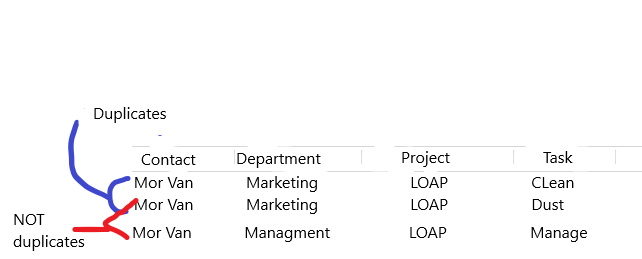
6177.1.PNG

*This post is locked for comments

I have the same question (0)
  • Verified answer
    Mahadeo Matre Profile Picture
    17,021 on at

    Hi Ama,

    You can create one custom number attribute in your sub-grid entity.. when any new record is added or created, assign incremental number to custom number attribute. now for sub-grid view add filter to show only records with custom attribute number =1.

    So if you have 2 records with same contact, department, project & task,then custom number values will be like 1 & 2, and you are going to show only 1 record based on filter.

    hope this will work..

  • Verified answer
    Arpit Shrivastava Profile Picture
    7,518 User Group Leader on at

    HI Ama,

    Here is one way of doing it.

    1. Write Pre-Create, Pre-Update plugins on Contact entity that call a function by passing the contactId & departmentId, projectid, taskid. If there is no match found then don't do anything just allow the user operation to go through.

    2. If you get multiple records returned by the retrieve then abort the create/update the plugin and display the duplicate error message to the user.

    Can refer:

    https://msdn.microsoft.com/en-us/library/hh210213.aspx?f=255&MSPPError=-2147217396

    https://parthimscrm.wordpress.com/2013/07/05/duplicate-detection-plugin-crm-2011/

    If my answer helped to resolve your issue, kindly verify it by clicking 'Yes'. It would be helpful to the other community members seeking to resolve a similar issue.


    Cheers
    Arpit
    https://arpitmscrmhunt.blogspot.in


  • NielsL Profile Picture
    262 on at

    Mahadeo Matre

    Can you elaborate a bit on how you would create the assign the custom number attribute on the entity and populate it? Can this be done using workflows are does it require code?

Under review

Thank you for your reply! To ensure a great experience for everyone, your content is awaiting approval by our Community Managers. Please check back later.

Helpful resources

Quick Links

Introducing the 2026 Season 1 community Super Users

Congratulations to our 2026 Super Stars!

Meet the Microsoft Dynamics 365 Contact Center Champions

We are thrilled to have these Champions in our Community!

Congratulations to the March Top 10 Community Leaders

These are the community rock stars!

Leaderboard > 🔒一 Microsoft Dynamics CRM (Archived)

#1
JS-09031509-0 Profile Picture

JS-09031509-0 3

#2
AS-17030037-0 Profile Picture

AS-17030037-0 2

#2
Mark Eckert Profile Picture

Mark Eckert 2

Last 30 days Overall leaderboard

Featured topics

Product updates

Dynamics 365 release plans
