web
You’re offline. This is a read only version of the page.
close
Skip to main content

Announcements

No record found.

News and Announcements icon
Community site session details

Community site session details

Session Id :
Supply chain | Supply Chain Management, Commerce
Suggested Answer

Dimension Batch number cannot be left blank if dimension Location is set. Update has been canceled.

(0) ShareShare
ReportReport
Posted on by 2,696

Friends,

When I using the mobile device menu option 'License plate receiving' I am getting the below error.

"Dimension Batch number cannot be left blank if dimension Location is set. Update has been canceled."
I have a location filled in on the PO line and expect batch number to be generated based on the batch number group linked to the product.
Can someone point what is missing here?
Regards
-Rahul
I have the same question (0)
  • Rahul Mohta Profile Picture
    21,032 on at

    seems error is coming on location

    wat setup on storage dimension group for location

  • Suggested answer
    CU21011815-0 Profile Picture
    1,945 on at

    Rahul,

    I have not ever really been able to get auto batch numbering to work with AWMS.  There have been others who have posted here asking the same thing and I don't think I've ever seen anyone able to answer it.  I'm not sure if its a bug or it isn't supported.

  • Suggested answer
    AliceBarendregt Profile Picture
    1,470 on at

    Hi Rahul, 

    I ran the flow in my test environment and was able to auto generate the batch number successfully. Maybe by means of sharing my config/steps you will be able to proceed. 

    pastedimage1591042459575v2.png

    Figure 1. Batch number group config 

    pastedimage1591042522195v3.png

    Figure 2. Released product - batch number group specification 

    pastedimage1591043187323v7.png

    Figure 3. Storage dimension group config that is used for item "Batch"

    pastedimage1591043228761v8.png

    Figure 4. Tracking dimension group config that is used for item "Batch"

    pastedimage1591042417324v1.png

    Figure 5. PO creation - no location has been specified since I would like that everything will be controlled by the RECV on the warehouse form and after this the configured location directives

    After a load has been created the user starts with defining the packing structure

    pastedimage1591042642607v4.png

    Figure 6. Packing structure [Batch ID already auto-generated]
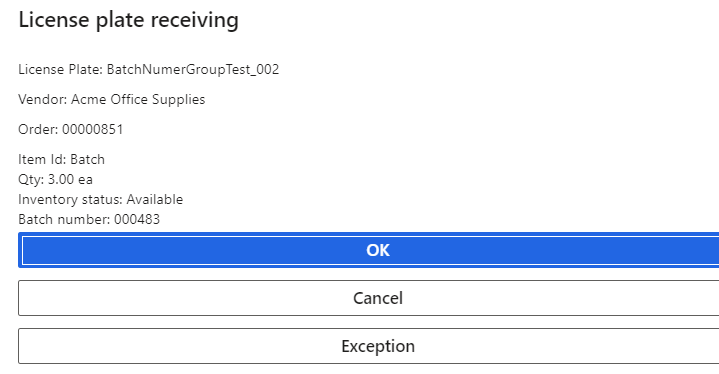
    pastedimage1591042691025v5.png

    Figure 7. LP receiving

    pastedimage1591042824493v6.png

    Figure 8. On-hand 

    Thanks, 

    Alice

  • Guy Terry Profile Picture
    28,944 Moderator on at

    Hi Rahul

    If you want to use a warehouse mobile device to receive a PO line, you should not be filling in a location on the PO line.

Under review

Thank you for your reply! To ensure a great experience for everyone, your content is awaiting approval by our Community Managers. Please check back later.

Helpful resources

Quick Links

Introducing the 2026 Season 1 community Super Users

Congratulations to our 2026 Super Stars!

Congratulations to our 2025 Community Spotlights

Thanks to all of our 2025 Community Spotlight stars!

Leaderboard > Supply chain | Supply Chain Management, Commerce

#1
Mallesh Deshapaga Profile Picture

Mallesh Deshapaga 1,093

#2
Laurens vd Tang Profile Picture

Laurens vd Tang 193 Super User 2026 Season 1

#3
André Arnaud de Calavon Profile Picture

André Arnaud de Cal... 159 Super User 2026 Season 1

Last 30 days Overall leaderboard

Product updates

Dynamics 365 release plans
