web
You’re offline. This is a read only version of the page.
close
Skip to main content

Notifications

Announcements

No record found.

Community site session details

Community site session details

Session Id :
Microsoft Dynamics 365 | Integration, Dataverse...
Suggested Answer

Address 1 composite Canadian formatting change?

(0) ShareShare
ReportReport
Posted on by 150

Hello everyone.

I noticed recently that the address 1 composite formatting for Canadian addresses has changed in our Dynamics 365 for Customer Engagement environment.

Instead of the postal code coming after the city and province, it now comes before.
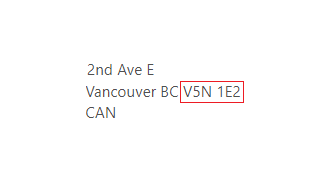
zzzz.PNG

Anyone know why this might be? This only started say, in the last month or so.

My colleague speculates that Microsoft decided to switch from 2-alpha to 3-alpha country code, as "CAN" switches it back to the correct Canadian address formatting.
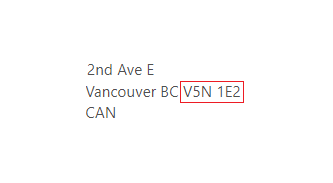
yyyy.PNG

Any insights would be appreciated.

Thanks.

Nathan

I have the same question (0)
  • Nathan Profile Picture
    150 on at

    Sorry. Not sure what happened to the incorrect formatting pic. 

    Here it is.

    5875.zzzz.PNG

  • Suggested answer
    LeoAlt Profile Picture
    16,331 Moderator on at

    Hi partner,

    Is the "address1" OOB field in account or contact?

    If so, as I know, We can enter any value in the country field like "AABB112233" and the system will not automatically check.

    If your address format changed, please check the following points.

    1.If there is any related js function on the form.

    2.Enable the field auditing and check the log to see if anyone else changed the format.

    If my understanding is not correct, please share more information so that make it easier for us to help you.

    BTW, here is the release of D365 upgrades and I did not find any information about address format.

    https://support.microsoft.com/en-us/help/2925359/microsoft-dynamics-crm-online-releases

    pastedimage1576462719563v1.png

    Best Regards,

    Leo

  • Nathan Profile Picture
    150 on at

    Hi Leo. Thanks for the help.

    As far as I can tell, the "Address 1" field is an OOTB field, displaying the primary address on a contact/account record.

    I do not see any Form scripts running that would affect address formatting. And auditing only shows changes on individual records, there is no option that I can see to show if something has done to this field that would affect the entire system.

    Do you know how to set address formatting in a Dynamics 365 for Customer Engagement environment? That is what we are using.

    I found information online about how to do it in Dynamics AX environments, but nothing for Customer Engagement.

    (docs.microsoft.com/.../key-tasks-set-up-address-formats

    Thanks.

    Nathan

  • Raphi Profile Picture
    186 on at

    Hi Nathan

    Have you found a solution to this problem?

    I am facing the same behavior for swiss addresses, but even the 3-alpha code does not work.

    Thank you.

    Best regards

    Raphael

Under review

Thank you for your reply! To ensure a great experience for everyone, your content is awaiting approval by our Community Managers. Please check back later.

Helpful resources

Quick Links

Responsible AI policies

As AI tools become more common, we’re introducing a Responsible AI Use…

Neeraj Kumar – Community Spotlight

We are honored to recognize Neeraj Kumar as our Community Spotlight honoree for…

Leaderboard > Microsoft Dynamics 365 | Integration, Dataverse, and general topics

#1
Siv Sagar Profile Picture

Siv Sagar 93 Super User 2025 Season 2

#2
#ManoVerse Profile Picture

#ManoVerse 80

#3
Martin Dráb Profile Picture

Martin Dráb 64 Most Valuable Professional

Last 30 days Overall leaderboard

Product updates

Dynamics 365 release plans
