web
You’re offline. This is a read only version of the page.
close
Skip to main content

Announcements

No record found.

News and Announcements icon
Community site session details

Community site session details

Session Id :
Microsoft Dynamics CRM (Archived)

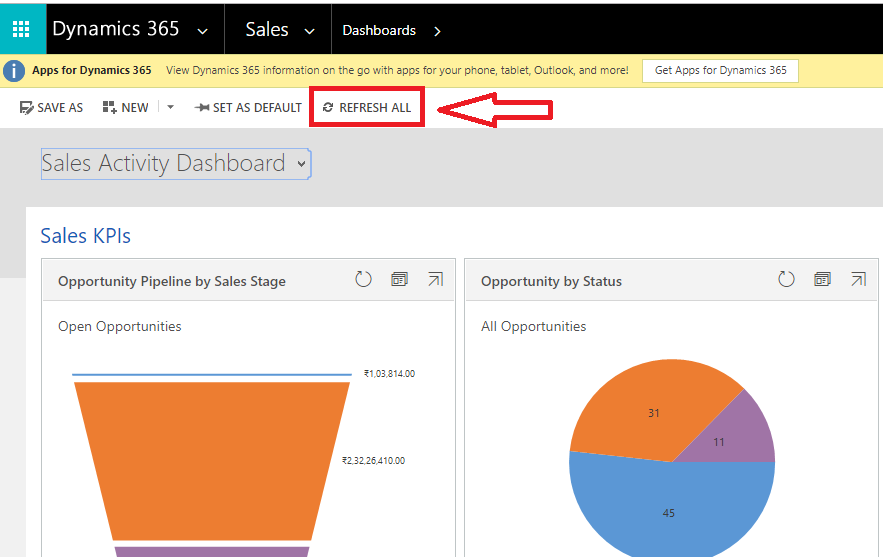
Hide "Refresh All" button for 30 seconds

(0) ShareShare
ReportReport
Posted on by 958

Hi All,

Is it possible to apply a custom script on "Refresh All" button of dashboards to hide the button for 30 seconds and after 30 seconds it should be visible untill and unless not click on that button. If we click on the button then again this should be hide for 30 seconds?

Please suggest.
8802.Dash.png

*This post is locked for comments

I have the same question (0)
  • Suggested answer
    Sreevalli Profile Picture
    3,264 on at

    Hello Shakti,

    Refresh All button will be available in "Application Ribbons" under "Client Extensions". you can customise the button commands with your javascript actions.

    If you are trying to auto refresh the dashboard in some time interval the you can go through my blog post - revisitdynamics.wordpress.com/.../dashboard-automatic-refresh

  • Seren S Profile Picture
    402 on at

    Hi Sreevalli,

    I am also interested your advice to modify this ribbon. Could please provide more details about where can we modify or add new custom commands into this spesific ribbon in dashboard area?

    Thanks, Seren.

  • Suggested answer
    gdas Profile Picture
    50,091 Moderator on at

    Hi Shakti,

    Just for curiosity I am asking you  what is the reason behind this requirement ?. I don't see any  valid point or necessity for this requirement.

    There is no supported way you can add your own actions in the "OOB Refresh All" button .However you can hide this OOB Refresh  button using ribbon workbench. I don't recommend you to go unsupported way as this button is displaying in Application Ribbon area  so any changes in the application ribbon button will be impact across the application.

Under review

Thank you for your reply! To ensure a great experience for everyone, your content is awaiting approval by our Community Managers. Please check back later.

Helpful resources

Quick Links

Introducing the 2026 Season 1 community Super Users

Congratulations to our 2026 Super Stars!

Meet the Microsoft Dynamics 365 Contact Center Champions

We are thrilled to have these Champions in our Community!

Congratulations to the April Top 10 Community Leaders

These are the community rock stars!

Leaderboard > 🔒一 Microsoft Dynamics CRM (Archived)

#1
ScottDurow Profile Picture

ScottDurow 2

#2
GJones Profile Picture

GJones 1

Last 30 days Overall leaderboard

Featured topics

Product updates

Dynamics 365 release plans
