web
You’re offline. This is a read only version of the page.
close
Skip to main content

Announcements

No record found.

News and Announcements icon
Community site session details

Community site session details

Session Id :
Supply chain | Supply Chain Management, Commerce
Suggested Answer

Sales line reservation on Site and Warehouse level only

(0) ShareShare
ReportReport
Posted on by 175

Hi,

I got this requirement from the client.

Receive the items with serial numbers, but have the items reserved on sales order lines on site and warehouse level only.

I tried setting up this one with the following storage dimension group setup:
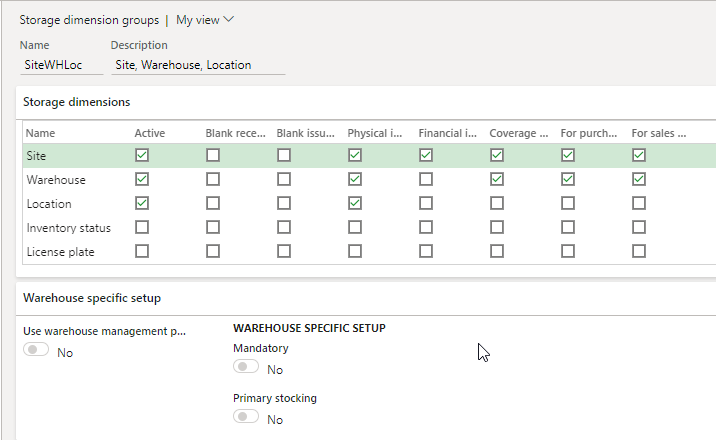
chrome_5F00_84ersLZ2ax.png

And then here's my tracking dimension setup:
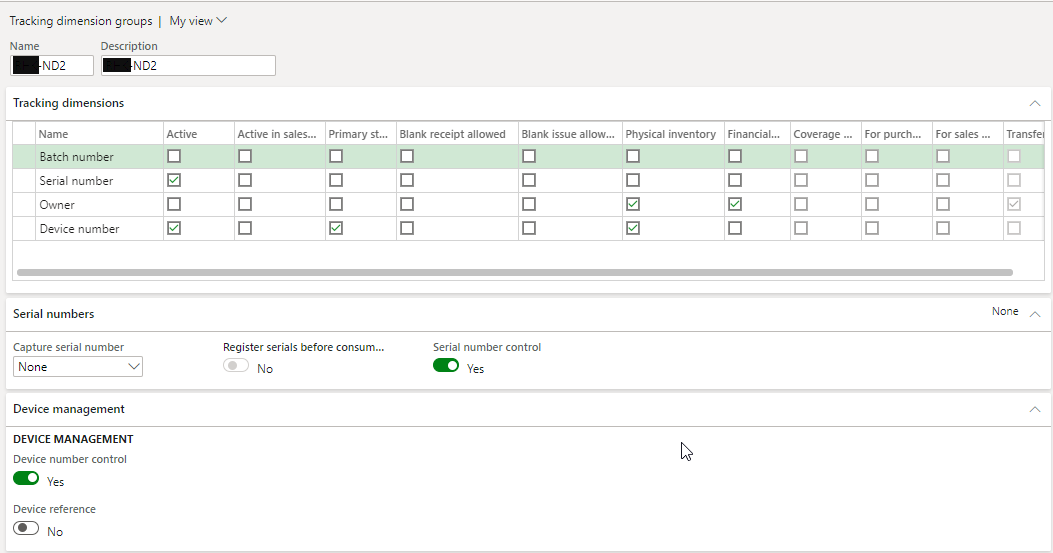
IwRSX4MfS7.png

With the above setup I can receive PO lines with serial numbers.

Issue is when I create a sales order line, since we have auto-reservation the system reserves up to the serial number level.

Thus when generating a picking list the serial numbers are already defined, which we know is very hard for warehouse workers to execute if it happens that the serial number reserved is not easy to reach inside the warehouse.

We wanted that only the site and warehouse will be reserved and by the time we pick the inventory from the warehouse that is the time that we define it in the pick list.

Regards,

RIEL

I have the same question (0)
  • Suggested answer
    Rahul Mohta Profile Picture
    21,046 on at

    would propose to remove auto reservation and use advanced warehouse which would help in reserving above serial level and that way warehouse worked can suggest which serial is picked which is more convenient to him/her

  • Riel A. Mallorca Profile Picture
    175 on at

    Hi Rahul,

    No other ways of doing it using basic inventory management function, unfortunately advanced warehouse is out of scope?

    I guess advance warehouse can handle this with reservation hierarchy setup in the item.

    Regards,

    RIEL

  • Suggested answer
    AliceBarendregt Profile Picture
    1,470 on at

    Hi Riel, 

    If I remember correctly as per standard, the serial number can either be specified upon receiving or during the picking operation. This depends on your setup via the tracking dimension form. Hence, if you decide to already define the serial number upon receiving you will not have the option to specify this during your outbound operation [capture serial number = none]. When defined during receiving, the serial number will indeed be specified via the picking list. However, when you configure the capture serial number field to "Picking" the user will be able to define the serial number himself. 

    Serial number specification upon receiving

    pastedimage1591518398371v1.png

    Figure 1. Setup 

    pastedimage1591518485362v2.png

    Figure 2. On-hand list - after reservation via associated sales order

    In the above scenario, the serial numbers will be specified as part of the picking list. 

    Serial number specification during picking 

    pastedimage1591518624489v3.png

    Figure 4. Setup 

    With the above setup the serial number will not be created/defined during the receiving process flow. However, it can be defined during the picking flow instead. 

    pastedimage1591519492080v4.png

    Figure 5. Reservation, no serial numbers are known yet

    During the registration of the picking list, you will be able to register the serial number. 

    pastedimage1591519815800v5.png

    Figure 6. Serial number registration 

    I believe another alternative is to register the serial numbers upon posting the packing slip. 

    Advanced warehouse management

    In case you decide advanced warehouse management with a reservation hierarchy of serial above keep in mind that you will need to define the serial number before releasing the order to the warehouse. Hence, the warehouse worker still doesn't have the flexibility, in this case, to define the serial number during the picking operation. 

  • Riel A. Mallorca Profile Picture
    175 on at

    Hi Alice,

    Thank you for the suggestion. What I did to resolve the issue is to create this tracking dimension group:

    3IpDL6ewCW.png

    And configure a storage dimension group that uses advanced warehouse management so that I can attach a reservation hierarchy to the item.

    446lqHyNXl.png

    With the above approach I can receive items and can define the serial numbers of the items received and I can perform reservation on sales order lines where only the site and warehouse is reserved for the sales order lines.

    Regards,


    RIEL

Under review

Thank you for your reply! To ensure a great experience for everyone, your content is awaiting approval by our Community Managers. Please check back later.

Helpful resources

Quick Links

Introducing the 2026 Season 1 community Super Users

Congratulations to our 2026 Super Stars!

Meet the Microsoft Dynamics 365 Contact Center Champions

We are thrilled to have these Champions in our Community!

Congratulations to the April Top 10 Community Leaders

These are the community rock stars!

Leaderboard > Supply chain | Supply Chain Management, Commerce

#1
André Arnaud de Calavon Profile Picture

André Arnaud de Cal... 155 Super User 2026 Season 1

#2
Laurens vd Tang Profile Picture

Laurens vd Tang 101 Super User 2026 Season 1

#3
Zain Mehmood Profile Picture

Zain Mehmood 89 Most Valuable Professional

Last 30 days Overall leaderboard

Product updates

Dynamics 365 release plans
