web
You’re offline. This is a read only version of the page.
close
Skip to main content

Announcements

No record found.

News and Announcements icon
Community site session details

Community site session details

Session Id :
Microsoft Dynamics CRM (Archived)

Lookup Filtering Bug

(0) ShareShare
ReportReport
Posted on by

I have found a bug in CRM online with regards to lookup filtering. 

A bit of background on this bug, it involves three entities of which two are custom and one is the out of box Products entity. 

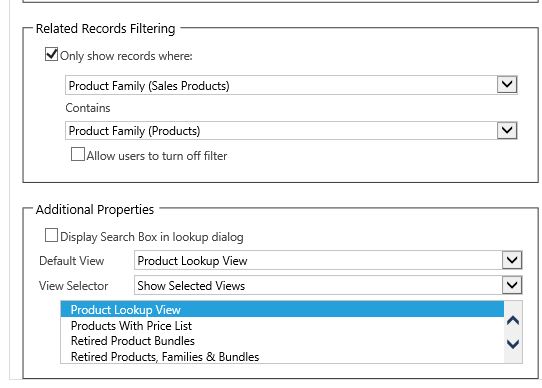
On the first custom entity called "Sales Product"I have created two lookup fields, one to "Product Family" (the other custom entity) and the other lookup is to Product. All products are linked to a product family. The aim of the filter is to only display the list of products that are associated to the product family that has been selected by the user. 
8272.Capture.JPG

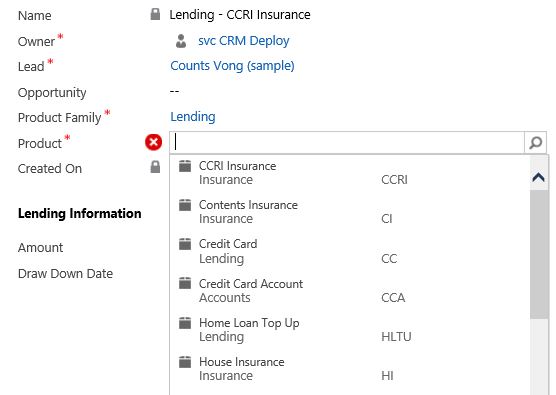
When the product family has already been selected, I would expect that the dropdown displayed after clicking the magnifying glass on the Product lookup would only display Products that are associated with the selected Product Family. However, the dropdown displays all Products. 
1348.Capture2.JPG

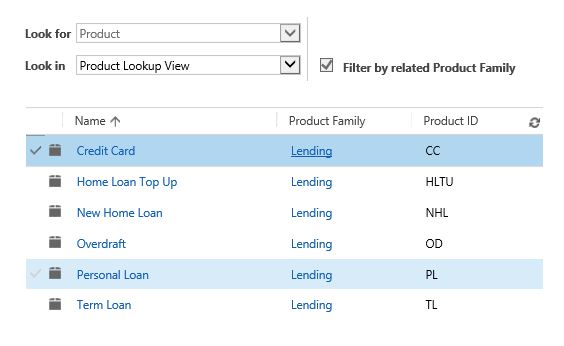
Now the strangest part, is that when I select "Look Up More Records" the filtering behaves correctly.
4062.Capture3.JPG

I have never encountered this behavior before when using these filters. It has worked properly for me on a recent implementation using all custom entities in the exact same scenario. Perhaps it has something to do with the fact I am using the products entity?

Please respond if you have any ideas or fixes for this.

Thanks

James

*This post is locked for comments

I have the same question (0)
  • Suggested answer
    Royal King Profile Picture
    27,686 on at

    One way to fix this issue is add addpresearch event and custom filter condition to filter products based on the selected product family lookup value.

    Example code :

    Xrm.Page.getControl("productid").addPreSearch(function () {

           // Call lookup filter method

           addFilter();

       });

    function addFilter()

    {

    if(Xrm.Page.getAttribute("productfamily").getValue() != null)

    {

    var filter = "<filter type='and'>" +

                            "<condition attribute='productfamilyid' operator='eq' uitype='izee_codegroup' value='{" + Xrm.Page.getAttribute("productfamily").getValue()[0].id + "}' />" +

                        "</filter>";

               //add filter

               Xrm.Page.getControl("product").addCustomFilter(filter, "product");

    }

    }

  • Community Member Profile Picture
    on at

    Thank you Chitra, I am looking for an out of the box solution, but if none are available I will try this

  • Community Member Profile Picture
    on at

    HI Mulvey, we have encountered the same problem. It only happens on one entity but on each field for that entity that we use the lookup filtering. Did you found a solution for this?

Under review

Thank you for your reply! To ensure a great experience for everyone, your content is awaiting approval by our Community Managers. Please check back later.

Helpful resources

Quick Links

Introducing the 2026 Season 1 community Super Users

Congratulations to our 2026 Super Stars!

Meet the Microsoft Dynamics 365 Contact Center Champions

We are thrilled to have these Champions in our Community!

Congratulations to the April Top 10 Community Leaders

These are the community rock stars!

Leaderboard > 🔒一 Microsoft Dynamics CRM (Archived)

#1
ScottDurow Profile Picture

ScottDurow 2

#2
GJones Profile Picture

GJones 1

Last 30 days Overall leaderboard

Featured topics

Product updates

Dynamics 365 release plans
