web
You’re offline. This is a read only version of the page.
close
Skip to main content

Notifications

Announcements

No record found.

Community site session details

Community site session details

Session Id :
Small and medium business | Business Central, N...
Answered

Power BI Integration in Business Central v20.4

(0) ShareShare
ReportReport
Posted on by 5

I am attempting to set up the Power BI integration in V20 the same way I did it in v14 but currently running into a very vague error when I go to Authorize Azure Service.

"We couldn't connect to Power BI using your Azure AD application registration. Run the Set Up Azure Active Directory assisted setup again, and make sure all the values are set correctly."
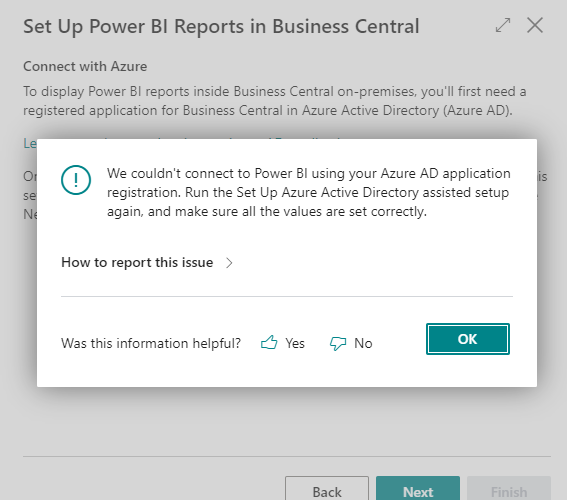
image-_2800_33_2900_.png

I know the Application ID is set correctly along with the secret key. 

The App has API Perms: user.read.all, report.read.all, and workspace.read.all.

AL call stack for the error: 

"Power BI Embed Setup Wizard"(Page 6327).AadOnpremSetup line 3 - Base Application by Microsoft
"Power BI Embed Setup Wizard"(Page 6327).PerformOperationAfterStep line 4 - Base Application by Microsoft
"Power BI Embed Setup Wizard"(Page 6327).GoToNextStep line 3 - Base Application by Microsoft
"Power BI Embed Setup Wizard"(Page 6327)."ActionNext - OnAction"(Trigger) line 2 - Base Application by Microsoft
"Power BI Report Spinner Part"(Page 6303)."OptInGettingStarted - OnDrillDown"(Trigger) line 13 - Base Application by Microsoft

I have the same question (0)
  • Suggested answer
    YUN ZHU Profile Picture
    95,329 Super User 2025 Season 2 on at

    Hi, maybe you missed the User.ReadWrite.All permission

    More details: https://learn.microsoft.com/en-us/dynamics365/business-central/admin-powerbi-setup#setup

    pastedimage1665707245702v1.png

    Hope this helps

    Thanks.

    ZHU

  • PeterSPS Profile Picture
    5 on at

    I added this role and I am still getting the same error. It doesn't quite make sense.

  • Suggested answer
    Inge M. Bruvik Profile Picture
    1,105 Moderator on at

    And you have been through this configuration?

    learn.microsoft.com/.../register-app-azure

  • Suggested answer
    YUN ZHU Profile Picture
    95,329 Super User 2025 Season 2 on at

    Hi, There is a similar discussion below, I hope the information in it can give you some help.


    Thanks

    ZHU

  • Bilal Fazrin Profile Picture
    84 on at

    Hi,

    Recently I've been having similar issue.

    In my case, our company doesn't allow internet access to our local server.

    After bypassing the network firewall policy, azure successfully connected to BC. After that we just have to rearrange the firewall policy.

    Make sure your SOAP OData Port is available to be accessed.

    Hope this help.

    Best Regards,

    Bilal Fazrin.

  • PeterSPS Profile Picture
    5 on at

    I did go through this but when I got to this line:

    Supported account types Select Accounts in any organizational directory (Any Azure AD directory - Multitenant)

    Note: Business Central does not require the organization to be multitenant, not even if this field is set to multitenant.


    I assumed it did not actually be set to (Any Azure AD directory- Multitenant) and left it as single tenant, So I just created a new app with the same settings I had previously with the exception of going from single tenant to (Any Azure AD directory - Multitenant)

    That's all I needed to do because I can now authorize the app and it works as expectedd. Thanks Inge!

  • Inge M. Bruvik Profile Picture
    1,105 Moderator on at

    Good to hear that you got it sorted out!

    Keep up the good work!

Under review

Thank you for your reply! To ensure a great experience for everyone, your content is awaiting approval by our Community Managers. Please check back later.

Helpful resources

Quick Links

Responsible AI policies

As AI tools become more common, we’re introducing a Responsible AI Use…

Neeraj Kumar – Community Spotlight

We are honored to recognize Neeraj Kumar as our Community Spotlight honoree for…

Leaderboard > Small and medium business | Business Central, NAV, RMS

#1
OussamaSabbouh Profile Picture

OussamaSabbouh 3,226

#2
Jainam M. Kothari Profile Picture

Jainam M. Kothari 2,047 Super User 2025 Season 2

#3
YUN ZHU Profile Picture

YUN ZHU 1,257 Super User 2025 Season 2

Last 30 days Overall leaderboard

Featured topics

Product updates

Dynamics 365 release plans
