web
You’re offline. This is a read only version of the page.
close
Skip to main content

Announcements

No record found.

News and Announcements icon
Community site session details

Community site session details

Session Id :
Small and medium business | Business Central, N...
Suggested Answer

Where is the application folder located?

(0) ShareShare
ReportReport
Posted on by 35

I'd like to find the location of Report files, App Extensions and other application related files. Where can I locate them? Program Files? I have BC190 installed 

I have the same question (0)
  • Suggested answer
    Nitin Verma Profile Picture
    21,812 Moderator on at

    Hi,

    You can right click on the Objects and Click on "Reveal in File Explorer"

    pastedimage1664240623131v1.png

    Thanks

  • Amrish66 Profile Picture
    35 on at

    I'm actually looking for the entire application folder, not only reports. But thanks for the tip.

    Any idea?

  • Suggested answer
    YUN ZHU Profile Picture
    100,751 Super User 2026 Season 1 on at

    Hi, Standard codes are stored in the installation package.

    For example,

    C:\Temp\Dynamics.365.BC.45889.W1.DVD 20.5\Applications

    pastedimage1664326315347v1.png

    Base Application: C:\Temp\Dynamics.365.BC.45889.W1.DVD 20.5\Applications\BaseApp\Source
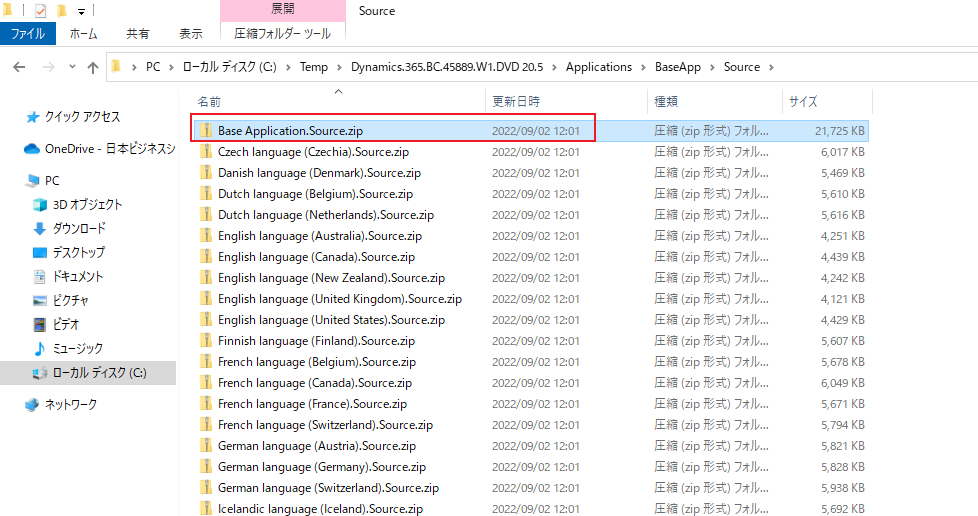
    pastedimage1664326342282v2.png

    Unzip this file, you can get all the source code in Base Application.
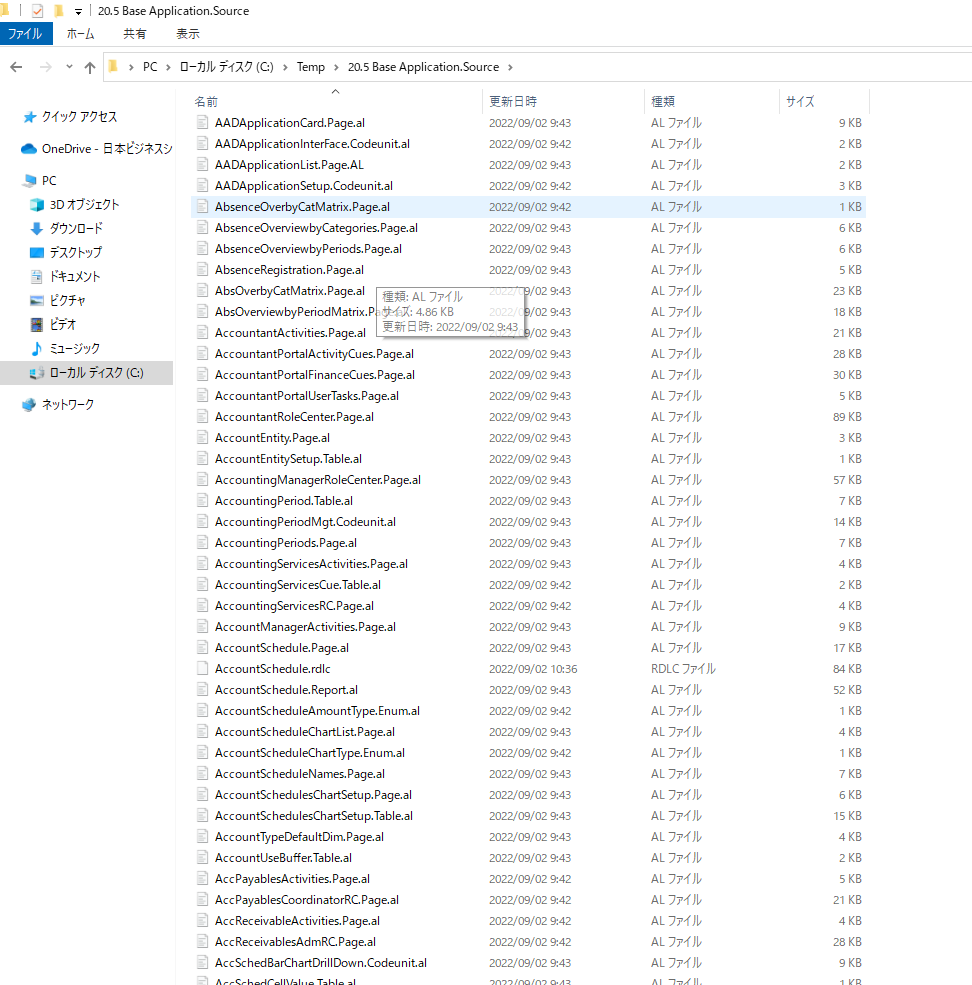
    pastedimage1664326366020v3.png

    Hope this helps.

    Thanks.

    ZHU

  • Amrish66 Profile Picture
    35 on at

    Fantastic, thank you!

  • Amrish66 Profile Picture
    35 on at

    Fantastic, thank you!

  • Suggested answer
    Amit Baru Profile Picture
    3,043 on at

    hi,

    refer the below link

    https://erpconsultors.com/find-base-application-object-in-bc-d365/

    Regards

    Amit Sharma

    www.erpconsultors.com

Under review

Thank you for your reply! To ensure a great experience for everyone, your content is awaiting approval by our Community Managers. Please check back later.

Helpful resources

Quick Links

Introducing the 2026 Season 1 community Super Users

Congratulations to our 2026 Super Stars!

Meet the Microsoft Dynamics 365 Contact Center Champions

We are thrilled to have these Champions in our Community!

Congratulations to the April Top 10 Community Leaders

These are the community rock stars!

Leaderboard > Small and medium business | Business Central, NAV, RMS

#1
OussamaSabbouh Profile Picture

OussamaSabbouh 1,909 Super User 2026 Season 1

#2
YUN ZHU Profile Picture

YUN ZHU 1,145 Super User 2026 Season 1

#3
AndrewThomas81 Profile Picture

AndrewThomas81 974

Last 30 days Overall leaderboard

Featured topics

Product updates

Dynamics 365 release plans
