web
You’re offline. This is a read only version of the page.
close
Skip to main content

Announcements

No record found.

News and Announcements icon
Community site session details

Community site session details

Session Id :
Microsoft Dynamics 365 | Integration, Dataverse...
Answered

Moving a created task to a queue via a Workflow

(0) ShareShare
ReportReport
Posted on by 274

Hi All,

Got a strange one where I need to move a task on creation to a queue (as long as it meets the pre-reqs).

I created a workflow for this but it seems to only move the related case rather than the Task which is very frustrating!

Here's my workflow:
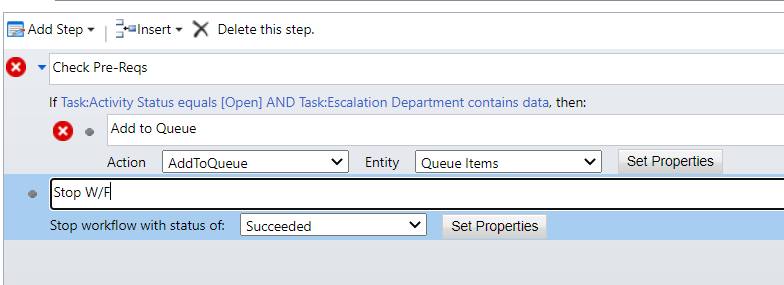
pastedimage1621449033645v1.png

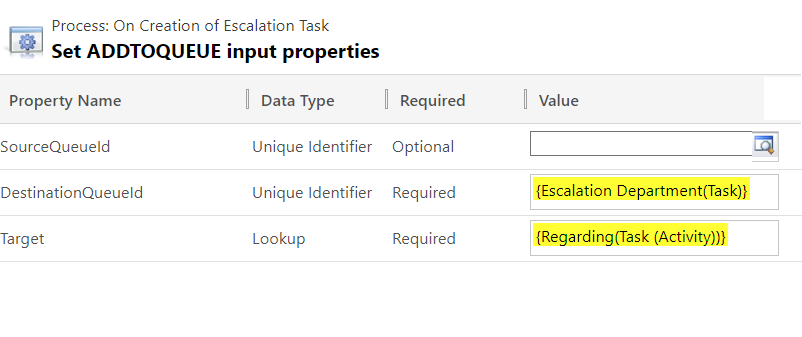
The properties of the AddtoQueue:

pastedimage1621449109518v2.png

So from the looks of it, as the task is being generated originally from a Case, the regarding field is what it's taking to route to the Queue, so I somehow need the Target to just be the Task, not the regarding Activity.

I've tried changing it to all sorts of different options but seem to get the same result where the case goes into the queue instead of the task.

Any help/guidance would be hugely appreciated

Cheers

Sam

I have the same question (0)
  • Suggested answer
    Torrado Profile Picture
    1,270 on at

    Hello,

    Could you try with "Create Queue Item" action instead of "AddToQueue"?

    Please also refer to this post: community.dynamics.com/.../difference-between-create-queue-item-and-add-to-queue

    Hope this helps you.

    Please mark the answer as verified if helpful. That will help others in future.

  • Verified answer
    Community Member Profile Picture
    on at

    Hi Sam,

    As Torrado said, you can try to use ‘create queue item’ to add new created task to the queue you need through workflow, you can set workflow as following screenshot:

    Go Settings > process to create a new workflow in  task entity.

    pastedimage1621490542149v2.png

    Set properties --Create queue item:

    pastedimage1621490438871v1.png

    Test:

    I have created a task from one case:

    pastedimage1621490821105v3.png

    then go to the new created task, it has been added to the queue.

    pastedimage1621490870855v4.png

    and regarding case has not added to any queue.

    pastedimage1621490922257v5.png

    Regards,

    Leah Ju

    Please mark as verified if the answer is helpful. Welcome to join hot discussions in Dynamics 365 Forums.

  • Sam Conroy Profile Picture
    274 on at

    Thank you, thats perfect!

Under review

Thank you for your reply! To ensure a great experience for everyone, your content is awaiting approval by our Community Managers. Please check back later.

Helpful resources

Quick Links

Introducing the 2026 Season 1 community Super Users

Congratulations to our 2026 Super Stars!

Meet the Microsoft Dynamics 365 Contact Center Champions

We are thrilled to have these Champions in our Community!

Congratulations to the March Top 10 Community Leaders

These are the community rock stars!

Leaderboard > Microsoft Dynamics 365 | Integration, Dataverse, and general topics

#1
11manish Profile Picture

11manish 173

#2
ManoVerse Profile Picture

ManoVerse 52 Super User 2026 Season 1

#3
Niki Patel Profile Picture

Niki Patel 46

Last 30 days Overall leaderboard

Product updates

Dynamics 365 release plans