web
You’re offline. This is a read only version of the page.
close
Skip to main content

Notifications

Announcements

No record found.

Community site session details

Community site session details

Session Id :
Small and medium business | Business Central, N...
Answered

Fixed Asset Disposal - Amount needs to be rounded in G/L Entry

(0) ShareShare
ReportReport
Posted on by 247

Hi, 

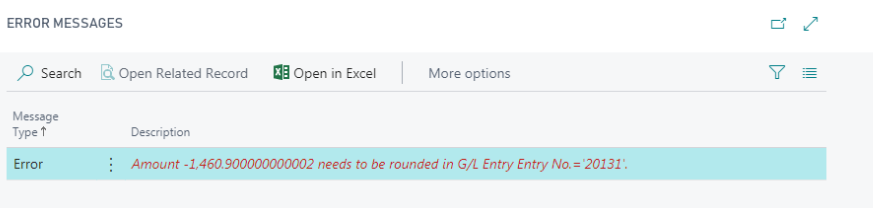
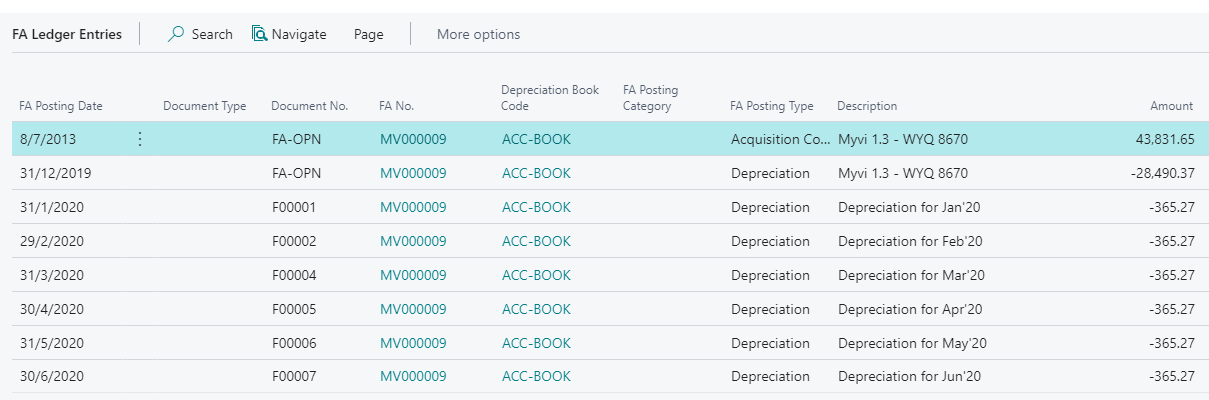
I encounter the FA disposal entry error due to the Amount needs to be rounded in G/L Entry on Fixed Asset G/L Journal.

System allow to post to by using Fixed Asset Journal (if the disposal not integrated - depreciation book)

Appreciated if you can advice.

pastedimage1602209625102v3.png

pastedimage1602209611053v2.png

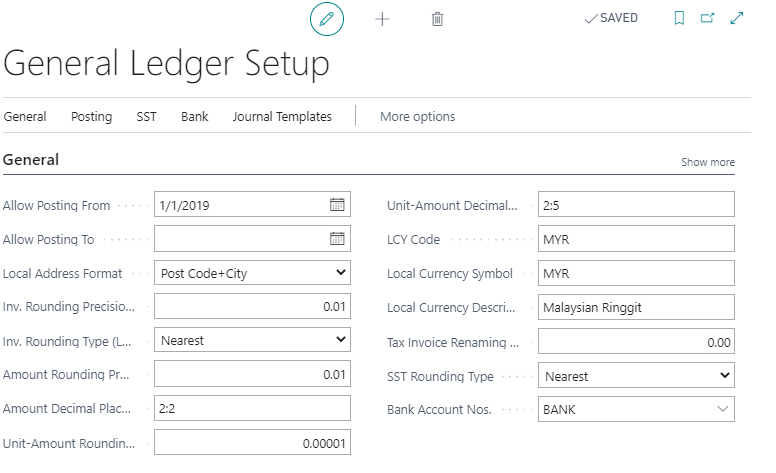
Enclosed herewith the following General Ledger Setup attached.
pastedimage1602210115063v4.png

pastedimage1602212103171v5.png

I have the same question (0)
  • Suggested answer
    Vanessa Garcia Profile Picture
    on at

    Hi Weiching,

    I recommend you to log this scenario as Support Request for Microsoft Dynamics 365 Business Central.

    We will analyze it and escalate to our developers.

    I researched and found a similar issue with the same error message fixed in the past.

    Thank you in advance and have a great day,

    Vanessa.

  • GinaH Profile Picture
    60 on at
    I know this is a really old thread but I'm wondering if there ever was a resolution. We are encountering the same issue. Disposing of an asset returns this message: Amount ($)2,309,086.0576 needs to be rounded in G/L Entry".
     
    We've checked the Depreciation book setup along with General Ledger setup and everything is set to 2 decimal places. The depreciation book is set to the Default Final Rounding Amount as 0.00.
     
    The asset was imported as a beginning balance (just to the subledger, no GL entry) but it was only 2 decimal places.
     
    I see some other posts regarding this message but no definitive resolution.
     
    Thanks,
    Gina
  • Verified answer
    Valentin Castravet Profile Picture
    31,262 Super User 2025 Season 2 on at
    This used to be a common issue when partners loading fixed assets were unaware that the Fixed Asset Journal (which is not integrated with the G/L) doesn’t round amounts, unlike other journals or documents that touch the G/L. They would copy and paste the book value of assets from Excel into the journal, and while Excel was formatted to display only two decimals, the actual number could contain many more. So when they posted the amounts to to the system, all the decimals would carry over. This often led to error messages when the fixed asset was depreciated or disposed of.

    The typical solution involved going to the table in NAV or creating a processing report in Business Central to round the amounts. This issue was so prevalent that Microsoft eventually created a fix. More information here, but here is how it works- you should see the below extension installed:  
     
     
    Essentially, in this extension they developed a job queue that loops through the fixed assets to check for any errors. The job queue is Codeunit 6090 'FA Ledger Entries Scan.' You can run it yourself if it hasn't run automatically.
     
     
    If errors are found, you’ll receive a notification on the fixed asset card.
     
     
    Clicking on the notification opens the 'FA Ledger Entries with Rounding Issues' page to help resolve the rounding issues.


  • GinaH Profile Picture
    60 on at
    Thank you Valentin. This solved our problem!!

    Gina
  • Suggested answer
    Valentin Castravet Profile Picture
    31,262 Super User 2025 Season 2 on at
    Great!

Under review

Thank you for your reply! To ensure a great experience for everyone, your content is awaiting approval by our Community Managers. Please check back later.

Helpful resources

Quick Links

Responsible AI policies

As AI tools become more common, we’re introducing a Responsible AI Use…

Neeraj Kumar – Community Spotlight

We are honored to recognize Neeraj Kumar as our Community Spotlight honoree for…

Leaderboard > Small and medium business | Business Central, NAV, RMS

#1
OussamaSabbouh Profile Picture

OussamaSabbouh 3,377

#2
Jainam M. Kothari Profile Picture

Jainam M. Kothari 2,696 Super User 2025 Season 2

#3
YUN ZHU Profile Picture

YUN ZHU 1,512 Super User 2025 Season 2

Last 30 days Overall leaderboard

Featured topics

Product updates

Dynamics 365 release plans