web
You’re offline. This is a read only version of the page.
close
Skip to main content

Announcements

No record found.

News and Announcements icon
Community site session details

Community site session details

Session Id :
Supply chain | Supply Chain Management, Commerce
Unanswered

Post Packing slip without Registration

(0) ShareShare
ReportReport
Posted on by 321

Hello,

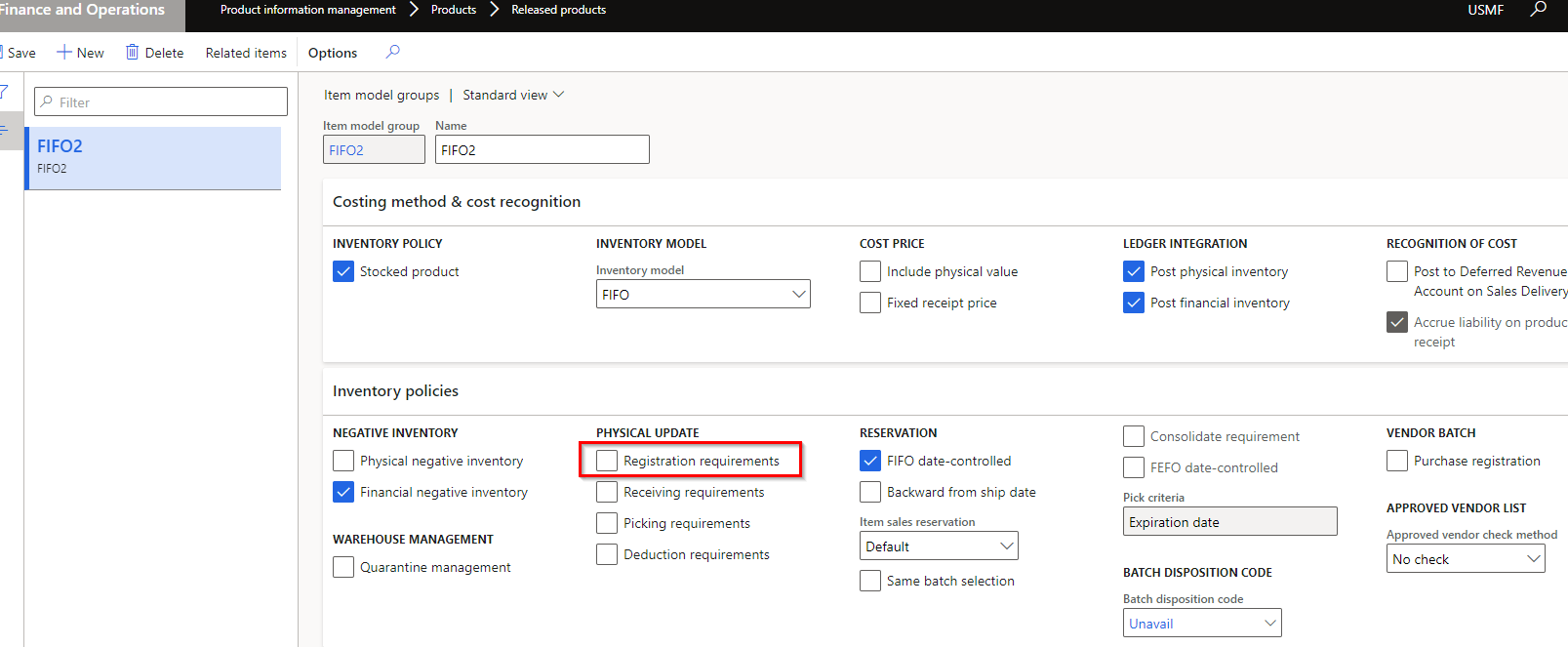
I have been trying to post a SO for an item with 'None' tracking dimensions. I need to skip the 'Picking list registration' step as there are no serials to scan. I need to be able to post the packing slip directly after 'Generate picking list' step. Thought turning off the 'Registration requirement' on item model group should address this. But still system won't post packing slip without this registration. I can't use the 'Picking route status = Completed' option in AR as I need other serialized items to go through registration.

Is there any other way to handle this in FO?

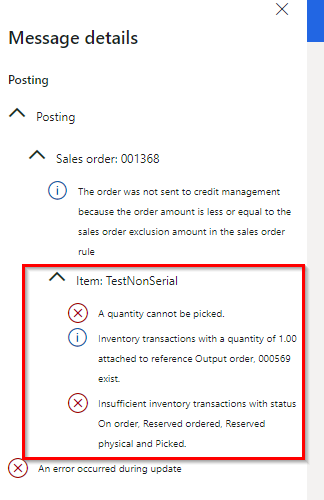
I have placed a screen shot of error msg below when I try to post packing slip without registration. 
pastedimage1615977996792v1.png

pastedimage1615978222734v2.png

Thanks!

Indiguna

I have the same question (0)
  • MATTGUO Profile Picture
    22,349 Moderator on at

    Hi Indiguna,

    Please cancel the picking line in the Picking list registration if you do not want to update the registration. Then directly post packing slip.

  • Indiguna Profile Picture
    321 on at

    Mattguo, That's exactly what my question is. How do I have the system not generate the picking list Registration line so I can directly post the packing slip?

    Thanks! Indiguna

  • MATTGUO Profile Picture
    22,349 Moderator on at

    Hi Indiguna,

    This is by design and can not be avoided.

    If this case is your normal business, you need to customize the logic.

  • Indiguna Profile Picture
    321 on at

    Not sure why FO makes that step mandatory because people do not really want to register any items with none tracking dimensions.

    I wonder what's the purpose of 'Registration Requirement' on Item model group in that case.

    Thanks for trying to help!

  • MATTGUO Profile Picture
    22,349 Moderator on at

    Hi,

    The registration requirement applies to the input order(PO, postive inventory journal). The item receipts must be registered before inventory is physically updated.

    The pick requirement applies to the output order(SO, negative inventory journal). The item issues must be picked before inventory is physically updated.

  • Indiguna Profile Picture
    321 on at

    The purpose of 'Registration Requirement' on Item model group please?

    Thanks!

  • MATTGUO Profile Picture
    22,349 Moderator on at

    As i said in my last response: The registration requirement applies to the input order(PO, positive inventory journal). The item receipts must be registered before inventory is physically updated.

    For PO, the item must be registered first, then the product receipt can be posted. Otherwise, you will get the error below.

    pastedimage1616143515806v1.png

Under review

Thank you for your reply! To ensure a great experience for everyone, your content is awaiting approval by our Community Managers. Please check back later.

Helpful resources

Quick Links

Introducing the 2026 Season 1 community Super Users

Congratulations to our 2026 Super Stars!

Congratulations to our 2025 Community Spotlights

Thanks to all of our 2025 Community Spotlight stars!

Leaderboard > Supply chain | Supply Chain Management, Commerce

#1
Mallesh Deshapaga Profile Picture

Mallesh Deshapaga 254

#2
Laurens vd Tang Profile Picture

Laurens vd Tang 188 Super User 2026 Season 1

#3
André Arnaud de Calavon Profile Picture

André Arnaud de Cal... 131 Super User 2026 Season 1

Last 30 days Overall leaderboard

Product updates

Dynamics 365 release plans