Hi Sumaira,
1. D365 has two ways to back up environments- system backups and manual backups.
All environments automatically create a system backup every day. System backups for production-type environments are retained up to 28 days. Other environment-type backups are retained up to 7 days.
Automated system backups are great, but you'll want to make your own backups before making some significant customization change or applying a version update. You can do this with manual backups.
Please note that In order to prevent accidental overwrites, we don't allow users to restore to a production environment directly. To restore to a production environment, first switch it to a Sandbox environment.
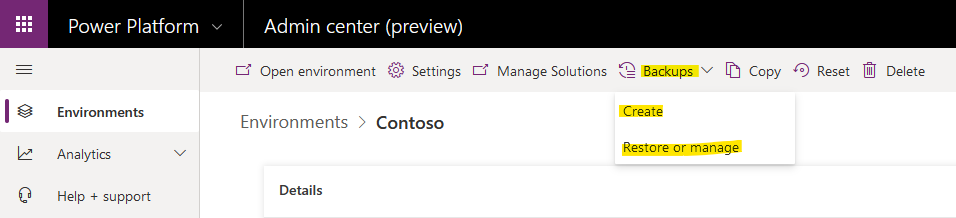
Go to Power Platform Admin center, select the environment, click the Backups, if you want to create a manual backup, click Create button, if you want to restore backup, click Restore or manage button.
Please refer to this document for details:
[View:https://docs.microsoft.com/en-us/power-platform/admin/backup-restore-environments:320:50]
2. The above backup and restore objects contain database data and environment solutions.
If you import the solution from the sandbox environment into the production environment, this does not involve database data.
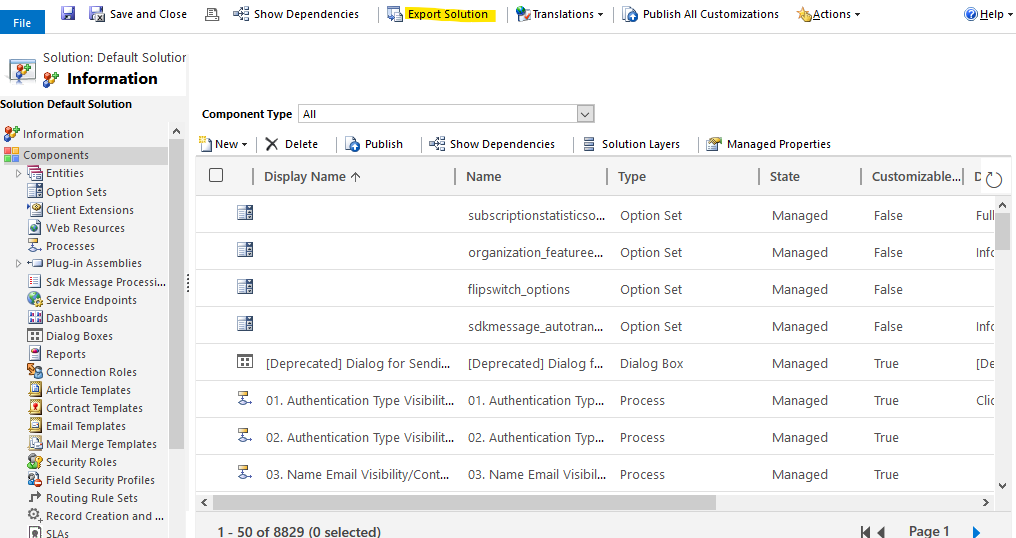
So you could also export the default solution of the production environment and store it locally so that you can re-import it into your production environment when you need it.
Go to D365, Settings > Customize the System, click Export Solution.