web
You’re offline. This is a read only version of the page.
close
Skip to main content

Notifications

Announcements

No record found.

Community site session details

Community site session details

Session Id :
Small and medium business | Business Central, N...
Answered

#Currency Exchange Rates

(0) ShareShare
ReportReport
Posted on by 184

Hi Everyone,

I'm new to Currency Exchange Rate functionality in Business Central. So kindly help me to understand its purpose.

My local currency is USD. For me, other currencies are foreign currencies. Also, I have listed down my queries below.

1. In General Ledger Setup, I have assigned USD as my Local Currency. Can I keep the LCY code empty instead of assigning the USD?

2. How to record exchange rate manually for currencies (For example, CAD)?

pastedimage1617433091486v2.png

Currency Code: With which currency code I'm going to do the transaction.

Relational Currency Code: Does this column denotes my local currency?

Exchange Rate: How should I fill this column?

Relational Exchange Rate Amount: How should I fill this column?

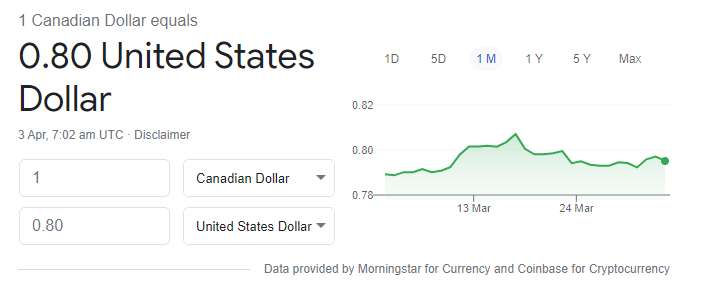
According to my understanding, I will fill 1.00 CAD at Exchange Rate Column and 0.80 at Relational Exch. Rate Amount. Am I correct here?
pastedimage1617433427748v3.png

3. What is the purpose of Adjustment Exch. Rate Amount and Relational Adjmt Exch Rate Amount columns? When it will be updated?

pastedimage1617433572974v4.png

4. At the end of every month should I run any batch job related to currencies?

Kindly enlighten me with your experience and knowlege.

Thanks & Regards

I have the same question (0)
  • Verified answer
    Gavin Profile Picture
    2,508 on at

    Hi,

    I've written a couple of articles on this subject that may be of use to you.

    http://thedynamicsexplorer.com/2021/02/26/dynamics-365-business-central-making-sense-of-the-currency-exchange-rates-page-when-setting-exchange-rates/

    This one below is a comparison between Business Central and Dynamics GP but may provide some pointers

    http://thedynamicsexplorer.com/2020/09/02/dynamics-gp-vs-dynamics-365-business-central-multi-currency-revaluation-adjust-exchange-rates/

    I hope this helps.

    Thanks

    Gavin

  • Verified answer
    Community Member Profile Picture
    on at

    Revan,

    As an Accountant and BC Implementor, in General Ledger Setup, always setup the LCY like my example for USD below:

    pastedimage1617560230388v1.png

    Now talking about what Currencies you will have within your company here is an example for a few:

    pastedimage1617560293243v2.pngpastedimage1617560329402v3.png

    Currency Code = The 3 letter code used internationally

    ISO Code = The 3 letter code from ISO Currency - www.iban.com/currency-codes

    ISO Numeric Code = 3 digit code from ISO Currency  - www.iban.com/currency-codes

    Realized Gain, Losses, Unrealized Gain and Losses Account - You enter the G/L Account, from Chart of Accounts, you have created/use

    Exchange Rate entry, using CAD and CHF examples:

    pastedimage1617560573272v4.png

    pastedimage1617560621651v5.png

    To enter the Exchange Rate Amount = 100.00, Relational Exch. Rate and Adjmt. Exchange Rate Amount if the rate converting to USD. I will use Floatrates.com to get the value. Enter the value you have in the listing for the Currency converting to USD. In the screen shot below, I would enter 0.79521 for 4/4/21.

    pastedimage1617560784475v6.png

    Now to make your life easier, yo could setup Floatrates.com to auto update the Exchange Rates daily. It is a free service. Her are the steps:

    Search for Currency Exchange Rate Service and add a new one. Below example is using USD feed.

    pastedimage1617561851304v1.pngpastedimage1617561868154v2.png

    If you want the inverse rate, you can setup the line part as below image.

    pastedimage1617561265469v8.jpeg

    When you enable the Currency Exchange Rate Services, it will automatically create a job queue entry. Go to that job queue entry and you can setup the schedule to update daily.

    pastedimage1617561265469v9.jpeg

    Note that you can only import today’s rate with this setup. You can’t import past rates.

    Hope this helps.

    Thanks,

    Steve

  • Jaunt Profile Picture
    184 on at

    Hi Gavin Whittaker & Steven Chinsky,

    My apologies for acknowledging your responses to this late!

    Your answers helped me a lot. I really thank you people for sharing such valuable information with me.

    Thanks & Regards,

    Jaunt

  • Suggested answer
    vuemacgeorge Profile Picture
    15 on at

    How Currency Conversion Works?

    BUY CURRENCY online with a click of a button at your own Convenience. Avoid driving to the city to pick up the Currency last minute.

    Fully Insured Currencies will be delivered to your address within Estimated *4 working days. There is a nominal $19.50 postage fee to ensure the security of the Postage.

    We have the best rates in the market & a convenient currency converter above, giving you the best value for your foreign cash.

    Visit us: https://foreignxchange.com.au/

  • Jaunt Profile Picture
    184 on at

    Hi Everyone,

    I have configured the currencies and exchange rate services in Business Central. But I would like to know the purpose and importance of Adjust Exchange Rates batch job.

    Kindly share your thoughts on this.

    Thanks in advance!

  • Verified answer
    Community Member Profile Picture
    on at

    Revan,

    Adjust Exchange Rates task can be run to update open subledger entries with current currency exchange rates. The adjustment will lead to a more accurate picture of the unrealized gains and losses of foreign currency transactions. At the end of each month, part of your month-end Accounting close process, you would Adjust Exchange Rates to reflect current exchange rates and an accurate unrealized gain/loss of the transactions.

    pastedimage1630335641505v1.png

    Thanks,

    Steve

  • Jaunt Profile Picture
    184 on at

    Hi Steven,

    Thank you for sharing the valuable information!

    I have scenario where the sales order is created for a customer in UK and my company is in US.

    I have created a sales order on 25th August 2021.

    Sales Order Value : $ 1500.00 (1090.33 Pounds).

    Exchange Rate : 1US = 0.73 Pounds

    I have also invoiced it on the same day.

    If run the "Adjust Exchange Rates" report on 31st August 2021, what would be the behaviour?

    Can you please enlighten me on this? I have tried it from my end but I couldn't see any changes.

    Thanks in advance!

  • Verified answer
    Community Member Profile Picture
    on at

    Revan,

    If you ran the Adjust Exchange Rate function with a date of 31/08/21 and you have entered an exchange rate for 31/08/21, on the Option page you will Click Adjust Customer, Vendor and Bank balances. What will happen is an entry will be made recording an Unrealized Gain or Loss, depending on the 31/08/21 Exchange Rate and the Customer Balance will be DB/(CR) and the offset booked to Unrealized Gain/Loss on FX DB/(CR).

    Thanks,

    Steve

  • Jaunt Profile Picture
    184 on at

    Hi Steven,

    Thank you for the information!

    Now I'll try out with multiple scenarios. In previous scenario, I failed to update the exchange rate for 31/8/2021.

    Thanks,

    Revan

  • vuemacgeorge Profile Picture
    15 on at

    Getting the foreign exchange rate you want and the amount of foreign cash suitable can be done without the going to the shopping centre or bank to exchange AUD. Our money exchange service is hassle-free. We’ve harnessed the power of online shopping to take some of the stress out of organising your trip.

    Visit: foreignxchange.com.au/.../

Under review

Thank you for your reply! To ensure a great experience for everyone, your content is awaiting approval by our Community Managers. Please check back later.

Helpful resources

Quick Links

Responsible AI policies

As AI tools become more common, we’re introducing a Responsible AI Use…

Neeraj Kumar – Community Spotlight

We are honored to recognize Neeraj Kumar as our Community Spotlight honoree for…

Leaderboard > Small and medium business | Business Central, NAV, RMS

#1
OussamaSabbouh Profile Picture

OussamaSabbouh 2,606

#2
YUN ZHU Profile Picture

YUN ZHU 931 Super User 2025 Season 2

#3
Jainam M. Kothari Profile Picture

Jainam M. Kothari 773 Super User 2025 Season 2

Last 30 days Overall leaderboard

Featured topics

Product updates

Dynamics 365 release plans
