web
You’re offline. This is a read only version of the page.
close
Skip to main content

Announcements

No record found.

News and Announcements icon
Community site session details

Community site session details

Session Id :
Microsoft Dynamics CRM (Archived)

Can we revert Edit Filter Criteria - Product family lookup view ?

(0) ShareShare
ReportReport
Posted on by 30

I have edited the Filter Criteria - Product family lookup view can I revert it back.

Previous View -
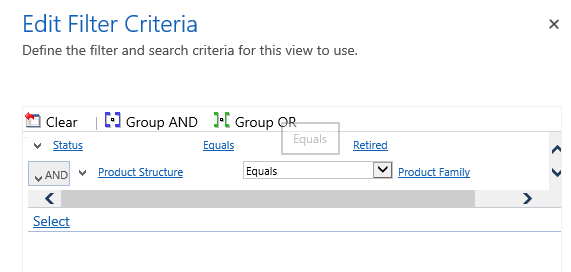
ProductFamilyOld.png

Updated View but cant able to make it as previous an idea ? Want to remove the highlighted in red but keep AND condition as well.
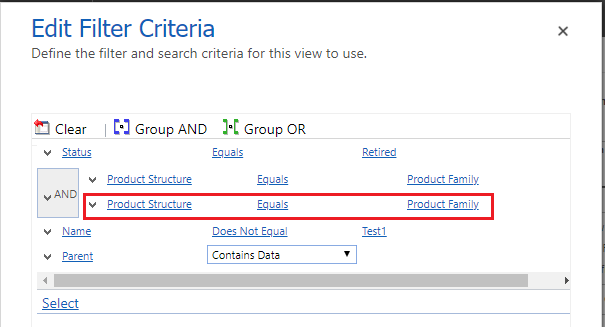
ProductFamilyNew.png

*This post is locked for comments

I have the same question (0)
  • Suggested answer
    RaviKashyap Profile Picture
    55,410 Moderator on at

    Hi,

    It doesn't make sense to keep the And clause if you are deleting the second statement i.e. And should/will be used with more than 1 condition. Right? With the default one, it is possibly some internal changes.

    If you want to revert it to previous, You can bring that view from some other environment as unmanaged solution and import it here. This should revert it.

    Hope this helps.

  • Suggested answer
    Community Member Profile Picture
    on at

    Hi,

    What is the purpose of product structure with AND clause. To group conditions, you have to select two or more conditions or groups that are listed under the same entity.

    For one field and clause is not possible.

    Hope it helps

    Thanks

  • Santosh341 Profile Picture
    30 on at

    Hi Ravi,

    Thanks, yes you are right we can remove the AND and the same should work but I was wondering how and why MS did it? The first filter criteria is OOB and if you change the same you can't be able to revert it. Even solution importing with view will not work I have tried only one option worked for me is XRM toolbox View Transfer.

    Thanks,

    Santosh

  • Santosh341 Profile Picture
    30 on at

    Hi Ridhima,

    Yes you are right we can remove the AND and the same should work but I was wondering how and why MS did it? The first filter criteria is OOB and if you change/update the same you can't be able to revert it. Even solution importing with view will not work I have tried solution approach also. Only one option worked for me is XRM toolbox View Transfer.

    Thanks,

    Santosh

  • RaviKashyap Profile Picture
    55,410 Moderator on at

    I would say, "This is one of the many things which we don't know why" :)

    As long as it sorted out for you, all good I guess?

Under review

Thank you for your reply! To ensure a great experience for everyone, your content is awaiting approval by our Community Managers. Please check back later.

Helpful resources

Quick Links

Introducing the 2026 Season 1 community Super Users

Congratulations to our 2026 Super Stars!

Meet the Microsoft Dynamics 365 Contact Center Champions

We are thrilled to have these Champions in our Community!

Congratulations to the April Top 10 Community Leaders

These are the community rock stars!

Leaderboard > 🔒一 Microsoft Dynamics CRM (Archived)

Last 30 days Overall leaderboard

Featured topics

Product updates

Dynamics 365 release plans
