web
You’re offline. This is a read only version of the page.
close
Skip to main content

Announcements

No record found.

News and Announcements icon
Community site session details

Community site session details

Session Id :
Microsoft Dynamics GP (Archived)

BP requisition management error with one vendor

(0) ShareShare
ReportReport
Posted on by 28,061 Moderator

Hi All,

We have a very strange case with our BP Requisition Management (RM) since last friday. Prior to this date, everything was working fine and no problemo. All of a sudden, requisitions created in BP RM for one specific vendor didn't appeared anymore in the list once final approved and ready to move to GP for the PO Creation. Other Vendors don't pose any problems, just one specific, and it turns out to be a well used one :-(.

Changes about the Vendor Card where checked and nobody touched this vendor for weeks, and the funny thing is that in our TEST company it still works perfectly.
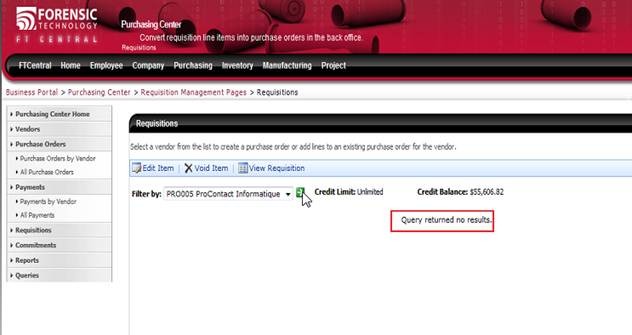
 

All the notifications for the approvals and final approvals are received perfectly in Outlook, so it does not seem to be a workflow or process related problem. One of the requisition had even a mix of lines for various vendors, all the lines could be converted to a PO in GP, except the line for this Vendor !?!. Our partner was notified about this problem, but could not help so far. The version of BP & RM is 4.0.2475.0 and GP is 10.0.1701 .

Thanks in advance to all for any hints or tips.

*This post is locked for comments

I have the same question (0)
  • Verified answer
    Beat Bucher  GP Geek  GPUG All Star Profile Picture
    28,061 Moderator on at

    As an update to this posted question a few months back :

    we figured out after a few searches with Microsoft that the problem was coming from the Line Item Description field in the requisition that had a special character that the SQL query was not able to process properly and therefore failed to return any data. Once the faulty entry was removed / modified in the table directly, the query could work again and return the proper data for the requisition.

    Originally the problem was introduced by an end-user that created the requisition by copying the description from a vendor's web-site... which carried in the text some invisible characters. It's of good advise when doing so to copy/paste the text first into the notepad to make sure no 'invisible' chars are copied to the end field.

    Hope this helps other users that may come accross a similar problem.

  • Community Member Profile Picture
    on at

    Good one Beat.

    Bet that was a doozy to debug!!

    Ian.

  • Beat Bucher  GP Geek  GPUG All Star Profile Picture
    28,061 Moderator on at

    Hi Ian,

    Yes indeed it was :-), and I had to grab the assistance from Microsoft in this case, that led me to the right path, while looking at the queries that are called up behind the scene in BP. At this point a quick SQL analysis put me on the right lane and helped to fix the bug quite quickly. Still I had to remove the faulty records from the Requisition tables (and put them into a backup table) to re-add them one by one and figure out which one was the culprit. The strange looking 'square' symbols in the description field was the 'Aha!' factor :-).

    I've currently another tricky one where I've gotten any reply from MS... A user came up one day saying that he doesn't see anymore all his historical expense reports... He can still create new ones, but the old ones aren't visible, but the records are all there in the PA tables from GP. Any ideas ?

  • Rob Bernhardt Profile Picture
    Microsoft Employee on at

    Béat,

    BP Project Time and Expense looks at the PDK tables (PDK10000 and PDK10500 I believe).  It doesn't look at the GP PA tables.  Take a look at those tables to verify if the records exist.

    Thanks

    Rob

  • Beat Bucher  GP Geek  GPUG All Star Profile Picture
    28,061 Moderator on at

    Hi Rob,

    Thanks for the hint, but I've already looked into those tables and we even checked the historical data in PDK for that user, everything looks normal, but it just doesn't want to show up in BP. Instead the page in BP returns a not-so-useful message : "An unexpected error has occurred. Please contact your system administrator."

    This is in the same type of error message I get when yesterday a user tried to create a new expense report with a different currency as usual and it fails... And this morning another user just called before lunch and said that new Project #'s don't show up for the users in the TimeSheet when they get added to the access list in GP... Is there anything special that needs to be done to refresh the Project list in BP ? I can't remember in the past having to do anything for this and it was working on Monday. I rebooted the BP and GP server just to make sure they communicate properly, but this had not effect on the missing data in BP.

  • Rob Bernhardt Profile Picture
    Microsoft Employee on at

    Béat,

    Take a look in your <drive>\inetpub\wwwroot\wss\VirtualDirectories\<###>\bin folder for Microsoft.BusinessPortal.Pma.config.  There are some options in that file for logging levels and details on where it puts the logged information.  Hopefully that helps.

    Thanks

    Rob

  • Beat Bucher  GP Geek  GPUG All Star Profile Picture
    28,061 Moderator on at

    Rob,

    I found the file and changed the flag for '2' (full debug messages). I assume that the BP needs to be restarted (IIS site )  before the changes take effect ? Will the message appear on the BP itself or burried in some deep hidden log file :-).

  • Rob Bernhardt Profile Picture
    Microsoft Employee on at

    In researching this further, it appears this functionality may have been refactored to write the log information to the event viewer.  I'd suggest changing that config file, restarting IIS, and running through the same scenario.  I'm guessing the information will show up in the event viewer, but I don't have an envrionment and scenario to verify.  

    Thanks

    Rob

  • Ronald Gressley Profile Picture
    30 on at

    Hey Beat,

    do you have any documentation on using special characters in portal for requisition management?  Knowledgebase or other article?  We moved to BP 5.1 sp1 last August.  Our users are reporting the same thing....if they use special characters in the item description - BOOM!

    if you have anything, can you reference it?

    thanks

    Ron Gressley

    Financial Application Mgr

    rgressley@apus.edu

  • Beat Bucher  GP Geek  GPUG All Star Profile Picture
    28,061 Moderator on at

    Hi Ron,

    No unfortunately there is no KB or FAQ related to this problem. It took me a few days to analyze the process behind the requisition and with an SQL trace (and the help of Microsoft) to identify the SP that was trying to retrieve the data and failed. They are actually burried in the BP Queries... Once extracting the SQL code that was retrieving the data, I was able to locate where the problem was. Since we knew for which Vendor specifically it happend, I copied the tables to have a backup and removed the entries for this Vendor, then added them back one by one to see where it started to fail.

    This allowed me to isolate the faulty requisition and then when looking at the actual data I spoted a strange 'non-displayable' character in my SQL Mgmt Studio (was looking like a blank square). Having removed that character fixed the issue and the requisition could be retrieved properly in BP. With the requisition I also knew who created it and went to see the user to get more details. He told me that he was doing copy/paste from an internet supplier site to grab the item description. Since this was spreading over 2 lines, an 'extra' character came into the string at the line end, but that was not visible, so he didn't notice about it...

    Would the string have been copied into the Notepad, the extra sign would have shown up and could have been removed...This was also the recommendation Microsoft gave, to use the Notepad for Copy/paste operations and check the text, in order to eliminate 'invisible' characters.

    Good luck with your hunt :-)

Under review

Thank you for your reply! To ensure a great experience for everyone, your content is awaiting approval by our Community Managers. Please check back later.

Helpful resources

Quick Links

Introducing the 2026 Season 1 community Super Users

Congratulations to our 2026 Super Stars!

Meet the Microsoft Dynamics 365 Contact Center Champions

We are thrilled to have these Champions in our Community!

Congratulations to the April Top 10 Community Leaders

These are the community rock stars!

Leaderboard > 🔒一 Microsoft Dynamics GP (Archived)

#1
talty09 Profile Picture

talty09 2

#1
Anthony Beatty Profile Picture

Anthony Beatty 2

#3
CP04-islander Profile Picture

CP04-islander 1

Last 30 days Overall leaderboard

Featured topics

Product updates

Dynamics 365 release plans
