web
You’re offline. This is a read only version of the page.
close
Skip to main content

Notifications

Announcements

No record found.

Community site session details

Community site session details

Session Id :
Small and medium business | Business Central, N...
Answered

How to use function COPYSTR in Report Builder (Row Visibility)?

(0) ShareShare
ReportReport
Posted on by

Hey guys,

in the layout of my report I have created a table with many rows.

Each row will have its own condtion, to say, when it will be printed.

One of these conditions should be:
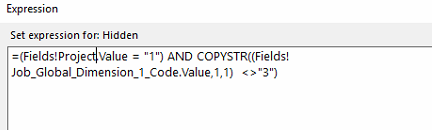
pastedimage1581940815868v1.png

Unfortunately I cannot compile my report after adding that condition...

The error message says, that "COPYSTR" is not declared...

What do I have to do?

Thank you ;)

I have the same question (0)
  • Verified answer
    keoma Profile Picture
    32,729 on at

    use mid(), left(), right() instead. copystr is a c/al or al command, not a vb command.

  • Community Member Profile Picture
    on at

    Thank you, that was the solution ;)

    Do you if, there is somewhere a document to see, which function in c/al or al could correspond to a vb command?

    I have to use functions like TOTALSCAUSEDBY in my report layout, but the report builder does not know them.

Under review

Thank you for your reply! To ensure a great experience for everyone, your content is awaiting approval by our Community Managers. Please check back later.

Helpful resources

Quick Links

Responsible AI policies

As AI tools become more common, we’re introducing a Responsible AI Use…

Neeraj Kumar – Community Spotlight

We are honored to recognize Neeraj Kumar as our Community Spotlight honoree for…

Leaderboard > Small and medium business | Business Central, NAV, RMS

#1
OussamaSabbouh Profile Picture

OussamaSabbouh 3,143

#2
Jainam M. Kothari Profile Picture

Jainam M. Kothari 1,694 Super User 2025 Season 2

#3
YUN ZHU Profile Picture

YUN ZHU 1,067 Super User 2025 Season 2

Last 30 days Overall leaderboard

Featured topics

Product updates

Dynamics 365 release plans
