Hello,
I am trying to register a plugin in our CRM but every time I try to login by using the Plugin Registration Tool I get this error:
Source	: mscorlib
Method	: HandleReturnMessage
Date	: 22.01.2018
Time	: 11:19:16
Error	: Der Aufrufer wurde vom Dienst nicht authentifiziert.
Stack Trace	: Server stack trace:
   bei System.ServiceModel.Security.IssuanceTokenProviderBase`1.DoNegotiation(TimeSpan timeout)
   bei System.ServiceModel.Security.SspiNegotiationTokenProvider.OnOpen(TimeSpan timeout)
   bei System.ServiceModel.Security.WrapperSecurityCommunicationObject.OnOpen(TimeSpan timeout)
   bei System.ServiceModel.Channels.CommunicationObject.Open(TimeSpan timeout)
   bei System.ServiceModel.Security.CommunicationObjectSecurityTokenProvider.Open(TimeSpan timeout)
   bei System.ServiceModel.Security.SymmetricSecurityProtocol.OnOpen(TimeSpan timeout)
   bei System.ServiceModel.Security.WrapperSecurityCommunicationObject.OnOpen(TimeSpan timeout)
   bei System.ServiceModel.Channels.CommunicationObject.Open(TimeSpan timeout)
   bei System.ServiceModel.Channels.SecurityChannelFactory`1.ClientSecurityChannel`1.OnOpen(TimeSpan timeout)
   bei System.ServiceModel.Channels.CommunicationObject.Open(TimeSpan timeout)
   bei System.ServiceModel.Channels.ServiceChannel.OnOpen(TimeSpan timeout)
   bei System.ServiceModel.Channels.CommunicationObject.Open(TimeSpan timeout)
   bei System.ServiceModel.Channels.ServiceChannel.CallOpenOnce.System.ServiceModel.Channels.ServiceChannel.ICallOnce.Call(ServiceChannel channel, TimeSpan timeout)
   bei System.ServiceModel.Channels.ServiceChannel.CallOnceManager.CallOnce(TimeSpan timeout, CallOnceManager cascade)
   bei System.ServiceModel.Channels.ServiceChannel.EnsureOpened(TimeSpan timeout)
   bei System.ServiceModel.Channels.ServiceChannel.Call(String action, Boolean oneway, ProxyOperationRuntime operation, Object[] ins, Object[] outs, TimeSpan timeout)
   bei System.ServiceModel.Channels.ServiceChannelProxy.InvokeService(IMethodCallMessage methodCall, ProxyOperationRuntime operation)
   bei System.ServiceModel.Channels.ServiceChannelProxy.Invoke(IMessage message)

Exception rethrown at [0]:
   bei System.Runtime.Remoting.Proxies.RealProxy.HandleReturnMessage(IMessage reqMsg, IMessage retMsg)
   bei System.Runtime.Remoting.Proxies.RealProxy.PrivateInvoke(MessageData& msgData, Int32 type)
   bei Microsoft.Xrm.Sdk.Discovery.IDiscoveryService.Execute(DiscoveryRequest request)
   bei Microsoft.Xrm.Sdk.Client.DiscoveryServiceProxy.Execute(DiscoveryRequest request)
   bei Microsoft.Xrm.Tooling.Connector.CrmWebSvc.DiscoverOrganizations(Uri discoveryServiceUri, Uri homeRealmUri, ClientCredentials clientCredentials, ClientCredentials deviceCredentials)
   bei Microsoft.Xrm.Tooling.CrmConnectControl.CrmConnectionManager.ValidateServerConnection(CrmOrgByServer selectedOrg)
======================================================================================================================
Inner Exception Level 1	:
Source	: System.ServiceModel
Method	: ThrowIfNegotiationFault
Date	: 22.01.2018
Time	: 11:19:16
Error	: Die Anforderung für ein Sicherheitstoken konnte nicht erfüllt werden, weil ein Fehler bei der Authentifizierung auftrat.
Stack Trace	: bei System.ServiceModel.Security.SecurityUtils.ThrowIfNegotiationFault(Message message, EndpointAddress target)
   bei System.ServiceModel.Security.SspiNegotiationTokenProvider.GetNextOutgoingMessageBody(Message incomingMessage, SspiNegotiationTokenProviderState sspiState)
======================================================================================================================
Things I already tried to fix my problem:
- Checked time on CRM Server
- Used diffrent versions of the Registration Tool
- Deleted the language folder from the Registration Tool
- Deselect Use SSL
Here are my settings:
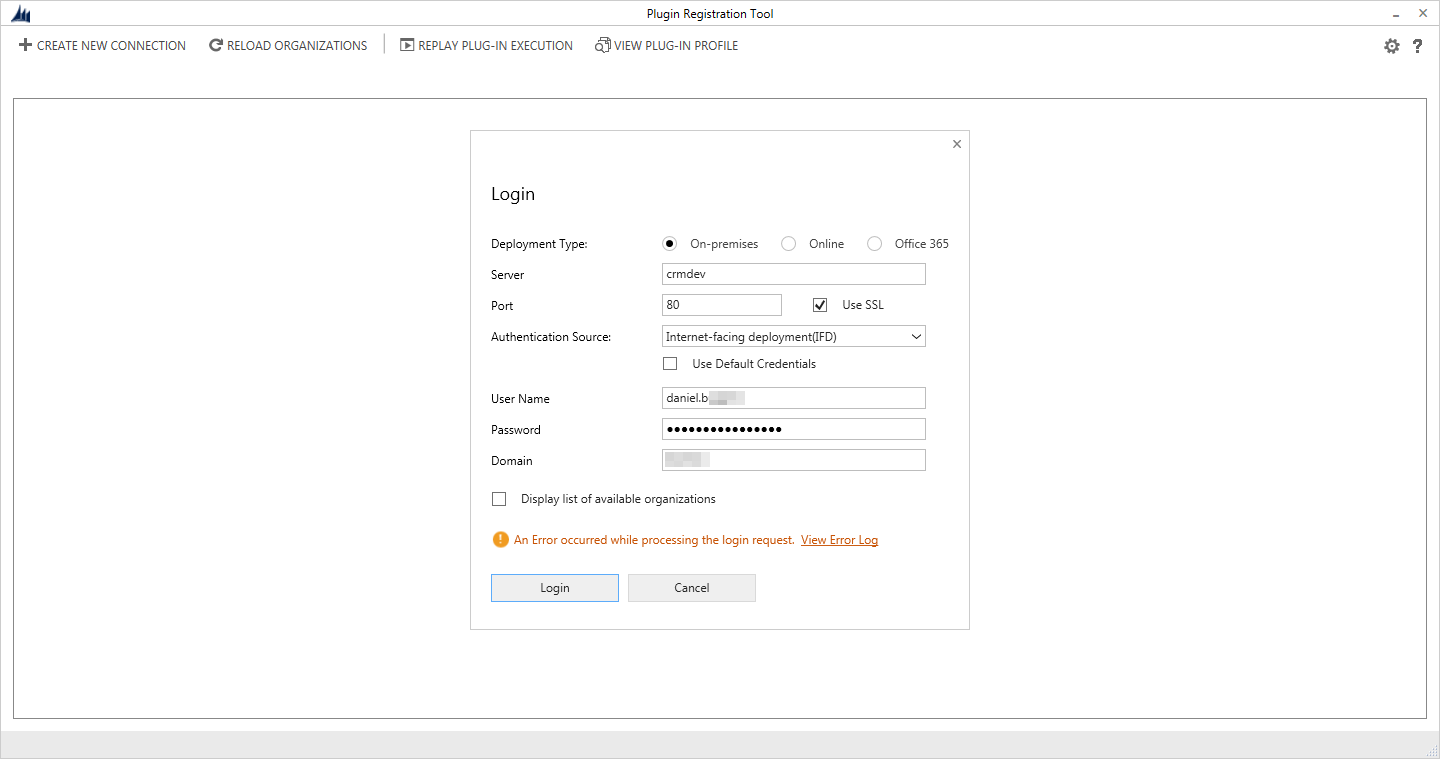
I have also tried using the domain in the Username field and also tried using my email in the username field.
Hope somebody can help me with this problem.
*This post is locked for comments
I have the same question (0)


