web
You’re offline. This is a read only version of the page.
close
Skip to main content

Announcements

No record found.

News and Announcements icon
Community site session details

Community site session details

Session Id :
Microsoft Dynamics CRM (Archived)

Importing CRM 2011 Organization into CRM 2011(new server)

(0) ShareShare
ReportReport
Posted on by

Hi,

We encountered problems during redeployment Dynamics CRM 2011 from old to new domain.

I already install MS SQL 2008 R2 and Report Builder 3.0 same like old server. And backup and restored 2 database i_MSCRM and i_CONFIG to new server.

Then, i start install MS CRM Dynamics 2011 to new server. After than i open Deployment Manager --> Import organization.


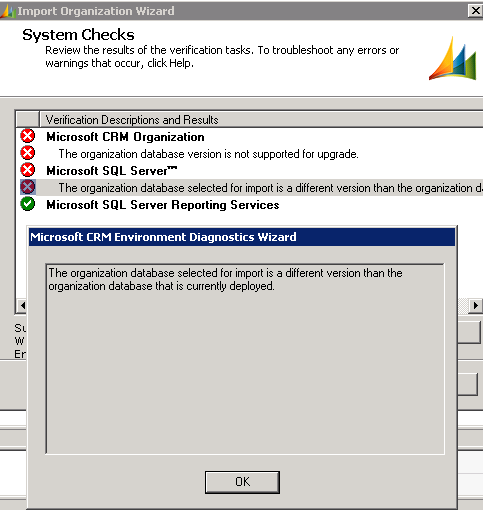
    1- CRM 2011 Source database: version of deployment: 5.0.9688.1157

        CRM 2011 Destination  database: version of deployment: 5.0.9688.583

    2- SQL server version for the source  CRM: SQL Server 2008 R2 version 10.50.1600

         SQL server version for the Destination CRM: SQL Server 2008 R2 version 10.50.1600

And any Update not available for both.

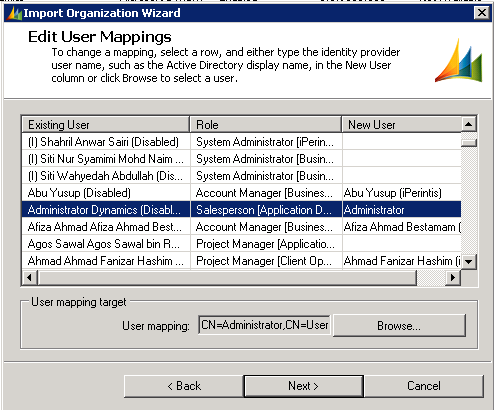
But during phase "Import organization in the new deployment of Microsoft Dynamics CRM 2011" I met several problems.
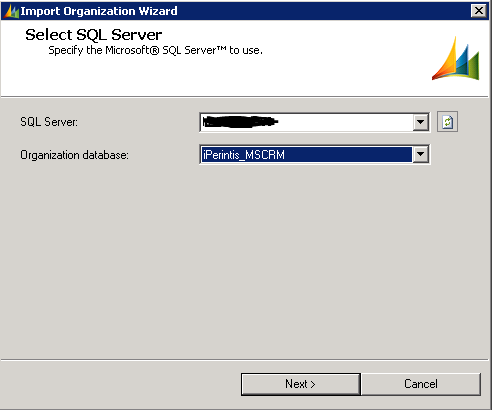
5417.3.PNG

6076.4.PNG

I made many attempts to install and I searched on the net, in the CRM forum and i have same problem with my issue but still same. Here the link https://community.dynamics.com/crm/f/117/t/101320.aspx#.UT2F0jfEbid.

And i try to install Exchange2010-KB2746164-x64-en to new server but come out below error.
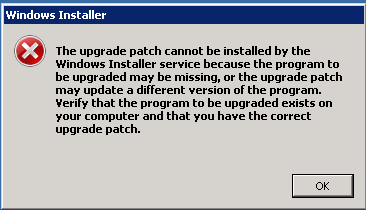
Please any one have an idea to solve my problem

Thanks.

Noor Hafizah

*This post is locked for comments

I have the same question (0)
  • Atilin Profile Picture
    on at

    Hi Noor,

    You have to be sure that both CRM has the same UR.

  • Community Member Profile Picture
    on at

    What u mean URL? its diffirent. how to make its same like old URL. this is first time i try to clone the CRM.

  • Verified answer
    Atilin Profile Picture
    on at

    Sorry, but i want tosay Update Rollup of Dynamics CRM

    In this post, you can see that your Servers are different update.

    blogs.msdn.com/.../microsoft-crm-2011-update-rollup-overview.aspx

    One of them have 5.0.9688.1157 and another 5.0.9688.583

  • Community Member Profile Picture
    on at

    understand.. but which Update Rollup i need to use?? or i need to try one by one. Please advise.

  • Verified answer
    JBirnbau Profile Picture
    Microsoft Employee on at

    Hi Noor,

    Based on the information above, it appears that your source database would have been on Update Rollup 2 (build 1155) along with a hotfix.  I would recommend installing Update Rollup 3 or higher prior to importing the database and see if the System Checks pass afterward.

Under review

Thank you for your reply! To ensure a great experience for everyone, your content is awaiting approval by our Community Managers. Please check back later.

Helpful resources

Quick Links

Introducing the 2026 Season 1 community Super Users

Congratulations to our 2026 Super Stars!

Meet the Microsoft Dynamics 365 Contact Center Champions

We are thrilled to have these Champions in our Community!

Congratulations to the March Top 10 Community Leaders

These are the community rock stars!

Leaderboard > 🔒一 Microsoft Dynamics CRM (Archived)

#1
JS-09031509-0 Profile Picture

JS-09031509-0 3

#2
AS-17030037-0 Profile Picture

AS-17030037-0 2

Last 30 days Overall leaderboard

Featured topics

Product updates

Dynamics 365 release plans