web
You’re offline. This is a read only version of the page.
close
Skip to main content

Announcements

No record found.

News and Announcements icon
Community site session details

Community site session details

Session Id :
Small and medium business | Business Central, N...
Answered

REST API - set "work description" of sales invoice

(0) ShareShare
ReportReport
Posted on by 10

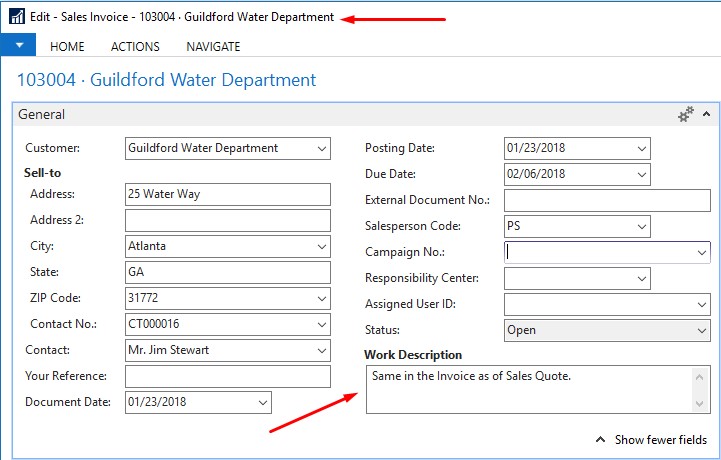
How do we set a value for "Work Description" native field of the Sales Invoice via Rest API? The field is a BLOB type and as such it seems it is not exposed by default via API when accessing to a salesInvoice instance.

Should the extension for that be created or it is achievable without creating an extension (which we prefer)?
Is there any direct url to get/set it's content even if it's not in API metadata?

We are using latest D365 BC implementation: W1 16.0 (Platform 16.0.11233.12833 + Application 16.0.11240.11946),
so the following picture is just to point on which field I'm thinking of..
NAV-2017-Sales-Invoice.jpg

I have the same question (0)
  • Suggested answer
    Andy Sather Profile Picture
    Microsoft Employee on at

    Hello  - We currently do not have dedicated Dev support via the Dynamics 365 Business Central forums, but I wanted to provide you some additional resources to assist.  If you need assistance with debugging or coding I would recommend discussing this on one of our communities.


    https://www.yammer.com/dynamicsnavdev#/home

    https://dynamicsuser.net/nav/f/developers


    I will open this up to the community in case they have something to add.

  • Verified answer
    Mohamed Hathout Profile Picture
    645 on at

    hello , 

    to integrate the new work description field in the sales order, you should use the link below . 

    you should find it in the sales invoice api reply . 


        "workDescription@odata.mediaReadLink": "https://api.businesscentral.dynamics.com/v2.0/fa669968-0000-0000-b675-c3cf959eb938/Production/ODataV4/Company('TmStaging')/salesDocuments(86193032-0000-0000-aa62-002248577cd1)/workDescription",

     pastedimage1600238868030v2.png


    use the link to send the description , just write the description without any formatting like below   

     https://api.businesscentral.dynamics.com/v2.0/fa669968-0000-0000-b675-c3cf959eb938/Production/ODataV4/Company('TmStaging')/salesDocuments(86193032-0000-0000-aa62-002248577cd1)/workDescription

    workDescriptionworkDescriptionworkDescriptionworkDescriptionworkDescriptionworkDescriptionworkDescriptionworkDescriptionworkDescriptionworkDescriptionworkDescriptionworkDescriptionworkDescriptionworkDescriptionworkDescriptionworkDescriptionworkDescriptionworkDescriptionworkDescriptionworkDescriptionworkDescriptionworkDescriptionworkDescriptionworkDescriptionworkDescriptionworkDescriptionworkDescriptionworkDescriptionworkDescriptionworkDescriptionworkDescriptionworkDescriptionworkDescriptionworkDescription

    pastedimage1600238972443v3.png

    make sure its patch request , 

    and if-match set to *

    pastedimage1600239408566v1.png

  • mmustapic Profile Picture
    10 on at

    Thank you very much. This has solved my issue.

    I'm using the endpoint other than odatav4 for creation of sales invoices and my endpoint doesn't include "workDescription@odata.mediaReadLink" in it's response but it's ok. I get the SalesInvoice ID after creation and use ODataV4 endpoint to modify its Work Description field as you mentioned.

Under review

Thank you for your reply! To ensure a great experience for everyone, your content is awaiting approval by our Community Managers. Please check back later.

Helpful resources

Quick Links

Introducing the 2026 Season 1 community Super Users

Congratulations to our 2026 Super Stars!

Meet the Microsoft Dynamics 365 Contact Center Champions

We are thrilled to have these Champions in our Community!

Congratulations to the March Top 10 Community Leaders

These are the community rock stars!

Leaderboard > Small and medium business | Business Central, NAV, RMS

#1
OussamaSabbouh Profile Picture

OussamaSabbouh 1,875 Super User 2026 Season 1

#2
YUN ZHU Profile Picture

YUN ZHU 926 Super User 2026 Season 1

#3
Teagen Boll Profile Picture

Teagen Boll 642 Super User 2026 Season 1

Last 30 days Overall leaderboard

Featured topics

Product updates

Dynamics 365 release plans
