web
You’re offline. This is a read only version of the page.
close
Skip to main content

Announcements

No record found.

News and Announcements icon
Community site session details

Community site session details

Session Id :
Small and medium business | Business Central, N...
Answered

New Edit options not working/enabled to add budget amount

(0) ShareShare
ReportReport
Posted on by 90

Hii,

I am using business central production environment. I want to add a budget details for budget named "2020". But when I open the page to add budget but those new, edit and delete option not working or not enabled. Is there any setting should be done to activate those buttons? Please provide a way to resolve this issue.

BC_5F00_budget.PNG

See highlighted options.

I have the same question (0)
  • Suggested answer
    Vanessa Garcia Profile Picture
    Microsoft Employee on at

    Hello Santosh,

    Are you following the next steps to create the Budget?

    1.) Go to Finance/G/L Budgets

    2.) Click on +New

    pastedimage1600976909782v1.png

    3.) Name: 2020

    Description: Budget 2020 (for example)

    pastedimage1600976968806v2.png

    4.) On the ribbon, click on Process --> Edit Budget

    pastedimage1600977059082v3.png

    5.) You should get something like this:

    pastedimage1600977110261v4.png

    If you don't, could it be that you got an extension affecting to this functionality?

    It seems you run only the Budget Matrix (9203) and not the main Budget Page (113)?

  • Santosh Guttigoli Profile Picture
    90 on at

    Thank you for your response.
    I have already followed steps given by you to create a new budget.
    I am not getting format mentioned in your step 5.
    Please see what I am getting. It is showing no editable lines for budget matrix.

    3286.BC_5F00_budget.PNG

  • Suggested answer
    Vanessa Garcia Profile Picture
    Microsoft Employee on at

    Hi Santosh,

    could it be that you got an extension affecting to this functionality?

    It seems you run only the Budget Matrix (9203) and not the main Budget Page (113)?

    Does the same happen to all users in this tenant? or only to you?

    If only to you, could it be permissions missing? If it happens to all...could you check if you have an extension that affects here?

  • Santosh Guttigoli Profile Picture
    90 on at

    Hello Venessa,
    Thank you for your response.
    Could you please elaborate on your first question that which kind of extension or how I can find any extensions are affecting existing functionalities.?
    And for your second question, I didn't run Budget matrix directly I followed your steps to create Budget so I first visited Budget Page (113) and created Budget 2020 and then went for matrix (9203) page. But I found this as given below, please see highlighted message.

    1018.p2.PNG 

    And I have checked my permission sets, I have one permission set which is D365 FULL ACCESS which gives me full access to table data. 113 and 9203 are object IDs for 'page' object type right? Could you please tell me what object IDs are there for  'table data' object type? So Once again I will verify in permission sets for these tables. 

    And for me, there is only one user available in my users list table of BC so I can't check for other users.

    One more thing,  when I change show as lines to "Business Unit"  instead of G/L account. It will show months for year in view.
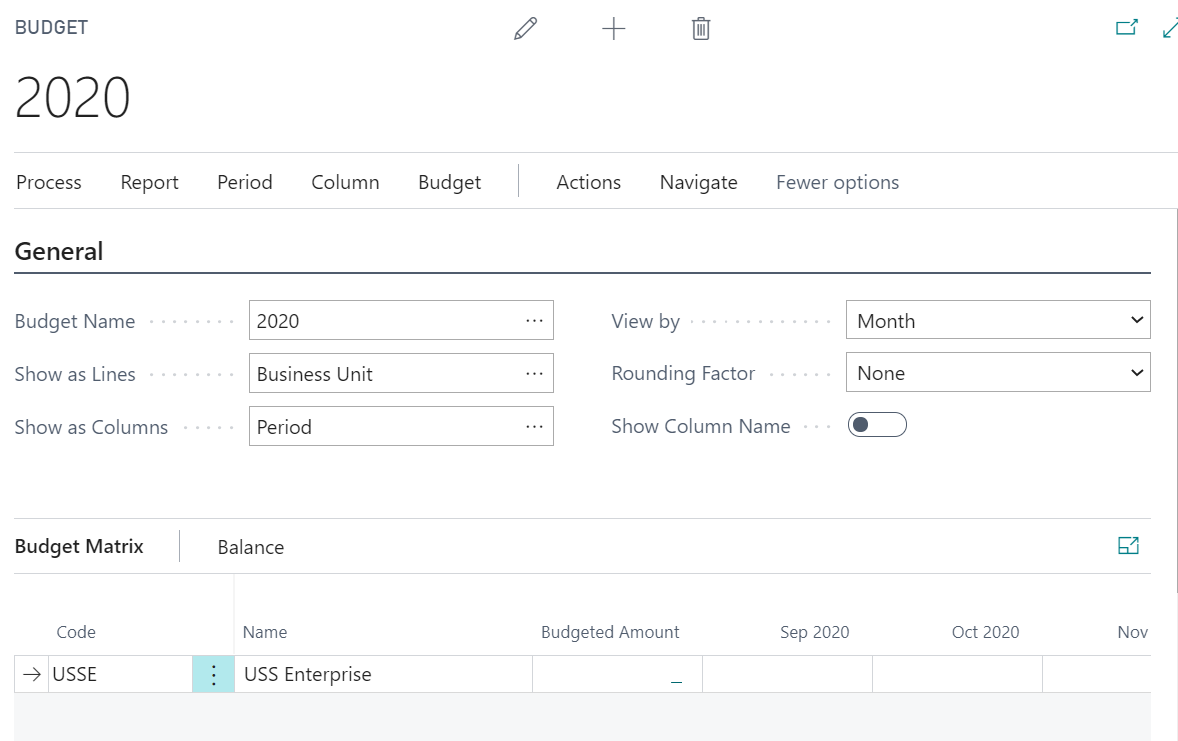
    5367.p1.PNG

    Then why it is not showing for  "G/L Account"  in show as lines. Is there any need to set/change something in available G/L account card page like some enable options or something field's value?

  • Verified answer
    Vanessa Garcia Profile Picture
    Microsoft Employee on at

    Hi Santosh,

    could it be that you don't have any "Income Statement" G/L Accounts in the Chart of Accounts?

    Please check this, I think this could be the reason why you don't get any G/L Account there.

  • Santosh Guttigoli Profile Picture
    90 on at

    Thank you so much Vanessa,

    You are right because of income statement that G/L account is not coming there.

    Thanks for your support

Under review

Thank you for your reply! To ensure a great experience for everyone, your content is awaiting approval by our Community Managers. Please check back later.

Helpful resources

Quick Links

Introducing the 2026 Season 1 community Super Users

Congratulations to our 2026 Super Stars!

Meet the Microsoft Dynamics 365 Contact Center Champions

We are thrilled to have these Champions in our Community!

Congratulations to the March Top 10 Community Leaders

These are the community rock stars!

Leaderboard > Small and medium business | Business Central, NAV, RMS

#1
OussamaSabbouh Profile Picture

OussamaSabbouh 1,993 Super User 2026 Season 1

#2
YUN ZHU Profile Picture

YUN ZHU 1,116 Super User 2026 Season 1

#3
Khushbu Rajvi. Profile Picture

Khushbu Rajvi. 557 Super User 2026 Season 1

Last 30 days Overall leaderboard

Featured topics

Product updates

Dynamics 365 release plans
