web
You’re offline. This is a read only version of the page.
close
Skip to main content

Announcements

No record found.

News and Announcements icon
Community site session details

Community site session details

Session Id :
Microsoft Dynamics CRM (Archived)

FetchXML link-entities attributes not retrieved

(0) ShareShare
ReportReport
Posted on by 1,090

Hi,

I'm running the following FetchXML in Javascript to retrieve some data:

var fetchXML = "<fetch version='1.0' output-format='xml-platform' mapping='logical' distinct='false'>" +
"<entity name='account'>" +
"<attribute name='name' />" +
"<attribute name='accountnumber' />" +
"<attribute name='accountid' />" +
"<order attribute='name' descending='false' />" +
"<filter type='and'>" +
"<condition attribute='dll_comreftype' operator='eq' value='400000000' />" +
"<condition attribute='parentaccountid' operator='eq' uitype='account' value='" + TopRef + "' />" +
"</filter>" +
"<link-entity name='connection' from='record1id' to='accountid' link-type='outer' alias='conn' >" +
"<attribute name='connectionid' alias='connectionid'/>" +
"<filter type='and' >" +
"<condition attribute='record2id' operator='eq' value='" + contactId +"' />" +
"</filter>" +
"</link-entity>" +
"</entity>" +
"</fetch>";


The problem is, when I debug the result, the attribute of the link-entity is nowhere to be found?
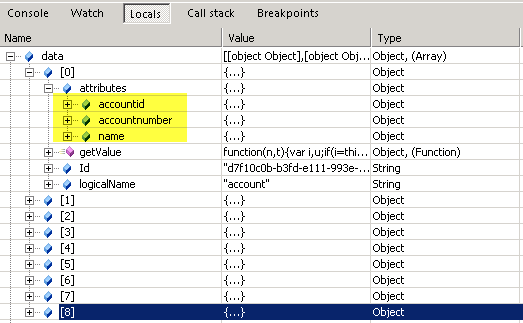
How is this possible?

Regards,

Roel

*This post is locked for comments

I have the same question (0)
  • Verified answer
    Royal King Profile Picture
    27,686 on at

    May be there is no connection record  exists in the system based on the fetchxml generated.I would suggest testing the generated fetchxml using XRMTOOLBOX fetchxml tool to check whether it returns any result or not.

    You can download this tool from below url

    xrmtoolbox.codeplex.com/.../644142

  • RoelG Profile Picture
    1,090 on at

    Hi Chitra,

    I've tested the query via a simple SSRS report. The result there showed the attributes of the linked entity just fine. As it is an outer join, the field wasn't always filled but that's not a problem.

    I will try again with XRMToolbox. I'm familiar with this toolbox.

    I'll get back to you with the results.

    Grts,

    Roel

  • RoelG Profile Picture
    1,090 on at

    Ok I got result.

    The problem was: when I alias the attribute of the linked entity, it's not returned from the result. If I delete the alias, then it works fine. I can alias the entity without problems, but not the attribute.

    Thx for the tip!

    Grts,

    Roel

Under review

Thank you for your reply! To ensure a great experience for everyone, your content is awaiting approval by our Community Managers. Please check back later.

Helpful resources

Quick Links

Introducing the 2026 Season 1 community Super Users

Congratulations to our 2026 Super Stars!

Meet the Microsoft Dynamics 365 Contact Center Champions

We are thrilled to have these Champions in our Community!

Congratulations to the April Top 10 Community Leaders

These are the community rock stars!

Leaderboard > 🔒一 Microsoft Dynamics CRM (Archived)

Last 30 days Overall leaderboard

Featured topics

Product updates

Dynamics 365 release plans
