As I mentioned in the original posting, we are having problem update the salesorderdetail record using CRM SDK only in production environment. We were not having any problem creating a new entry in salesorder and salesorderdetail entities. The exception we were getting while update an existing salesorderdetail record was
“A validation error occurred. The value of 'salesorderstatecode' on record of type 'salesorderdetail' is outside the valid range”
As per the error message, it is clear that the error has occurred while validating the value of “salesorderstatecode”. “salesorderstatecode” attribute in salesorderdetail entity is a read only attribute and we are not setting any value to this attribute. When we checked this attribute metadata, out of the box, no picklist values were configured and the default value is set to “-1”. Moreover we cannot customize this attribute and the question of maybe we did not import the pick list values properly into production environment was quickly ruled out.
As the error message was saying that salesorderstatecode is outside of valid range, we were very much narrow focused and trying to find out if some other custom pick list on salesorderdetails is causing this problem. We compared each and every picklist and their values numerous times and could not find any discrepancy.
After almost 4 days of investigation and comparison of production environment with other working environments, finally yesterday I decided to use reflector to disassemble Microsoft CRM sdk assemblies to find out from where the exception is getting raised and why the validation is failing on salesorderstatecode which is a read only attribute.
Within few minutes I was able to identify the method which is responsible for validating picklist values and the line which is throwing the exception we are getting. Below is the method responsible for picklist validation and the line highlighted in red color box is the line which is throwing an exception and it is matching with the exception we are getting.
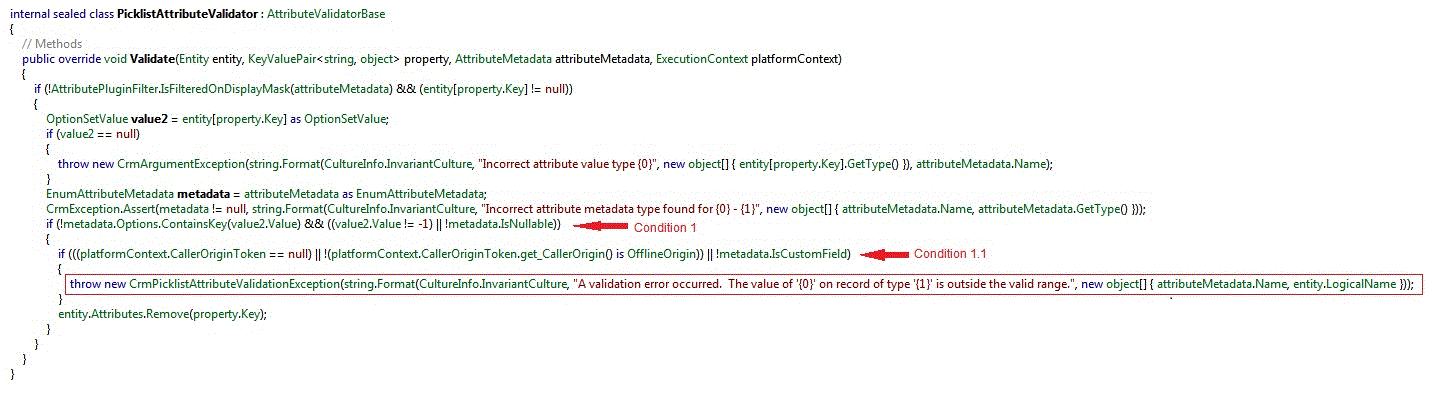
Source Code (In case if the above image is not clear)
|
internal sealed class PicklistAttributeValidator : AttributeValidatorBase
{ // Methods
public override void Validate(Entity entity, KeyValuePair<string, object> property, AttributeMetadata attributeMetadata, ExecutionContext platformContext)
{
if (!AttributePluginFilter.IsFilteredOnDisplayMask(attributeMetadata) && (entity[property.Key] != null))
{
OptionSetValue value2 = entity[property.Key] as OptionSetValue;
if (value2 == null)
{
throw new CrmArgumentException(string.Format(CultureInfo.InvariantCulture, "Incorrect attribute value type {0}", new object[] { entity[property.Key].GetType() }), attributeMetadata.Name);
}
EnumAttributeMetadata metadata = attributeMetadata as EnumAttributeMetadata;
CrmException.Assert(metadata != null, string.Format(CultureInfo.InvariantCulture, "Incorrect attribute metadata type found for {0} - {1}", new object[] { attributeMetadata.Name, attributeMetadata.GetType() }));
if (!metadata.Options.ContainsKey(value2.Value) && ((value2.Value != -1) || !metadata.IsNullable)) <-- Condition 1
{
if (((platformContext.CallerOriginToken == null) || !(platformContext.CallerOriginToken.get_CallerOrigin() is OfflineOrigin)) || !metadata.IsCustomField) < -- Condition 1.1
{
throw new CrmPicklistAttributeValidationException(string.Format(CultureInfo.InvariantCulture, "A validation error occurred. The value of '{0}' on record of type '{1}' is outside the valid range.", new object[] { attributeMetadata.Name, entity.LogicalName }));
}
entity.Attributes.Remove(property.Key);
}
}
}
}
|
Now carefully looking at the “if condition” which is responsible for throwing this exception (Condition 1.1), the condition is checking if “CallerOriginToken” is null or if picklist attribute is not a custom field (NOTE THAT IT IS NOT AT ALL CHECKING THE ATTRIBUTES VALUE RANGE) and throwing an exception. After looking at the condition it was clear to me that the exception we were getting was a false and misleading exception.
I know that CallerOriginToken basically inherits SoapHeader (http://msdn.microsoft.com/en-us/library/cc151236.aspx) and it will be null only if the authentication token is not getting set in SoapHeader. Immediately we checked the custom WCF service which is calling CRM SDK and it was reading the credential information from web.config file instead of using the apppool identity. After few modification to the web.config file, the service started using the apppool identity and we were able to perform update on salesorderdetail entity. Even though the issue was fixed something was bother me. Even though the custom WCF service was not using the apppool identity, we never had any problem creating new entries in salesorderdeatil entity, we had problem only update. Which to me did not made any sense, if the security token in Soap header is important, we should not be able to create new entries also. So I went back to the original Microsoft code, look at the line marked as “Condition 1”, it is checking if the picklist value is available in the metadata or not and the value is not -1. As I mentioned above, out of the box default value of salesorderstatecode is -1 and hence the if condition will evaluate to false for create request and subsequent nested if condition will not be executed, which means a check for “CallerOriginToken” is not getting executed for create requests. In case of update, we retrieve the salesorderdetail record from database first and then issue an update. When the record is retrieved, salesorderstatecode value is getting returned as “0”. So the if condition in line marked “Condition 1” is evaluating to true and forcing the nested if condition marked as “Condition 1.1” to get executed. As the CallerOriginToken was null case we were getting a misleading exception. I think the exception should clearly mentioned that the security token is missing instead of saying the value is outside the valid range.
If Microsoft team is viewing my finding, I really appreciate your comments on my findings.
-Suresh


