web
You’re offline. This is a read only version of the page.
close
Skip to main content

Announcements

No record found.

News and Announcements icon
Community site session details

Community site session details

Session Id :
Small and medium business | Business Central, N...
Answered

Limit Total filter Currency code in aged account payable

(0) ShareShare
ReportReport
Posted on by

Hi all,

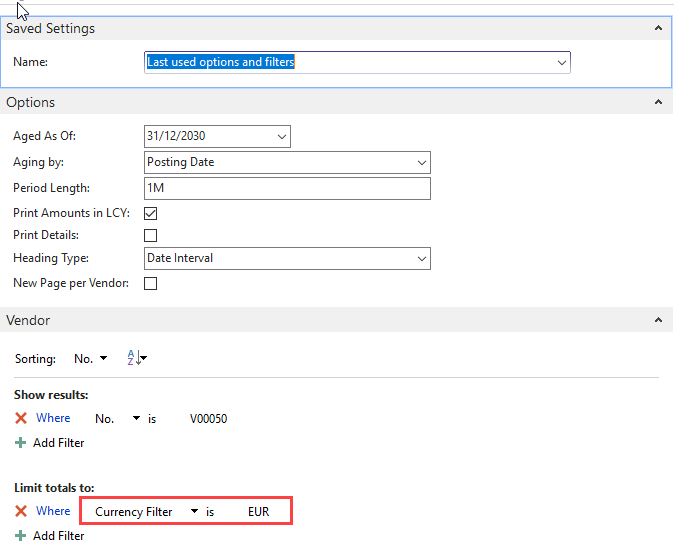
Would like to check why is it the limit total filter by currecny code not working in aged account payable ?

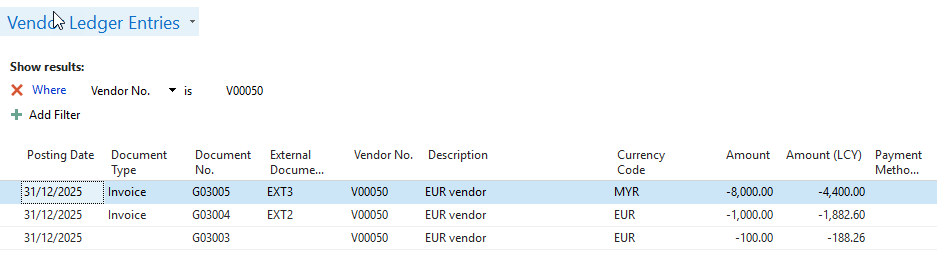
Below example of VLE:
pastedimage1609808632513v2.png

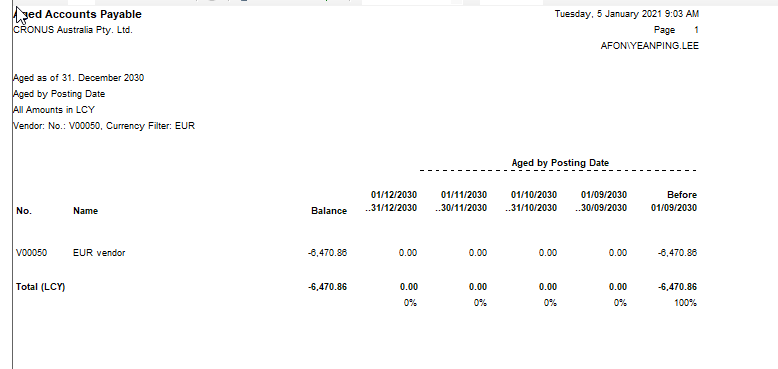
When print in Aged Account Payable with filtering EUR
pastedimage1609808699928v3.png

pastedimage1609808748876v4.png

Result not as expected to filter only EUR.

What is the feature for this currency filter and how it works?

Thanks

Alx.

I have the same question (0)
  • Verified answer
    Alessandro Vannini 1 Profile Picture
    Microsoft Employee on at

    Hello Alexey

    the aged account Payables ( also the receivables one) doesn't have a currencyfilter instruction in the code, for this reason even if you setup a limit total for the currency filter, system ignores it.

    In this report this limit total for currency doesn't work

  • Verified answer
    Community Member Profile Picture
    on at

    Alex,

    Happy New Year. Alessandro is correct and when I saw this I started using a Jet Report to generate my Aged AP and Aged AR so that I can use better filtering. Not sure if you use Jet Reports but if so try this. If you need an Aged AP example Jet Report, write back and I will send one.

    Thanks,

    Steve

  • Community Member Profile Picture
    on at

    Hi Alessandro,

    Thanks for the input! Just wondering if the filter of currency doesn't work, why is it there for selection ? is it for other purpose ? or None at all ?

    Rgs,

    Alx

  • Community Member Profile Picture
    on at

    Hi Steve,

    Happy new year to you!

    We do use jet report but never do it on aged since there's report in NAV.

    But now seems we will opt for jet.

    And thanks for your kind sharing, an example of report will be great!

    Rgs,

    Alx

Under review

Thank you for your reply! To ensure a great experience for everyone, your content is awaiting approval by our Community Managers. Please check back later.

Helpful resources

Quick Links

Introducing the 2026 Season 1 community Super Users

Congratulations to our 2026 Super Stars!

Congratulations to our 2025 Community Spotlights

Thanks to all of our 2025 Community Spotlight stars!

Leaderboard > Small and medium business | Business Central, NAV, RMS

#1
OussamaSabbouh Profile Picture

OussamaSabbouh 1,926 Super User 2026 Season 1

#2
YUN ZHU Profile Picture

YUN ZHU 1,158 Super User 2026 Season 1

#3
Khushbu Rajvi. Profile Picture

Khushbu Rajvi. 533 Super User 2026 Season 1

Last 30 days Overall leaderboard

Featured topics

Product updates

Dynamics 365 release plans