web
You’re offline. This is a read only version of the page.
close
Skip to main content

Announcements

No record found.

News and Announcements icon
Community site session details

Community site session details

Session Id :
Small and medium business | Business Central, N...
Suggested Answer

Cost Center Analysis - How to set up for Invoice Posting Lines?

(0) ShareShare
ReportReport
Posted on by 15

Hello Community,

I'm still in the process of Learning how I can work with Cost Centers to fulfil the need of our Accounting Deparment.

Up to now I have prepared the Cost Centers as followed:

  • Setup up a Dimension and added Cost Centers
  • Defined this Dimension as the Cost Center Dimension
  • Imported the Values to the Chart of Cost Centers
  • Defined the Cost Center Dimension as a Shortcut Dimension

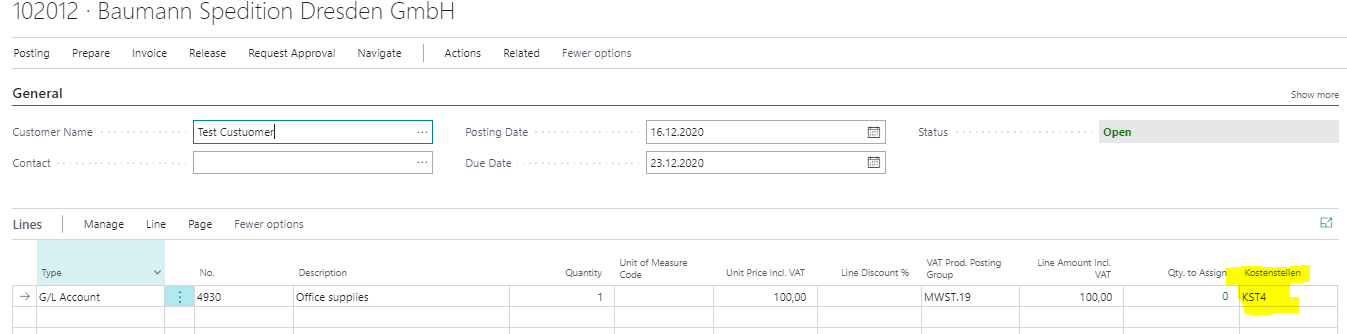
Now im struggling. I create a Sales Invoice, use cost center I wanted and booked the invoice. When I look at the Chart of Cost Centers I can't see a Balance. I was expecting to see something there. Am I wrong in configuration or maybe I was looking on the wrong location?

Thank you for help

ChartofCostCentersBC.PNGSalesInvoiceBC.PNG

I have the same question (0)
  • JAngle Profile Picture
    150 on at

    Value will only be seen when the invoice is posted. No “open” dimension analysis view exists as standard

  • DennisH. Profile Picture
    15 on at

    Thanks for you fast reply. Maybe my question was not clear as I normally work with german language. The Invoice is posted in the system.

  • Suggested answer
    Dirk Profile Picture
    Microsoft Employee on at

    You are using the Cost Accoutning functionality, right?

    Did you set "Auto Transfe from G/Lr" to true in the Cost Accounting Setup?

Under review

Thank you for your reply! To ensure a great experience for everyone, your content is awaiting approval by our Community Managers. Please check back later.

Helpful resources

Quick Links

Introducing the 2026 Season 1 community Super Users

Congratulations to our 2026 Super Stars!

Congratulations to our 2025 Community Spotlights

Thanks to all of our 2025 Community Spotlight stars!

Leaderboard > Small and medium business | Business Central, NAV, RMS

#1
OussamaSabbouh Profile Picture

OussamaSabbouh 1,821 Super User 2026 Season 1

#2
YUN ZHU Profile Picture

YUN ZHU 1,122 Super User 2026 Season 1

#3
Dhiren Nagar Profile Picture

Dhiren Nagar 959 Super User 2026 Season 1

Last 30 days Overall leaderboard

Featured topics

Product updates

Dynamics 365 release plans