I am trying to install CRM 2015 but am getting a very strange error as shown below.
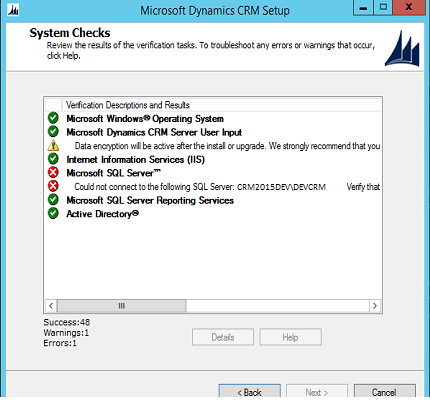
For the life of me I cannot figure this out. I checked the crmserversetup.log and found only 1 line of relevance which is 15:01:55| Error| Check SqlServerValidator : Failure: Could not connect to the following SQL Server: 'CRM2015DEV\DEVCRM'. Verify that the server is up and running and that you have SQL Server administrative credentials. Login timeout expired
I pasted that line along with the lines above and below it for review below. CRM and SQL are on the same server and there is no firewall involved. Any help would be appreciated.
15:01:39|   Info| Check IncomingExchangeServerValidator: Success
15:01:39|   Info| Check IfdSettingsValidator: Success
15:01:39|   Info| ClaimsEncryptionCertificateValidator linking to help topic: html/379e429f-2485-4a15-9e18-3672eccc5748.htm
15:01:39|   Info| ClaimsEncryptionCertificateAccessValidator linking to help topic: html/379e429f-2485-4a15-9e18-3672eccc5748.htm
15:01:39|   Info| Check ServerClaimsEncryptionCertificateValidator: Skipped
15:01:39|   Info| Group Internet Information Services (IIS)
15:01:39|   Info| Check IIsInstalledValidator: Success
15:01:39|   Info| Check IisAdminServiceValidator: Success
15:01:39|   Info| Check W3svcServiceValidator: Success
15:01:39|   Info| Check NTAuthenticationProvidersValidator: Success
15:01:39|   Info| Group Microsoft SQL Server™
15:01:39|   Info| Check SqlServerAgentValidator: Success
15:01:39|   Info| Check SqlInstanceNameValidator: Success
15:01:39|   Info| Check CrmSqlDomainValidator: Success
15:01:55|  Error| Check SqlServerValidator : Failure: Could not connect to the following SQL Server: 'CRM2015DEV\DEVCRM'. Verify that the server is up and running and that you have SQL Server administrative credentials. Login timeout expired

15:01:55|   Info| Group Microsoft SQL Server Reporting Services
15:01:55|   Info| Check ReportingUrlValidator: Success
15:01:55|   Info| UrlAccessValidator linking to help topic: html/01f421a9-da60-4d47-a06a-75550ee94430.htm
15:01:57|   Info| Check ExistingRSValidator: Success
15:01:57|   Info| Group Active Directory®
15:01:57|   Info| Check DomainUserValidator: Success
15:01:57|   Info| Account network name: DEV\ZZ_CRMSANDBOX
15:01:57|   Info| Account distinguished name: CN=CRM Sandbox Processing Service,OU=DynamicsCRM,DC=dev,DC=local
15:01:57|   Info| Check SandboxServiceSettingServicePrincipalNameValidator: Success
15:01:57|   Info| Account network name: DEV\ZZ_CRMASYNCPRO
15:01:57|   Info| Account distinguished name: CN=CRM Asynchronous Processing Service,OU=DynamicsCRM,DC=dev,DC=local
15:01:57|   Info| Check AsyncServiceSettingServicePrincipalNameValidator: Success
15:01:57|   Info| Check WebBasedServiceSettingServicePrincipalNameValidator: Skipped
15:01:57|Verbose| Validation ran.
15:01:57|Verbose| Validation completed.
15:01:57|Verbose| Method exit: Microsoft.Crm.Tools.EDW.Framework.EDWTool.Run
15:01:57|Verbose| Method exit: Microsoft.Crm.Tools.EDW.Framework.EDWTool.RunAll
15:01:57|Verbose| Method entry: Microsoft.Crm.Tools.EDW.Framework.EDWToolCallbacks.Clear
15:01:57|Verbose| Method exit: Microsoft.Crm.Tools.EDW.Framework.EDWToolCallbacks.Clear
*This post is locked for comments
I have the same question (0)


