web
You’re offline. This is a read only version of the page.
close
Skip to main content

Announcements

No record found.

News and Announcements icon
Community site session details

Community site session details

Session Id :
Microsoft Dynamics CRM (Archived)

Contact Quick Create form no longer working

(0) ShareShare
ReportReport
Posted on by

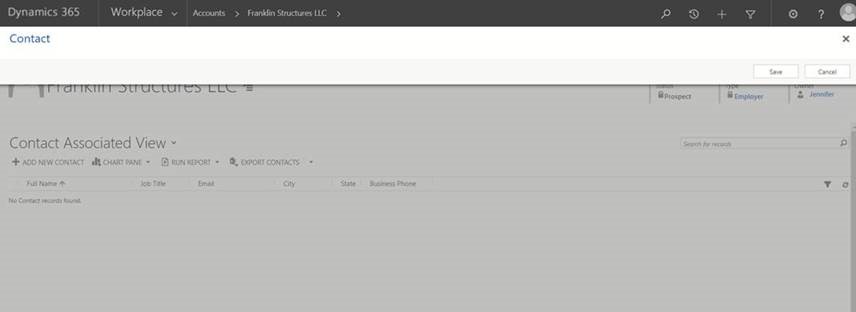
I do not know if this is because a recent Microsoft Update but our contact quick create form no longer works.  We currently cannot add contacts to an account using the form as it now only shows as blank.
quick-create.jpg

*This post is locked for comments

I have the same question (0)
  • Suggested answer
    Shahbaaz Ansari Profile Picture
    6,211 on at

    Hi Ben,

    It is having issue with Google chrome browser, Please check in other browser if you are getting same issue.

    Best Regards,

    Shahbaaz

  • Aric Levin - MVP Profile Picture
    30,190 Moderator on at

    Hi Ben,

    Is this browser specific?

    You mention a recent Microsoft Update. Can you specify what version of D365 you are on, and whether you are Online or On-Premise?

  • Suggested answer
    Shahbaaz Ansari Profile Picture
    6,211 on at

    you can also refer this link, community.dynamics.com/.../272462

  • Suggested answer
    Community Member Profile Picture
    on at

    Hi,

    Can you check in IE.

    Thanks

  • Suggested answer
    gdas Profile Picture
    50,091 Moderator on at

    Hi Ben

    Which browser are you facing issue? Try to check Internet Explorer if it's not working then contact to Microsoft suppprt. Most of the people are facing similar issue in Google Chrome.

  • Ben Markland Profile Picture
    on at

    It seems to be working in IE.

  • Suggested answer
    Shahbaaz Ansari Profile Picture
    6,211 on at

    Please try to update google chrome and try

  • Community Member Profile Picture
    on at

    We are experiencing a similar issue. Seems to be Chrome specific. Have raised it as a ticket with Microsoft. 

  • Ben Markland Profile Picture
    on at

    Please keep us posted with Microsoft's response.

    Thanks

  • Community Member Profile Picture
    on at

    Microsoft have said this is a Chrome issue and are unable to troubleshoot it. Advised our team to use an alternative browser until it's fixed in Chrome.

Under review

Thank you for your reply! To ensure a great experience for everyone, your content is awaiting approval by our Community Managers. Please check back later.

Helpful resources

Quick Links

Introducing the 2026 Season 1 community Super Users

Congratulations to our 2026 Super Stars!

Meet the Microsoft Dynamics 365 Contact Center Champions

We are thrilled to have these Champions in our Community!

Congratulations to the March Top 10 Community Leaders

These are the community rock stars!

Leaderboard > 🔒一 Microsoft Dynamics CRM (Archived)

Last 30 days Overall leaderboard

Featured topics

Product updates

Dynamics 365 release plans
