web
You’re offline. This is a read only version of the page.
close
Skip to main content

Notifications

Announcements

No record found.

Community site session details

Community site session details

Session Id :
Microsoft Dynamics CRM (Archived)

Work Flow Object Reference Error

(0) ShareShare
ReportReport
Posted on by

workflow-error-img.png

Hi,

I created a "on demand"  workflow for send "invitation code" to the contact (sending from contact entity not from invitation entity),All steps are working fine except final step(send to the contact).

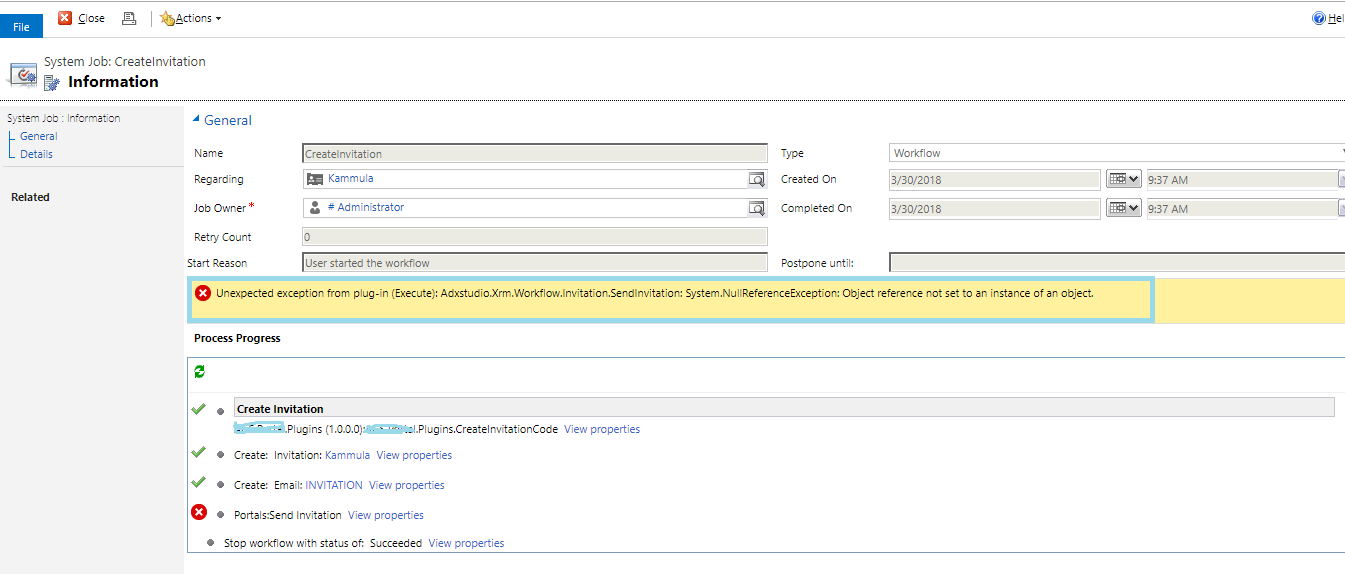
I am getting an error while running the workflow "OBJECT REFERENCE NOT SET TO AN INSTANCE OF AN OBJECT",

Please help me out

Thank You

*This post is locked for comments

I have the same question (0)
  • Suggested answer
    Aric Levin - MVP Profile Picture
    30,190 Moderator on at

    Seems like there is a Null Reference Exception in your Portals: Send Invitation step.

    Try and see the results in your Plugin Trace Log. This should give you a better reason to why you are experiencing this error.

    If you don't see anything there, navigate to your User Settings -> Options and in the Customizations Tab, change the Plugin Trace Log to show either All Tracing or only Exceptions. This will show you the log in the Plugin Trace Log.

    If you need additional information which is not supplied in the Plugin Trace Log, add tracing to your code, where you anticipate the error is occurring and you can check values and display messages which will be displayed in the Plugin Trace Log.

    Hope this helps.

  • Suggested answer
    Arpit Shrivastava Profile Picture
    7,518 User Group Leader on at

    Hi Prem,

    Make sure you are giving proper values in from and to fields. Especially in 'from' field (ideally that should be your CRM Administrator or any Fixed User).

    If you have mentioned any dynamic value in 'from' field then change it to your CRM Admin who have rights to send the email. If it works then we can find out the root cause in this way.

    It would be more helpful if you could provide the screenshot of send email steps(by clicking on View Properties)

    Thanks

    Arpit

  • Community Member Profile Picture
    on at

    Hi Arpit,

    Here are the ScreenShots

    1145.workflow1.png

    1145.workflow1.png

    Thank You

  • Suggested answer
    Arpit Shrivastava Profile Picture
    7,518 User Group Leader on at

    Hi Prem,

    What I can see you have used two steps for invitation and two steps for send invitation. Not sure what is the logic behind.

    Could you pls have a look below article once. Hope it helps.

    www.inogic.com/.../send-invite-to-contacts-automatically-for-microsoft-portal-in-dynamics-365

    Mark it as answer. If it helps

    Cheers

    Arpit

  • Community Member Profile Picture
    on at

    Hi Arpit,

    Thank you for your response

    I created according to the above the link ,The message is sent Successfully but when i see the process session ,It is in Waiting state and steps are in completed (OBJECT REFERENCE NOT SET TO AN INSTANCE OF AN OBJECT).

    Thank You

  • Arpit Shrivastava Profile Picture
    7,518 User Group Leader on at

    Hi Prem,

    Your workflow should look like below but I am seeing two steps for Send Invitation and two for Create:

    Could you please post the updated screenshot of your workflow and error details. (get the detailed error from System Jobs under Details Tab)

    540203.Capture.JPG

    Thanks for your patience.

  • Community Member Profile Picture
    on at

    25087.Error2.png

    25087.Error2.png

    Here are the Error Details and screenshot of workflow is Same asabove

    Thank You

Under review

Thank you for your reply! To ensure a great experience for everyone, your content is awaiting approval by our Community Managers. Please check back later.

Helpful resources

Quick Links

Responsible AI policies

As AI tools become more common, we’re introducing a Responsible AI Use…

Neeraj Kumar – Community Spotlight

We are honored to recognize Neeraj Kumar as our Community Spotlight honoree for…

Leaderboard > 🔒一 Microsoft Dynamics CRM (Archived)

#1
SA-08121319-0 Profile Picture

SA-08121319-0 4

#1
Calum MacFarlane Profile Picture

Calum MacFarlane 4

#3
Alex Fun Wei Jie Profile Picture

Alex Fun Wei Jie 2

Last 30 days Overall leaderboard

Featured topics

Product updates

Dynamics 365 release plans
