web
You’re offline. This is a read only version of the page.
close
Skip to main content

Announcements

No record found.

News and Announcements icon
Community site session details

Community site session details

Session Id :
Small and medium business | Business Central, N...
Answered

How to use the property KeepTogether in report layouts?

(0) ShareShare
ReportReport
Posted on by 30

Hello guys,

I have the following problem in my report.

When I print it, it is often the case that the additional description of the article is printed over two pages.

However, I would prefer the text block to always be on the same page.

This means that if there is not enough space for the text, it should be placed on the next page.

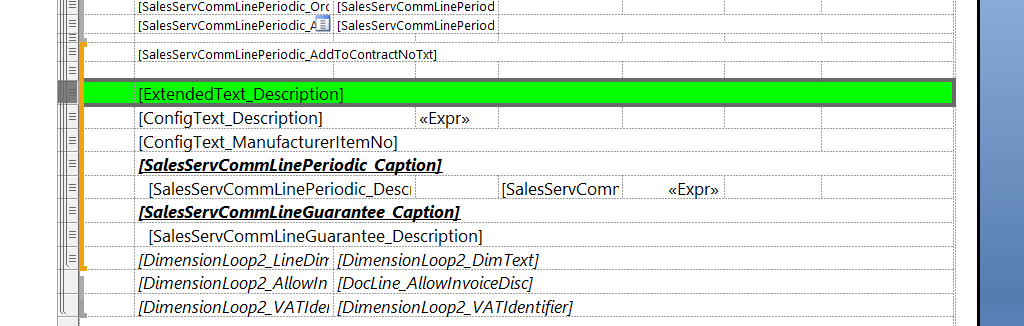
Now there is the property KeepTogether in the layout.
pastedimage1660823906880v1.png


I have set this to True for the group.
I have set the property for all static lines in the group to True.
At field level, I have set the property for the 3 cells in the green highlighted row to True.

Unfortunately, the pagination still occurs.

Do you have any ideas?
Thank you ;)

I have the same question (0)
  • Suggested answer
    Marco Mels Profile Picture
    Microsoft Employee on at

    Hello,

    We currently do not have dedicated Dev support via the Dynamics 365 Business Central forums, but I wanted to provide you some additional resources to assist. If you need assistance with debugging or coding I would recommend discussing this on one of our communities.

    www.yammer.com/dynamicsnavdev

    www.dynamicsuser.net/.../14

    I will open this up to the community in case they have something to add.

    Thanks.

  • Suggested answer
    Nitin Verma Profile Picture
    21,794 Moderator on at

    Hi,

    Please refer the below link, see if it helps you.

    social.msdn.microsoft.com/.../keep-together-property-in-rdlc

  • Verified answer
    YUN ZHU Profile Picture
    99,086 Super User 2026 Season 1 on at

Under review

Thank you for your reply! To ensure a great experience for everyone, your content is awaiting approval by our Community Managers. Please check back later.

Helpful resources

Quick Links

Introducing the 2026 Season 1 community Super Users

Congratulations to our 2026 Super Stars!

Meet the Microsoft Dynamics 365 Contact Center Champions

We are thrilled to have these Champions in our Community!

Congratulations to the March Top 10 Community Leaders

These are the community rock stars!

Leaderboard > Small and medium business | Business Central, NAV, RMS

#1
OussamaSabbouh Profile Picture

OussamaSabbouh 2,005 Super User 2026 Season 1

#2
YUN ZHU Profile Picture

YUN ZHU 1,148 Super User 2026 Season 1

#3
Khushbu Rajvi. Profile Picture

Khushbu Rajvi. 557 Super User 2026 Season 1

Last 30 days Overall leaderboard

Featured topics

Product updates

Dynamics 365 release plans
