web
You’re offline. This is a read only version of the page.
close
Skip to main content

Announcements

No record found.

News and Announcements icon
Community site session details

Community site session details

Session Id :
Microsoft Dynamics CRM (Archived)

Processes won't publish

(0) ShareShare
ReportReport
Posted on by 490 User Group Leader

Strange issue here. We use CRM Online.

Since we received the Polaris update users have been unable to publish workflows (I assume this extends to dialogs but haven't confirmed). A few layers to what we're seeing:

1) Users have unpublished existing workflows that were working fine (even after the update), they wanted to tweak something - just adding text to a textfield, so nothing extraordiary - not even a dynamic field. When trying to re-publish he was given an error that he does not have sufficient privs for this. The log file notes this error:

User is missing prvWriteSdkMessageProcessingStep privilege

I checked the role and it appears they have this permission. Thought maybe it was the "...Step Secure Configuration" one, but enabling that didn't fix this, so I removed that one to keep the role "as was". I suspect this has to do with the Polaris inclusion of custom workflow assembly?
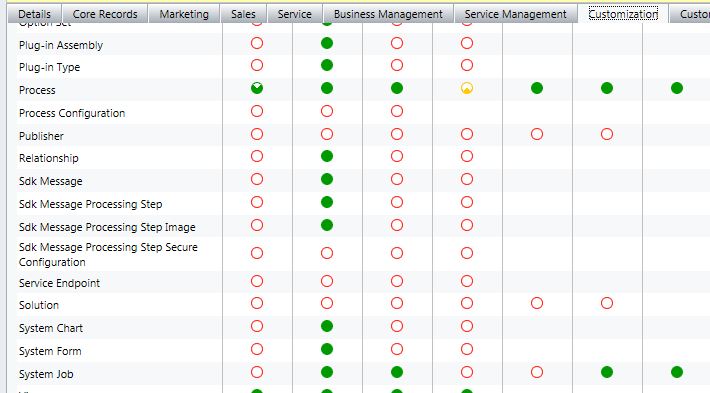
But there's more...

2) When he tried to insert a Check Condition it let him get so far as specifying the criteria but when he clicks Save and Slose he gets this:

Error

This process cannot be created, updated or activated because it was created outside the Microsoft Dynamics CRM Web application. Your organization does not allow this type of process.

Huh?! He built this the same way we've built any of them, from within the web application. He can structure a new workflow and this error does not come up, so it's only when adjusting an existing one.

This issue does not impact admin roles, I can publish anything as I normally could. We use custom roles, but these were not issues before the update, so I suspect there is just a small item in the role that needs updating, I just can't figure it out.

Thoughts...anyone?

Malcolm

*This post is locked for comments

I have the same question (0)
  • Suggested answer
    Gus Gonzalez Profile Picture
    27,113 on at

    Malcolm,

    Many organizations have been affected by this same issue, please open a ticket with Microsoft for them to address.

    Thanks.

  • Malcolm McAuley Profile Picture
    490 User Group Leader on at

    Thanks Gus. I figured this was common so was hoping the answer was a generic one and I wouldn't have to open a ticket. I'll go ahead and do that. Hopefully can get some kind of response and will post that here. I couldn't find any other posts along these lines.

    Cheers!

    Malcolm

  • Malcolm McAuley Profile Picture
    490 User Group Leader on at

    Embarassing note here, but this issue is solved, but I had it solved when I posted, just made a mistake that I missed.

    The missing permission was this:

    User is missing prvWriteSdkMessageProcessingStep privilege

    In my screenshot you can see the third column of the security role is missing the permission, but somehow I read that it was mssing the "read" permission (I don't know how or why I did that)...so when I looked at the role it appeared all was well.

    Enter a checkmark into the WRITE field of the SDK Message Processing Step and voila, users can publish.

    Still not sure about users editing what they've built, but I suspect something similar. If anyone knows that solution please pass it along. I'll post here once confirmed.

    Thanks!

    Malcolm

  • Annie110774 Profile Picture
    45 on at

    I am having a similar issue except I don't throw an error; mine just does not save.

    Guess I need to open a ticket with Microsoft??

  • Malcolm McAuley Profile Picture
    490 User Group Leader on at

    I would open a support ticket. It seems this issue comes up in a few different manners. I've seen the order of the criteria within the WF have an impact. I know the security role issue as outlined earlier in this thread seemed to have some impact as well. Not sure if this has been fixed for CRM 2013.

Under review

Thank you for your reply! To ensure a great experience for everyone, your content is awaiting approval by our Community Managers. Please check back later.

Helpful resources

Quick Links

Introducing the 2026 Season 1 community Super Users

Congratulations to our 2026 Super Stars!

Meet the Microsoft Dynamics 365 Contact Center Champions

We are thrilled to have these Champions in our Community!

Congratulations to the April Top 10 Community Leaders

These are the community rock stars!

Leaderboard > 🔒一 Microsoft Dynamics CRM (Archived)

Last 30 days Overall leaderboard

Featured topics

Product updates

Dynamics 365 release plans
