Hy Saravanan,
of course this is possible to prepare BOMs and as well ROUTES in Excel.
1) You can use "BOM Header and Version V3" and "BOM Lines V3" entity to do this.
I would first export these both entities so you have a template.
Take these tables and input your data in the sheets. After that you can import these using Data Management Workspace.
Take care to only use Items that are present in the system, otherwise the import will fail.
2) Otherwise you could also create a custom Excel template for BOM Lines V3 (use: Workbook Designer) containing only these columns which are of interest for you.
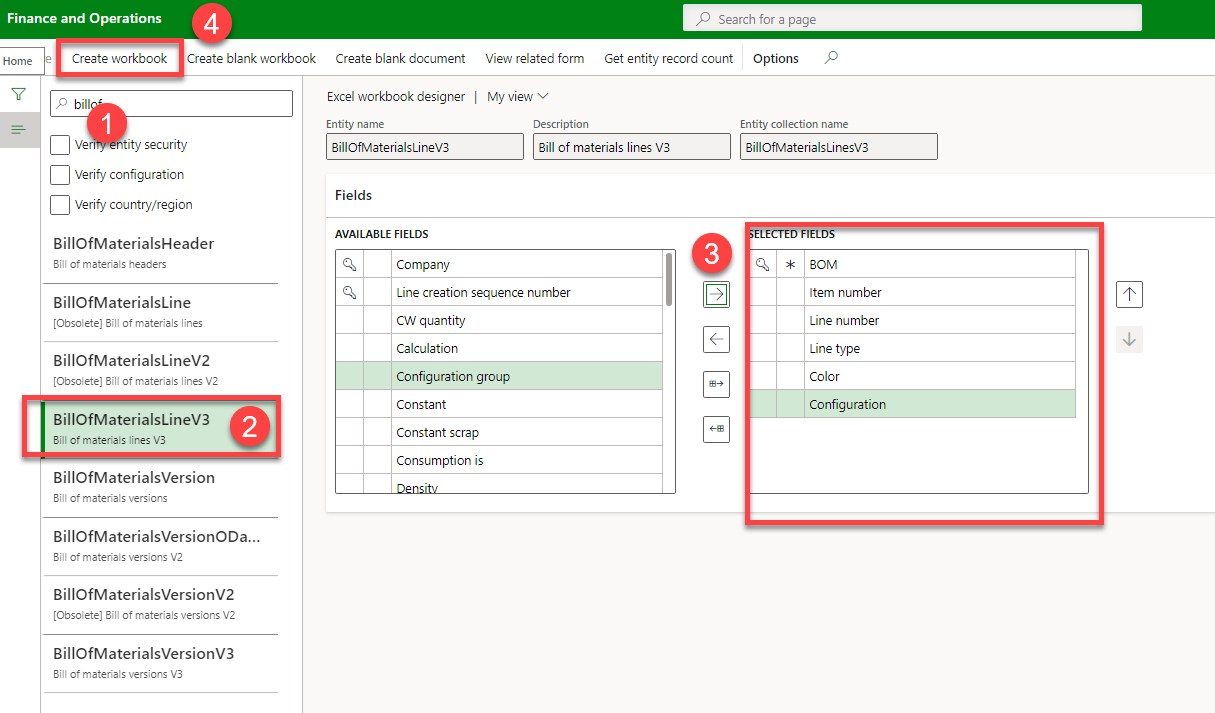
1) Just search the entity
2) select the entity
3) add needed columns
4) Select "create Workbook"
3) Furthermore you can use "Open in Excel" at the "BOM Designer" form. There is the "BOM Lines V3" entity available. But there is no filter and all bomlines rows will be exported. So use the Excel AddIn Filter to reduce to these BOM you want to edit.


