web
You’re offline. This is a read only version of the page.
close
Skip to main content

Announcements

No record found.

News and Announcements icon
Community site session details

Community site session details

Session Id :
Supply chain | Supply Chain Management, Commerce
Suggested Answer

Hide organization hierarchy nodes where retail stores are not part of current legal entity

(1) ShareShare
ReportReport
Posted on by 25

Hi Forum,

We are developing one customized batch job which runs specific to legal entity related retail stores only. To configure the batch job, organization hierarchy is shown on the customized batch job configuration form. That organization hierarchy can have different retail channels (stores) associated with, which might be part of other legal entities and also at different hierarchy levels as well.

We want below feature on the batch job configuration form,

1. Hide stores which are not part of current legal entity.

2. Hide all parent/child nodes where there is no stores to be shown on the form as those are part of other legal entities.

Is there any standard F&O form/code/functionality where such feature is already implemented? We can grab that code and implement accordingly.

If not any alternative solution or code would be greatly appreciated.

Thanks,

Nitin Patel

I have the same question (0)
  • André Arnaud de Calavon Profile Picture
    305,150 Super User 2026 Season 1 on at

    Moved to the Dynamics 365 Commerce forum.

  • André Arnaud de Calavon Profile Picture
    305,150 Super User 2026 Season 1 on at

    Hi Nitin,

    I do assume you have a dialog when you talk about "batch job configuration form". Is this a dialog built using x++ coding or do you have a specific form as dialog? Can you also share a screenshot which will illustrate your question in more detail?

  • Dynamics 365 SCM Explorer Profile Picture
    25 on at

    Organization-Hierarchy.jpg

    Hi Andre,

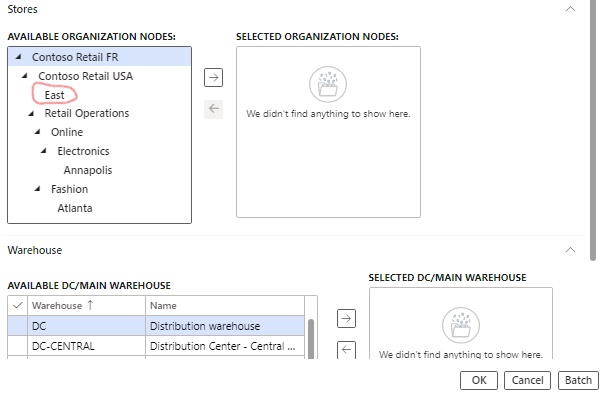
    We have a Batch job configuration form as a dialog. Refer attached form where user can select nodes under "Stores" section where we are trying to hide other legal entity stores and also need to hide all associated parent nodes if there are no stores applicable to the current legal entity.

    In the attached screenshot, we were able to hide the stores underneath "Fashion" which were not part of current legal entity, but at the same time we also need to hide "Fashion" node as it has no remaining store to be shown which are part of current legal entity USRT.

    So it's like at every parent node (from bottom to top) we need to check whether we have to show that node on the form or not , based on the condition as whether that node contain the current legal entity stores or not.

    Thanks,

    Nitin Patel

  • Ramune Profile Picture
    Microsoft Employee on at

    Hi Nitin,

    I don't think this is possible in standard. I will leave this for the community to answer. Let's see if anybody has experienced the same and can advise for you anything.

  • André Arnaud de Calavon Profile Picture
    305,150 Super User 2026 Season 1 on at

    Hi Nitin,

    Is this dialog a form you created as part of a customization? How is the tree control created? Depending on the technical details, there might be an option or not.

  • Dynamics 365 SCM Explorer Profile Picture
    25 on at

    Hi Andre,

    Yes it is a form which we have created as part of customization and added the tree control to custom form.
    we have added that form to display Menu Item and so it shows like a dialog. The hierarchy has been used frequently in Retail and commerce module (like assortments, Post inventory job etc) and so we have grabbed it from from there. The path is Retail and commerce > POS Posting > Post inventory.  

    Myself and Krishna working together on this issue and herewith below is the technical details,

    The requirement is to restrict the Organization hierarchy display on the Form i.e. Entire tree structure node needs to be ignored if that node doesn't consists of retail channel.

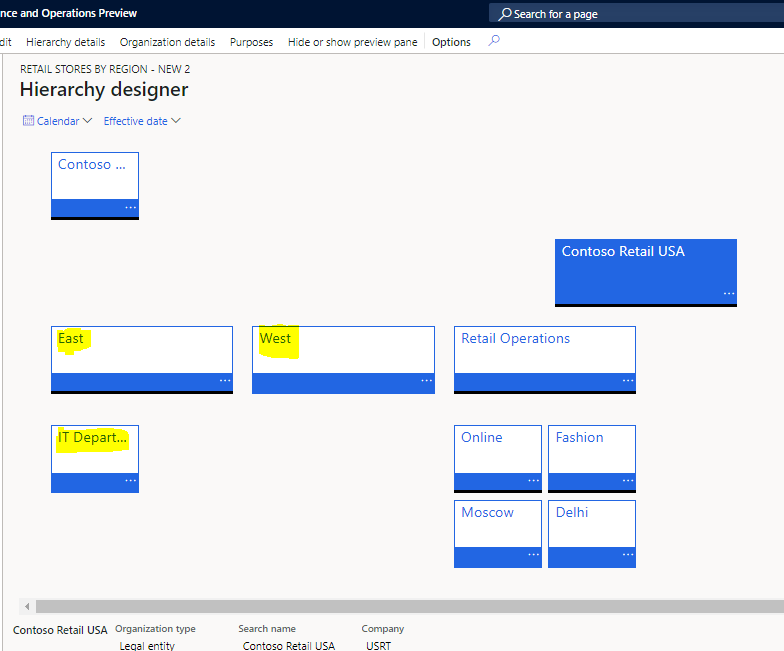
    For example: Please refer the below sample setup done in organization hierarchy (Highlighted nodes doesn't have any retail channels).

    Now my requirement was to ignore the display of entire nodes i.e. "East" (i.e. East & IT Department) and "West". 

    Currently i'm able to hide "WEST" node only because when standard code was traversing through each node  added the condition to check whether that node consists any child/not if that was not there this was ignored.

    I have duplicated the standard class [RetailInternalOrgTreeDatasource] and added some conditions as this entire customization was Legal Entity Specific.

    Class    - RetailInternalOrgTreeDatasource

    Method - getOrgTreeData

    Please refer condition  added to the above mentioned method in the attachment file highlighted in UPPERCASE:- (added code in while loop)

    Condition which added ignoring entire "WEST" node & "IT Department" node which is a child to "EAST" node in this scenario.

    [View:/cfs-file/__key/communityserver-discussions-components-files/797/0247.getOrgTreeData_5F00_Method.txt]

    8055.OrgHierarchy.PNG

    Stores-Hierarchy.jpg

    Thanks,

    Nitin and Krishna

  • krishna srikanth Profile Picture
    137 on at

    HI Andre,

    In addition to that please find the image which was hiding the "WEST" & "IT Department" nodes based on condition added in the mentioned code.

    But we want to hide the EAST node as well as it doesn't have any retail channels associated with that.

    StoreHierarchyHide.PNG

    Thanks & regards,

    Krishna Srikanth M.

  • Dynamics 365 SCM Explorer Profile Picture
    25 on at

    Hi Andre,

    Hope you have got a chance to look into the queries posted here  by myself and Krishna. Let us know if there is any way to fix it.

    Regards,

    Nitin Patel

  • André Arnaud de Calavon Profile Picture
    305,150 Super User 2026 Season 1 on at

    Hi Nitin,

    I'm not fully able to understand if you build the tree in the code above or only an ignore list. Is this the full coding?

  • krishna srikanth Profile Picture
    137 on at

    Hi Andre,

    Please find the full code in attached text format. In form init() method we are calling that class using below code.

    MinMaxUpdateOrgTree     internalOrgTreeDS;

    internalOrgTreeDS = MinMaxUpdateOrgTree::construct(tree, element.getOMHierarchyType());
    internalOrgTreeDS.buildTree();

    In Standard F&O we have class named (RetailInternalOrgTreeDatasource) to display the organization hierarchy as tree structure on forms.

    RetailInternalOrgTreeDatasource class was built in such a way that it will display all "Legal Entity's" & all LE Stores as well. i.e. STANDRAD WAS NOT A LEGAL ENTITY SPECIFIC

    But our requirement was specific to current LE and also if any nodes doesn't consists child's as retail channels then that entire node must be ignored. 

    To achieve this requirement :-

    1. Duplicated the Standard F&O class (RetailInternalOrgTreeDatasource).

    2. Added conditions to display the organization hierarchy on the form w.r.t LE specific i.e. 'contoso retail usa' LE related nodes only.

    3. In "getOrgTreeData" Method you can see those conditions in b/w Inline comment tags (// Custom code - START ----- // Custom code - END).

    4. Condition with comments "// Condition added to ignore the Tree Nodes which doesn't consists Children as retail channel/store" is added to ignore the tree nodes which doesn't consists child as retail channel.

    5. Now added condition (4th point) not working as expected.

    6. our expectation was to hide the entire tree node if that node & it's children's are not a retail channels.

    Example:-

    1. Refer below images with org hierarchy. Now my condition was hiding only "IT Department" & "WEST".

    2. Instead we want to hide the "EAST" node as well along with "IT Department" & "WEST" because in this org hierarchy setup

        2.1 'EAST' & it's child's doesn't have any retail channel associated.

        2.2 'WEST' is  not a retail channel.
    0638.OrgHierarchy.PNG

    StoreHierarchyHide.jpg

    [View:/cfs-file/__key/communityserver-discussions-components-files/797/5706.MinMaxUpdateOrgTree.xml]

    I hope now you understand.

    Thanks & Regards,

    krishna Srikanth M.

Under review

Thank you for your reply! To ensure a great experience for everyone, your content is awaiting approval by our Community Managers. Please check back later.

Helpful resources

Quick Links

Introducing the 2026 Season 1 community Super Users

Congratulations to our 2026 Super Stars!

Meet the Microsoft Dynamics 365 Contact Center Champions

We are thrilled to have these Champions in our Community!

Congratulations to the April Top 10 Community Leaders

These are the community rock stars!

Leaderboard > Supply chain | Supply Chain Management, Commerce

#1
André Arnaud de Calavon Profile Picture

André Arnaud de Cal... 164 Super User 2026 Season 1

#2
Laurens vd Tang Profile Picture

Laurens vd Tang 105 Super User 2026 Season 1

#3
Zain Mehmood Profile Picture

Zain Mehmood 89 Most Valuable Professional

Last 30 days Overall leaderboard

Product updates

Dynamics 365 release plans