web
You’re offline. This is a read only version of the page.
close
Skip to main content

Notifications

Announcements

No record found.

Community site session details

Community site session details

Session Id :
Small and medium business | Business Central, N...
Suggested Answer

Error "You do not have Permission to use the Role center Business Manager"

(0) ShareShare
ReportReport
Posted on by

Business Central is returning the error "You do not have permission to user the role center Business Manager"

A user is repeatedly receiving this error when exiting the Payment Journal.

The user has permission to all pages and is able to log in successfully however this error is received randomly. If the user selects Go Back Home it allows them to continue working in the solution.

After going to help and View the last known error this is the result
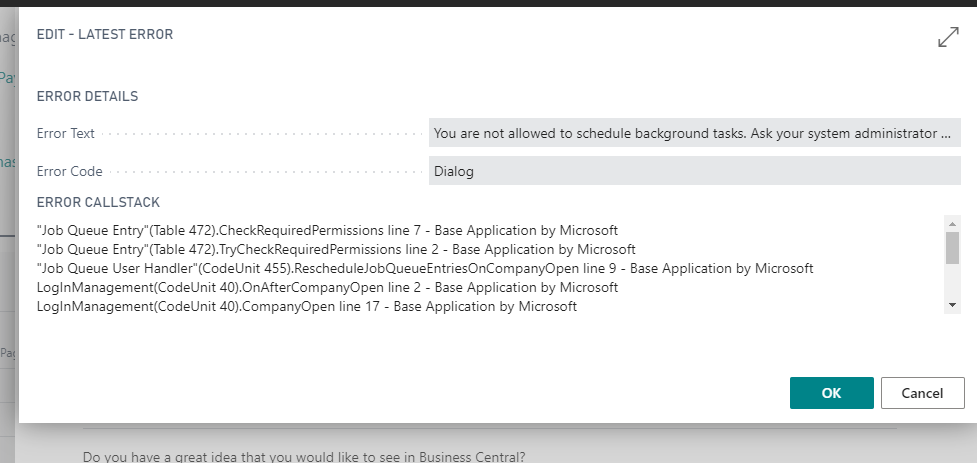
Job-Queue-Error.png

When looking at the Job Queue entries there is an entry that appears to be created by a user (not the same user receiving the error) however the user did not manually create the job.

Job-Queue-Entry.png

Does anyone know why a user would be getting the role center error and why this job related to RC Headlines is being created?

I have the same question (0)
  • Suggested answer
    Marco Mels Profile Picture
    on at

    Hello,

    What role does this user have? Are more users having this issue?

    Thanks.

  • Community Member Profile Picture
    on at

    Hi Marco

    This user has the D365 Basic permission set as well as a custom permission set and their User Personalization is set to Business Manager

    There is one other user that has reported the same issue

  • Suggested answer
    Renni Profile Picture
    960 on at

    Check if you have permissions in the source Cue table data (9xxx range)

    Sometimes personalisation can be an issue if the role centre has been modified

    Not sure about the other user could it possible be an admin account for a modification done

  • Community Member Profile Picture
    on at

    Hi Paul

    The D365 Basic permission set includes all Cue table data, the user may have modified his role center page but the OOB Business Manager role center has not been modified

  • Suggested answer
    Renni Profile Picture
    960 on at

    Have you removed the basic and the custom permissions and given them supper and seen if the error still occurs ? If it is fine with the super permission I would look into the custom permissions as there may be an issue there

  • Community Member Profile Picture
    on at

    I have Super and have not gotten the error. However the custom permissions have been used for the last several months without the error showing up.

    There have been no changes to the permission set or user group

  • Suggested answer
    Marco Mels Profile Picture
    on at

    Hello,

    I assume this is something we need to look into. Please raise a support request to CSS via your partner / CSP.

    Thanks.

  • Michal zon Profile Picture
    19 on at

    Hi Wendy, did you find solution for your problem? Today I have a very simillar issue with our users, but they all have SUPER permissions. Also, event viewer shows that for some reason there is a problem with premission do tabledata User Metadata, which is very wierd.

Under review

Thank you for your reply! To ensure a great experience for everyone, your content is awaiting approval by our Community Managers. Please check back later.

Helpful resources

Quick Links

Responsible AI policies

As AI tools become more common, we’re introducing a Responsible AI Use…

Neeraj Kumar – Community Spotlight

We are honored to recognize Neeraj Kumar as our Community Spotlight honoree for…

Leaderboard > Small and medium business | Business Central, NAV, RMS

#1
OussamaSabbouh Profile Picture

OussamaSabbouh 3,010

#2
Jainam M. Kothari Profile Picture

Jainam M. Kothari 1,270 Super User 2025 Season 2

#3
YUN ZHU Profile Picture

YUN ZHU 1,085 Super User 2025 Season 2

Last 30 days Overall leaderboard

Featured topics

Product updates

Dynamics 365 release plans
