web
You’re offline. This is a read only version of the page.
close
Skip to main content

Notifications

Announcements

No record found.

Community site session details

Community site session details

Session Id :
Microsoft Dynamics GP (Archived)

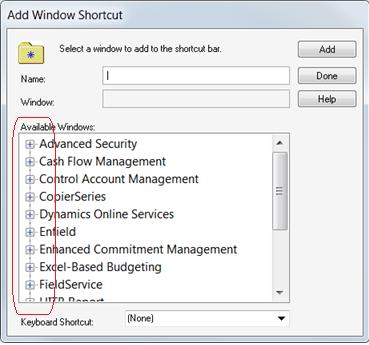
Add Window Shortcut: Can't expand product name to see windows

(0) ShareShare
ReportReport
Posted on by

I2117.Inter.jpg"font-family: 'Calibri','sans-serif'; color: #1f497d; font-size: 11pt; mso-fareast-font-family: Calibri; mso-fareast-theme-font: minor-latin; mso-ansi-language: EN-US; mso-fareast-language: EN-US; mso-bidi-language: AR-SA;">  

*This post is locked for comments

I have the same question (0)
  • Sureshn07 Profile Picture
    702 on at

    Take a backup of "Dynamics.set" file, 3rd party dictionary file. Delete the 3rd party dictionary file, and remove the lines for the 3rd party dictionary from the Dynamics.set file. And reinstall the 3rd party chunk file.

  • Community Member Profile Picture
    on at

    What's the thinking there, that the one chunk caused whatever is making all the other 3rd party products not show the "+" expansion button?

  • Jonathan Fear Profile Picture
    on at

    Hi Walt,

    Suresh is correct as this is always one thing we do from the support side. However this sounds like a case I just recently had where there was some IE settings that were causing issues. Can you enable Active X in IE? Have you tried to reinstall GP?

  • Verified answer
    Community Member Profile Picture
    on at

    Finally had to go to Microsoft.  The original problem that led me to the screen shots above was that a window I'd modified and put into a chunk file for them did not appear in the "Alternate/Modified Forms and Reports" setup window.  

    MS were able to duplicate the problem (I couldn't) and have identified the issue as being caused by the same modified window (Employee Maintenance) existing in multiple third party dictionaries on the client's workstation.  

    Regarding the "Add Shortcut Window" issue, the user was able to double click on the product names and expand them even though no "+" is displayed.

    I've been customizing in Dex for 15+ years and this was a first.

Under review

Thank you for your reply! To ensure a great experience for everyone, your content is awaiting approval by our Community Managers. Please check back later.

Helpful resources

Quick Links

Responsible AI policies

As AI tools become more common, we’re introducing a Responsible AI Use…

Neeraj Kumar – Community Spotlight

We are honored to recognize Neeraj Kumar as our Community Spotlight honoree for…

Leaderboard > 🔒一 Microsoft Dynamics GP (Archived)

#1
mtabor Profile Picture

mtabor 1

Last 30 days Overall leaderboard

Featured topics

Product updates

Dynamics 365 release plans