web
You’re offline. This is a read only version of the page.
close
Skip to main content

Announcements

No record found.

News and Announcements icon
Community site session details

Community site session details

Session Id :
Microsoft Dynamics 365 | Integration, Dataverse...
Suggested Answer

Customize Subgrid footer in Dynamics 365 CRM

(0) ShareShare
ReportReport
Posted on by 28
Hi, 
 
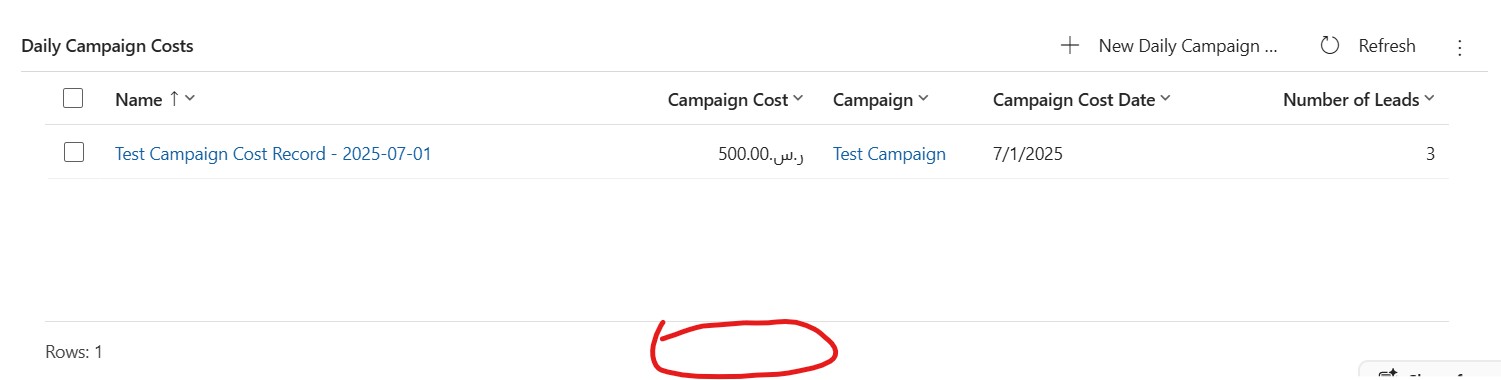
I am looking for a way to customize the footer of a subgrid. in Dynamics 365 CRM. Currently, we have "Rows" displayed in the subgrid.
 
However, I am looking for a way to add the total of a column in the footer of subgrid.
 
Example, in this snapshot of the subgrid, I want the total of the "Campaign Cost" displayed in the footer with the "Rows" like "Total Campaign Cost: 5000 SAR"
 
Can any member of the community have done this type of customization before? I know Javascript, C# as well so  I can make a custom logic but I am looking for steps how to do it if anyone can guide.
 
Thanks.
Categories:
I have the same question (0)
  • Suggested answer
    Tom_Gioielli Profile Picture
    3,096 Super User 2026 Season 1 on at
    If you want something truly in the footer, then you will need to create a custom PCF control to achieve this functionality.
     
    For something close, you can use the new Power Apps grid control on your subgrid. One of the configurable options in the subgrid is to allow users to summarize values in a column.
     
    • Open your form in the Maker portal and select the subgrid
    • Click on 'Add Component' and select the 'Power Apps Grid Control'
    • In the settings, make sure that 'Enable Aggregation' is set to Yes
    This will allow users to aggregate a column with a numeric value in the view. The downside is that I don't believe this aggregation is visible immediately, meaning the user always has to initiate the update to the view.


  • CU27040837-11 Profile Picture
    28 on at
    Thank you Tom for the suggestion I will try to explore the PCF control functionality.
     
    However, there is an another challenge.
     
    This subgrid I have is on the "Form" Table (msdynmkt_marketingform) inside the "Customer Insights - Journeys" app.
     
    While I try to customize it via make.powerapps.com, it doesn't let me customize in the PowerApps Form Editor and I have to then switch to classic to do the customization. In the classic form editor, I can't add the Power Apps grid
     
    What I have tried to do, is I have added a read-only decimal field below the "Daily Campaign Costs" subgrid and I am filling it via Javascript on load of the "Form" page like so:


Under review

Thank you for your reply! To ensure a great experience for everyone, your content is awaiting approval by our Community Managers. Please check back later.

Helpful resources

Quick Links

Introducing the 2026 Season 1 community Super Users

Congratulations to our 2026 Super Stars!

Meet the Microsoft Dynamics 365 Contact Center Champions

We are thrilled to have these Champions in our Community!

Congratulations to the April Top 10 Community Leaders

These are the community rock stars!

Leaderboard > Microsoft Dynamics 365 | Integration, Dataverse, and general topics

#1
11manish Profile Picture

11manish 135

#2
André Arnaud de Calavon Profile Picture

André Arnaud de Cal... 82 Super User 2026 Season 1

#3
CP04-islander Profile Picture

CP04-islander 57

Last 30 days Overall leaderboard

Product updates

Dynamics 365 release plans
