web
You’re offline. This is a read only version of the page.
close
Skip to main content

Announcements

No record found.

News and Announcements icon
Community site session details

Community site session details

Session Id :
Small and medium business | Business Central, N...
Answered

How to trouble shoot error relates to business central communicating with Dataverse

(0) ShareShare
ReportReport
Posted on by

Hi everyone,

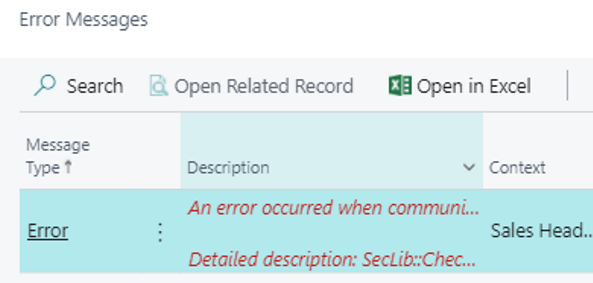
I would like to seek some advise as to how to trouble shoot the errors in business central relate to Dataverse. For example, this below error.  Should we check the access in D365 Sales or in the Business Central.  If you have any articles documents helpful ? Thank you.

When user creates a sales invoice and post the invoice the error shows up.

"An error occurred when communicating with Dataverse.

Detailed description: SecLib: CheckPrivillege failed. User 795fdaeb-7e03-eb11-0813-000d3af33756, PrivililedgeName:PrvRead

"
pastedimage1617121087220v1.png

I have the same question (0)
  • Verified answer
    Marco Mels Profile Picture
    Microsoft Employee on at

    Hello,

    Your message seems to indicate that the connection setup was done successfully from BC to Dynamics 365 for Sales and a full synchronization was done successfully. Now incremental synchs show these errors which seem to relate to missing permissions. 

    If the above is true, my bet is that the synchronization user is being used somehow. It should be a non-nteractive user. Or the user is missing roles in Dynamics 365 for Sales. Maybe you can give him / her a role like Salesperson or Salesmanager.

    From the error itself, it seems that this is a permission issue in Dynamics 365 for Sales.

    Thanks.

  • B@houston Profile Picture
    on at

    Thank you Marco and this works.

  • Leonard Nicolson Profile Picture
    5 on at

    Hi B@houston

    I have exactly the same issue. Whenever an invoice is posted from a Sales Order in BC, the invoice posts ok but an error pops up and the error appears on the error register. Would you mind sharing the exact steps you took to resolve it in BC and CE.

    pastedimage1623309250827v3.png

    In advance, thank you

    Leonard

  • B@houston Profile Picture
    on at

    Hi @Leonard,

    To resolve this issue, pleas add a security role of Sales Manager, or Sales Rep in the D365 Sales, and test if the issue is gone.  Thank you.

Under review

Thank you for your reply! To ensure a great experience for everyone, your content is awaiting approval by our Community Managers. Please check back later.

Helpful resources

Quick Links

Introducing the 2026 Season 1 community Super Users

Congratulations to our 2026 Super Stars!

Congratulations to our 2025 Community Spotlights

Thanks to all of our 2025 Community Spotlight stars!

Leaderboard > Small and medium business | Business Central, NAV, RMS

#1
OussamaSabbouh Profile Picture

OussamaSabbouh 1,857 Super User 2026 Season 1

#2
YUN ZHU Profile Picture

YUN ZHU 1,047 Super User 2026 Season 1

#3
Dhiren Nagar Profile Picture

Dhiren Nagar 959 Super User 2026 Season 1

Last 30 days Overall leaderboard

Featured topics

Product updates

Dynamics 365 release plans
