web
You’re offline. This is a read only version of the page.
close
Skip to main content

Announcements

No record found.

News and Announcements icon
Community site session details

Community site session details

Session Id :
Microsoft Dynamics CRM (Archived)

Composite field issue on Lead

(0) ShareShare
ReportReport
Posted on by 1,067

Hi all,

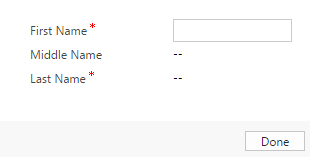
I'm using Microsoft Dynamics CRM 365 and having and issue with composite fields. Basically in my Lead form, there's a field called "Name"(Schema Name: 'Full Name') that that concats First Name, Middle Name and Last Name. In order to capture First Name and Last Name I have to click on the Name field and this will lead the form to open a small 'Form' in which First Name, Middle Name and Last Name appear.
aaaaaaa.png

I have a requeriment in which, whenever a user click on Create new Lead, the form should set the focus to First Name. This is pretty easy using XRM framework but since First Name is contained within this composite form, I haven't find the way to set the focus on it. In less words, what I want to achieve is: Open this small form automatically using JS(Or another component) and set the focus on First Name field whenever the User is creating a new Lead.

Any workarounds?

Thanks a lot.

*This post is locked for comments

I have the same question (0)
  • Suggested answer
    PS Profile Picture
    23,577 on at

    You can hide the composite name field on the form and then add First, Middle and Last name as three separate fields on the form and set the focus to first name

  • Suggested answer
    Zohaib Uddin Khan Profile Picture
    2,822 on at

    There is no supported way to open that small form automatically. Workaround is mentioned below:

    Go to Settings - Customization - Customize the System - Entities - Lead - Form - <Open your required form> - Remove the Full name field from the form and place First Name and Last Name on the form. Thanks.

  • Suggested answer
    Nadeeja Bomiriya Profile Picture
    6,804 on at

    Hi Crm User,

    There's no fully supported way to do this.  Alternative is what Prashant suggested.  An unsupported way to this is as below.

    document.getElementById("fullname_compositionLinkControl_flyoutLoadingArea_flyOut").style.display = 'block';

    Xrm.Page.getControl("fullname_compositionLinkControl_firstname").setFocus();

    First line, is unsupported.

    Second line is supported.

    It is recommended not to use unsupported methods though.

Under review

Thank you for your reply! To ensure a great experience for everyone, your content is awaiting approval by our Community Managers. Please check back later.

Helpful resources

Quick Links

Introducing the 2026 Season 1 community Super Users

Congratulations to our 2026 Super Stars!

Meet the Microsoft Dynamics 365 Contact Center Champions

We are thrilled to have these Champions in our Community!

Congratulations to the March Top 10 Community Leaders

These are the community rock stars!

Leaderboard > 🔒一 Microsoft Dynamics CRM (Archived)

#1
JS-09031509-0 Profile Picture

JS-09031509-0 3

#2
AS-17030037-0 Profile Picture

AS-17030037-0 2

#2
Mark Eckert Profile Picture

Mark Eckert 2

Last 30 days Overall leaderboard

Featured topics

Product updates

Dynamics 365 release plans
