web
You’re offline. This is a read only version of the page.
close
Skip to main content

Notifications

Announcements

No record found.

Community site session details

Community site session details

Session Id :
Supply chain | Supply Chain Management, Commerce
Suggested Answer

RMA (return merchandise authorization)

(0) ShareShare
ReportReport
Posted on by 10

Dear Supply chain experts,

Greetings!

I have faced a issue in RMA process through Mobile device in AWM on invoiced sale order which status is shipped and below screen shots is attached for reference.

Reservation Done :-
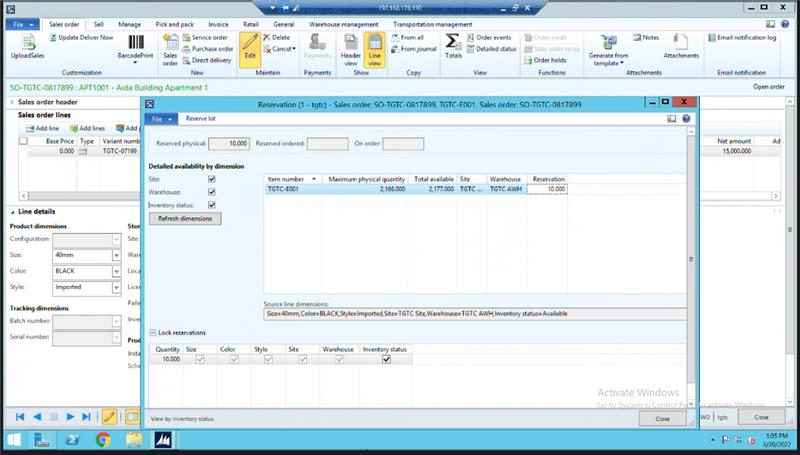
Image

SO Confirmed :-

Image

Release to warehouse confirmed:-

Image

Wave ID and Load ID created :-

Image

Work is completed on SO:-

Image

Work is closed:-

Image

Bill of lading ID is created and shipment status is loaded:-

Image

Shipment is confirmed :

Image

Image

Quality Order is passed:-

Image

SO is Invoiced :-

Image

After completion of these all steps successfully, I have created create RMA of above invoiced SO and receive through mobile device and found below error (Return line not found) and unable to complete the process. 

Image

Image

My question is:

  1. AX 2012 (R3) is supported RMA process though mobile portal) ?
  2. MY PO & RMA AWM all settings are same but PO is successfully processed through mobile device but RMA not, is there any change is required in setups?
  3. how to fix the above RMA error (Return line not found)
  4. Any solution or guidelines are available of RMA through mobile device in AX 2012 ?

Thanks,

Regards:-

Muhammad Usman

I have the same question (0)
  • Suggested answer
    Mehdi AMRANI Profile Picture
    1,422 on at

    Hi Muhammad,

    1. Yes the RMA is supported for mobile device. However, the current process can be enhanced from microsoft.

    2. I think there is a dimension that you populated that shouldn't be for the RMA (Only populate Site,Warehouse,Status) the batch location and LP should be populated when receiving through mobile device.

    3. To fix this try to register the inventory through the registration under line update in AX, and then move the goods through movement or movement by template.

    4. Avoid default setup location for item for the WHSEnabled warehouses and check the lines when you create RMA to not have more than Site warehouse and status are populated under Product fasttab.

    Regards,

    Mehdi

  • M. Usman Profile Picture
    10 on at

    Hi Mehdi,

    Thank you for your kind response.

    1-Mehdi I have used same setups and same dimensions of invoiced SO on RMA and LP populated during receiving through mobile device and used only Site, Warehouse and Status.

    2-i have used same process of registration.

    3-only use site, WH and status is populated on item of RMA under product fast tab.

    but same error and issue is still pertained.

  • Suggested answer
    Mehdi AMRANI Profile Picture
    1,422 on at

    Hi Muhammad,

    Can you try to register it through the AX form of registration under line update and send a screenshot ?

    Regards,

    Mehdi

Under review

Thank you for your reply! To ensure a great experience for everyone, your content is awaiting approval by our Community Managers. Please check back later.

Helpful resources

Quick Links

Responsible AI policies

As AI tools become more common, we’re introducing a Responsible AI Use…

Neeraj Kumar – Community Spotlight

We are honored to recognize Neeraj Kumar as our Community Spotlight honoree for…

Leaderboard > Supply chain | Supply Chain Management, Commerce

#1
Siv Sagar Profile Picture

Siv Sagar 283 Super User 2025 Season 2

#2
Laurens vd Tang Profile Picture

Laurens vd Tang 213 Super User 2025 Season 2

#3
André Arnaud de Calavon Profile Picture

André Arnaud de Cal... 152 Super User 2025 Season 2

Last 30 days Overall leaderboard

Featured topics

Product updates

Dynamics 365 release plans
