web
You’re offline. This is a read only version of the page.
close
Skip to main content

Announcements

No record found.

News and Announcements icon
Community site session details

Community site session details

Session Id :
Supply chain | Supply Chain Management, Commerce
Suggested Answer

Putaway location based on Zone and Filter code

(0) ShareShare
ReportReport
Posted on by 95

Hi Members,

We have setup WMS for performing the Inbound for a client.

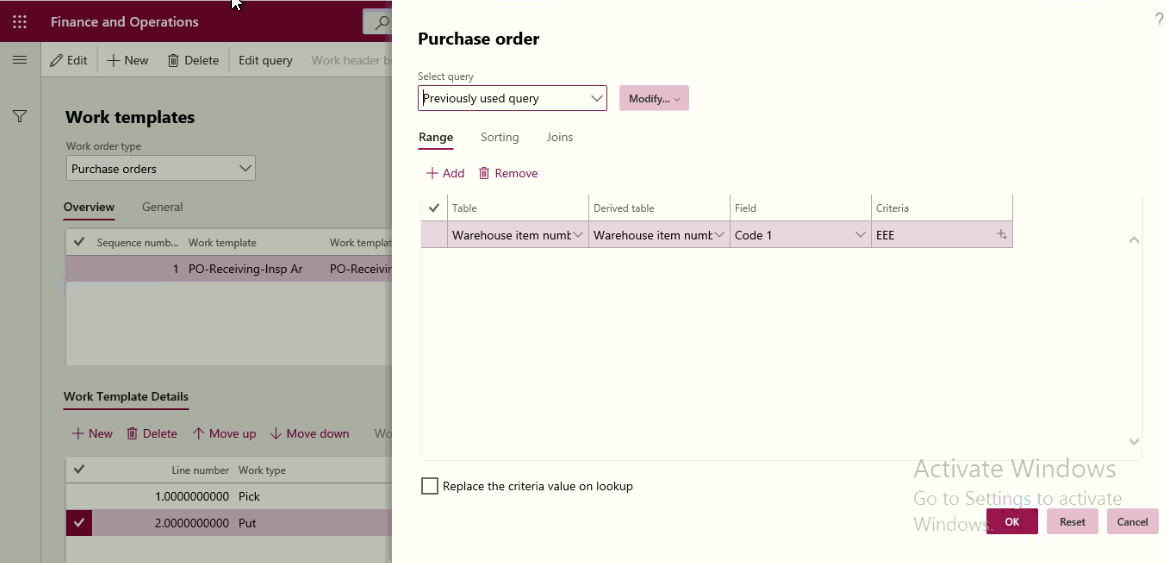
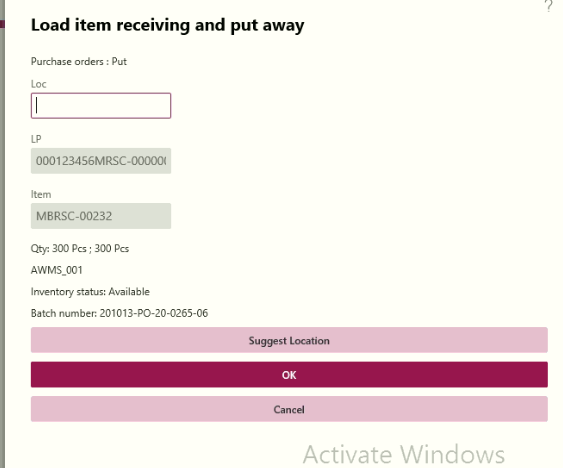
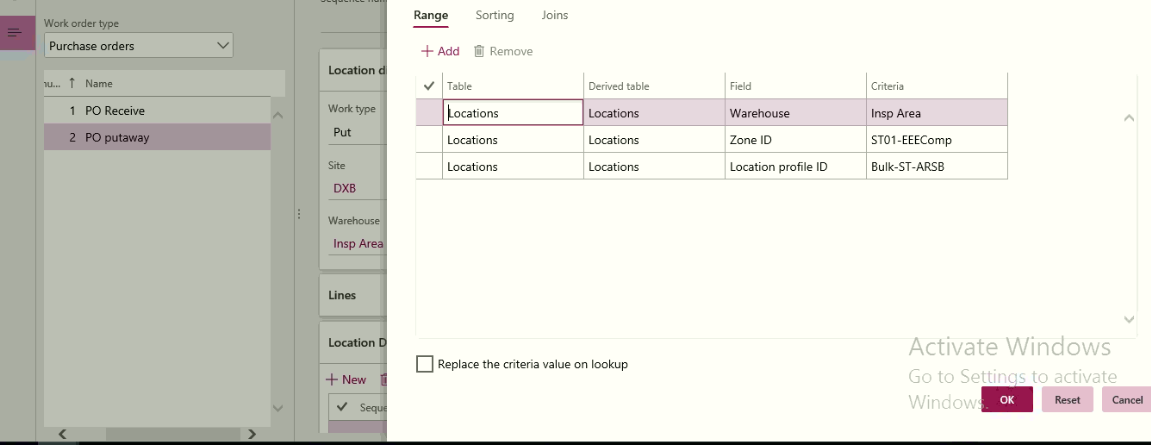
have setup Location directive with Warehouse item using criteria as filter code, in putaway have defined the Zone id and warehouse, location profile where the item needs to be put during the putaway process, but when doing the putaway the TO location is not shown automatically and it needs to be entered manually.

Below is the screenshots of the setup
pastedimage1602616477976v1.png

pastedimage1602616534257v2.png

Work template:

pastedimage1602616641505v3.png

pastedimage1602617294792v4.png

Pls. let me know what im missing in the setup to achieve putaway using location directive, zone and product filter codes setup.

thanks in advance for the replies.

Br,

Maharaja.P

I have the same question (0)
  • tabarret Profile Picture
    Microsoft Employee on at

    Hi Maharaja,

    What do you see in the Work creation history log?

    Can you show me the Work lines that are created as part of putaway?

    Have you validated that your Location directive is set up correctly?  For example, Batch enabled and/or Multi-sku (if necessary).  

    Have you validated that the combination of Zone and Location profile specified in the query are valid?

  • Suggested answer
    Ashish Upadhyay79 Profile Picture
    Microsoft Employee on at

    Hello Maharaja,

    Does the item have the Filter code mapped.

    Kindly check with following filter strategy

    1. Remove filter from Work Template

    2. Remove filter from Location directive header

    3. Create Location directive action and set filter as per Code1 filter code and ZoneID combination

    Also, recommend to try once mapping Location ID and see if your query set works

    Let me know if the above works

  • MaharajaP Profile Picture
    95 on at

    Hi Taylor,

    Below are further screens from my testing.

    Work

    pastedimage1602675358412v1.png

    pastedimage1602675426160v2.png

    It says item allocation failed.

    LD setup

    pastedimage1602675580402v3.png

    pastedimage1602675753986v4.png

    I have setup filter code in Warehouse fasttab in code1 on release products too.

    what might be still missing?

    Pls share your ideas.

    Thanks.

    Maharaja.P

    [quote user="MaharajaP"]

    Hi Members,

    We have setup WMS for performing the Inbound for a client.

    have setup Location directive with Warehouse item using criteria as filter code, in putaway have defined the Zone id and warehouse, location profile where the item needs to be put during the putaway process, but when doing the putaway the TO location is not shown automatically and it needs to be entered manually.

    Below is the screenshots of the setup
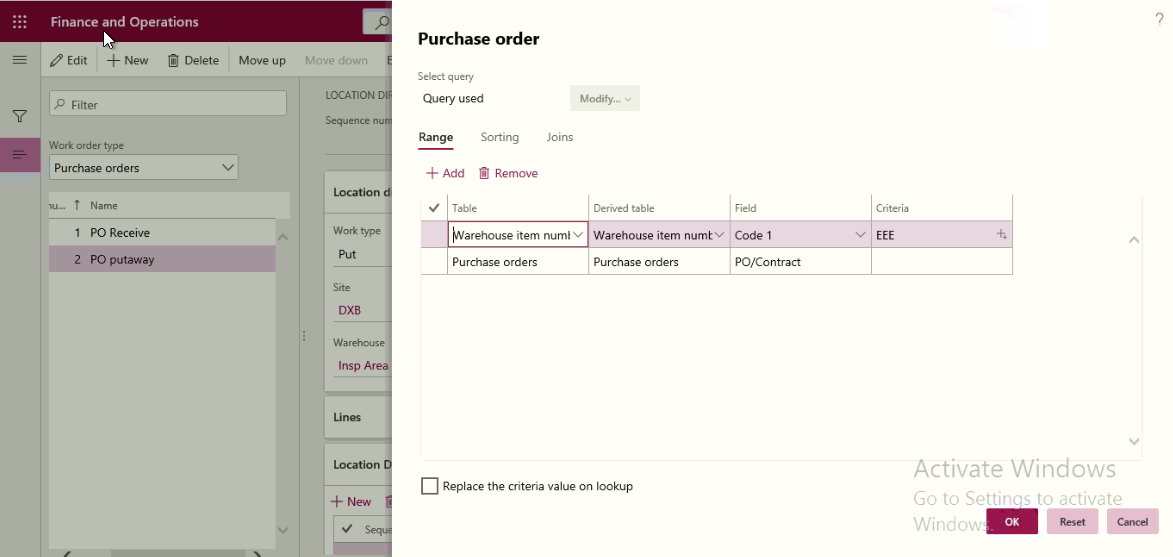
    pastedimage1602616477976v1.png

    pastedimage1602616534257v2.png

    Work template:

    pastedimage1602616641505v3.png

    pastedimage1602617294792v4.png

    Pls. let me know what im missing in the setup to achieve putaway using location directive, zone and product filter codes setup.

    thanks in advance for the replies.

    Br,

    Maharaja.P

    [/quote]
  • MaharajaP Profile Picture
    95 on at

    Hi Ashish,

    I've done all the three steps but the Put location does not populate during putaway as per Zone, Location profile and filter code.

    Thanks.

    Maharaja.P

  • tabarret Profile Picture
    Microsoft Employee on at

    Hi Maharaja,

    Can you provide a screenshot of the Work creation history log for the Work ID in question?  

    Can you show the rest of the setup for your Location directive?

    Are these batch-enabled items?  If so, is the Location directive set up accurately?

    Is there at least 1 Location in Zone ST01-EEEComp that has Location profile of Bulk-ST-ARSB.

    Does your Location profile allow Mixed items?

  • MaharajaP Profile Picture
    95 on at

    Hi Taylor,

    Pls find the screenshots,

    Work creation history log,

    pastedimage1602707205262v1.png

    Location directive

    pastedimage1602707304984v2.png

    pastedimage1602707339554v3.png

    Yes these are batch enabled items. Am i missing some setup in LD for batch enabled items?

    Available locations

    pastedimage1602707685812v4.png

    On location profile having mixed items flagged or not does not make a difference, because im trying to use one item and achieve putaway and Put location for the item based on Zone and Item filter code setup in Location directive.

    Pls. suggest if more information is required.

    Thanks.

  • tabarret Profile Picture
    Microsoft Employee on at

    Hi Maharaja,

    There is a setting on the Location directive action called 'Batch enabled'.  Can you check to make sure this setting is active?

    pastedimage1602707943875v1.png

    Also, can you please send a screenshot of the Location directive, not the Query?  

  • MaharajaP Profile Picture
    95 on at

    Hi Taylor,

    PFB,

    pastedimage1602708776392v1.png

    pastedimage1602708787518v2.png

    Put

    pastedimage1602708843226v3.png

    i couldn't activate batch enabled on put hope its std?

    Thanks.

  • tabarret Profile Picture
    Microsoft Employee on at

    I would try removing the Pick directive, or try changing the sequence so that the Put directive is first.  You should not need a Pick directive for Purchase orders.

  • MaharajaP Profile Picture
    95 on at

    Doesn't solve the problem, thanks for the support though.

Under review

Thank you for your reply! To ensure a great experience for everyone, your content is awaiting approval by our Community Managers. Please check back later.

Helpful resources

Quick Links

Introducing the 2026 Season 1 community Super Users

Congratulations to our 2026 Super Stars!

Meet the Microsoft Dynamics 365 Contact Center Champions

We are thrilled to have these Champions in our Community!

Congratulations to the April Top 10 Community Leaders

These are the community rock stars!

Leaderboard > Supply chain | Supply Chain Management, Commerce

#1
André Arnaud de Calavon Profile Picture

André Arnaud de Cal... 164 Super User 2026 Season 1

#2
Laurens vd Tang Profile Picture

Laurens vd Tang 105 Super User 2026 Season 1

#3
Zain Mehmood Profile Picture

Zain Mehmood 89 Most Valuable Professional

Last 30 days Overall leaderboard

Product updates

Dynamics 365 release plans