web
You’re offline. This is a read only version of the page.
close
Skip to main content

Announcements

No record found.

News and Announcements icon
Community site session details

Community site session details

Session Id :
Microsoft Dynamics CRM (Archived)

How to query "Missing Required Components" through the SDK?

(0) ShareShare
ReportReport
Posted on by

Hi all,

Wondering if anybody can help me with this... we're performing automated deployments using a custom script and are often running into issues where required components are missing from the solution.

When a solution is exported manually in Dynamics 365 a dialog often pops up with "Missing Required Components" (see screenshot). Does anybody know how I can call this through the SDK? This would allow us to warn the developers that dependencies are missing and fix it so the automated deployments do not fail. I've been trying to write the code to do this myself using the RetrieveRequiredComponentsRequest, but it gets complicated with the many different types, some of which aren't solution components but belong to another (e.g. forms, views, fields etc. belong to an entity).

The code to perform this must already be written to produce the "Missing Required Components" view, so hopefully somebody knows how I can access it through the SDK.
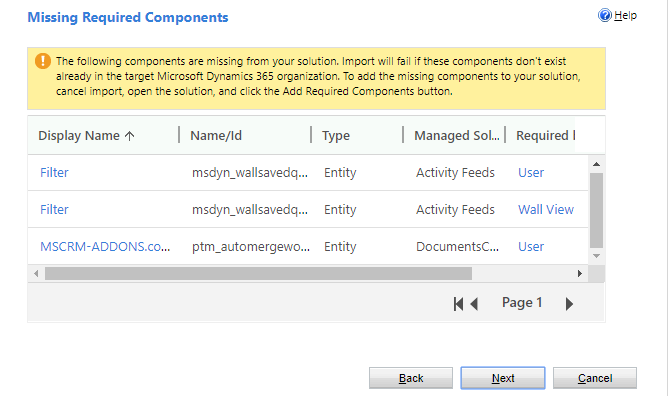
2018_2D00_08_2D00_10-15_5F00_59_5F00_47_2D00_Solutions-All-Solutions-_2D00_-Microsoft-Dynamics-365.png

Thanks in advance,

Andrew

*This post is locked for comments

I have the same question (0)
  • David Jennaway Profile Picture
    14,065 on at

    I don't think this logic is available via the SDK. As far as I know the Dynamics 365 just calls RetrieveRequiredComponentsRequest , and in my view doesn't do anything particularly clever with components that belong to an entity (but then I don't think there's anything much more that can be done, as the subcomponents may or may not exist in the solution or destination

  • Andrew Gallery Profile Picture
    on at

    Thanks David. That matches with my research too.

  • Suggested answer
    RaviKashyap Profile Picture
    55,410 Moderator on at

    Hi Andrew,

    Not sure if this help you but you could directly access the URL of missing components.

    https://<crm>.crm6.dynamics.com/Tools/Solution/ExportWizard/MissingDependencyPage.aspx?appSolutionId=%7bCE77D4FB-AC9C-E811-A968-000D3AE0562F%7d

    Hope this helps.

Under review

Thank you for your reply! To ensure a great experience for everyone, your content is awaiting approval by our Community Managers. Please check back later.

Helpful resources

Quick Links

Introducing the 2026 Season 1 community Super Users

Congratulations to our 2026 Super Stars!

Meet the Microsoft Dynamics 365 Contact Center Champions

We are thrilled to have these Champions in our Community!

Congratulations to the April Top 10 Community Leaders

These are the community rock stars!

Leaderboard > 🔒一 Microsoft Dynamics CRM (Archived)

Last 30 days Overall leaderboard

Featured topics

Product updates

Dynamics 365 release plans
